How To Reduce No Shows On Sales Calls: Proven Strategies And Best Practices



You’re ten minutes early, the rep is ready, calendar shows accepted, and the prospect never appears; it’s easy to chalk that up to flakiness, but the real causes are usually qualification gaps, booking friction, unclear value, timezone or tech mismatches, or weak routing rather than pure rudeness. Too many teams treat bookings like volume metrics instead of a signal to be earned, so calendar invites fill up with low-commitment slots that ghost. Read on and you’ll get a practical playbook: how to qualify before you book, tighten scheduling UX, require simple confirmations, use thoughtful reminders and deposits when appropriate, route and prep the right reps, and measure the lift so you turn missed meetings into predictable revenue improvements.
Why Are Prospects Missing Calls?
What Common Root Causes Exist?
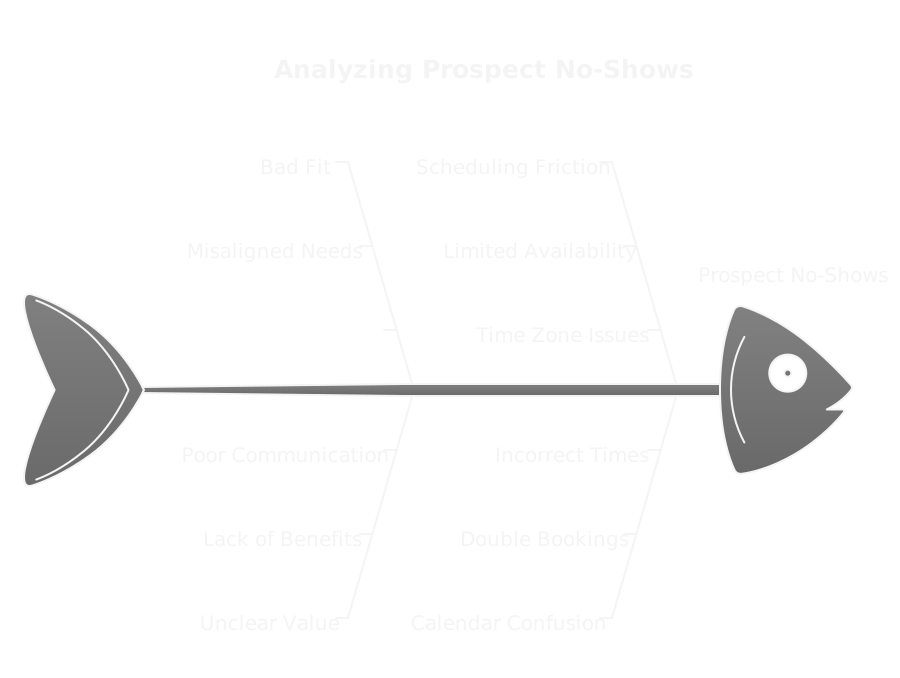
No shows usually come from a handful of predictable failures: bad fit, unclear value, scheduling friction, calendar confusion, and tech problems. Add outreach volume and competing priorities, and you get low attention spans. When outbound is treated like spray and pray marketing, quantity wins over signal and attendance suffers. Fixes map directly to the root cause, so diagnose before changing tactics.
How Does Poor Qualification Contribute?
If the prospect isn’t the right persona, isn’t the decision maker, or isn’t on a buying timeline, they won’t prioritize your meeting. Cheap, AI-driven outbound makes it easy to generate leads, but that amplifies noise. Qualification saves time, it protects your reps, and it raises show rates by ensuring every booked slot solves a real problem for a real buyer.
What to watch for
- Generic bookings with no context, often research-only.
- Leads that cite price or vendor evaluation as future tasks.
- Repeated contact attempts with no engagement signal.
Fix: capture a minimal set of intent signals before booking so you only schedule real opportunities.
How Does Scheduling Friction Cause Drops?
Friction kills commitment. Long booking flows, required account creation, unclear timezone handling, or a calendar invite that never arrives all make it easy for busy people to ghost you. Even good intentions evaporate if adding the call to personal calendars is a multi-step chore.
Practical fixes
- One-click time selection and automatic calendar add.
- Show local time and timezone conversion clearly.
- Allow easy reschedules and show alternate slots in the confirmation.
How Do Perceived Value And Trust Affect Attendance?
Prospects skip meetings they don’t expect to be useful. Cold outreach needs to act like marketing, building credibility before a call. Social proof, relevant case examples, and a clear promise increase perceived value. If the invite looks like a generic sales pitch, it’ll be deprioritized.
Tactics that build trust quickly
- Short tailored note about why you’re reaching out.
- Proof points or micro-case studies in the invite.
- Named attendees and expected outcomes, not vague “discovery call.”
How Do Time Zones And Tech Failures Play A Role?
Simple timezone mismatches and flaky conferencing links are surprisingly common. DST mistakes, calendar sync problems, VPNs that block audio, or lack of dial-in options all turn a scheduled call into a missed one.
Mitigations
- Display local time on the booking page and the invite.
- Include multiple connection options, dial-in numbers, and a plain meeting link.
- Send a short test link or pre-call check for enterprise environments.
---
How Can You Qualify Before Booking?
Which Screening Questions Reveal Intent?
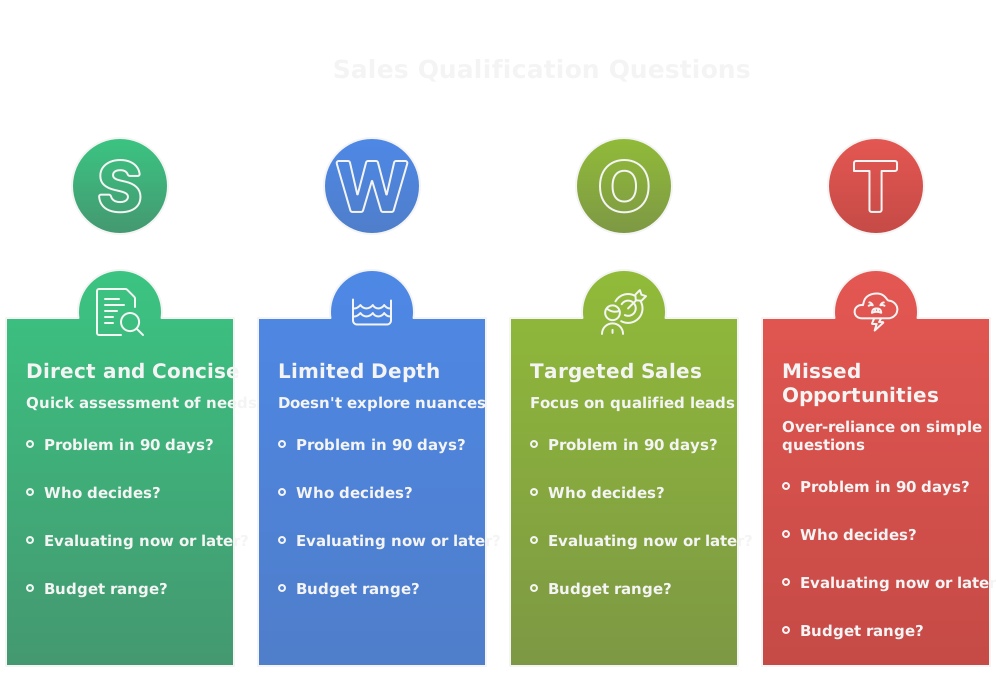
Ask small, high-signal questions that separate researchers from buyers. Focus on timeline, role, current solution, pain intensity, and budget range. Keep it scannable.
Examples you can use
- "What problem are you trying to solve in the next 90 days?"
- "Who else is involved in vendor decisions?"
- "Are you evaluating solutions today or planning for next year?"
- "Do you have an allocated budget range?"
How to use Clay for pre-qualification
Use Clay to enrich profiles and combine intent signals like company growth, job changes, and engagement events. Plug the Clay dataset into your booking flow to auto-score prospects, then surface only the ones that meet your thresholds. Using this link, https://clay.com/?via=salescaptain, gives you 3,000 free credits to experiment.
When To Use Intake Forms Or Short Calls
Use intake forms when volume is high and you need structured inputs at scale. Use a 10-minute screen call when complexity or deal size demands nuance. Forms scale, short calls validate tone and authority.
Design rules
- Forms: 3 to 5 fields, conditional logic, instant routing.
- Short calls: strict 10-minute agenda, single objective, and immediate next-step options.
- Combine both: form first, short call only for ambiguous or high-value responses.
How To Segment By Buying Stage And Budget
Segment by clear signals, not guesswork. Map fields and behaviors into stages like Research, Evaluating, Ready-to-Buy. Use explicit budget bands to decide handle level.
Simple segmentation model
- Research: low engagement, no budget declared, nurture path.
- Evaluating: demo interest, mid engagement, SDR or specialist call.
- Ready-to-buy: declared budget, decision timeline under 90 days, AE or closer.
Tie actions to segments, not hopes. This is GTM as a system, with routing, SLAs, and feedback loops.
How To Route Qualified Prospects Appropriately
Routing decides show rates. Send high-value, ready-to-buy prospects to senior reps with calendar ownership. Route regional leads to timezone-appropriate reps. Use automation to create the right calendar invite and prep material.
Routing checklist
- Auto-assign based on score, budget, and geography.
- Set SLA timers and follow-up sequences for unaccepted invites.
- Send the rep a one-click confirmation to accept the meeting and review pre-call notes.
If you don’t have the ops to build this, an outbound agency like SalesCaptain can set up routing and scoring workflows as a GTM accelerator.
---
How Do You Increase Commitment At Booking?
When Should You Add Gentle Friction?
Add friction when meetings are high value and you want to reduce casual bookings. Examples: a quick qualifying field, a 60-second prep task, or a refundable deposit for workshops. Don't add friction when your goal is discovery volume.
Guideline
- High deal value or scarce rep time, add friction.
- Cold, top-of-funnel outreach, keep it low friction.
How To Require A Confirmation Action
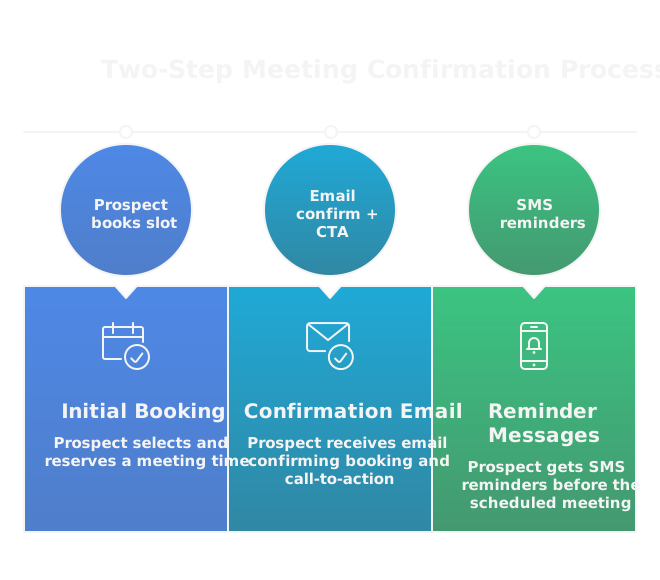
Require an explicit confirmation to turn a tentative booking into a committed one. A single click in the confirmation email, an SMS reply, or a calendar RSVP dramatically improves attendance.
Two-step confirmation pattern
- Prospect books a slot.
- Email with clear CTA to confirm plus "Add to calendar" button and a one-line agenda.
- Send instant SMS or Slack reminder 24 hours and 1 hour before the call.
Make the confirmation action frictionless, but required.
How To Use Scarcity And Limited Slots
Use genuine scarcity to increase perceived value, not fake scarcity. Limited weekly demo slots, special access to a product team, or a short pilot window create urgency that motivates attendance.
Do it honestly
- Display real remaining slots.
- Use scarcity tied to resource constraints, like engineer time.
- Use outbound messaging to highlight limited availability, so booking feels like an earned slot.
How To Set Clear Agendas And Outcomes
A precise agenda converts curiosity into commitment. State time, attendees, and three outcomes the prospect can expect. When people know what they'll get, they show up.
Agenda template for a 30-minute call
- 3 minutes, introductions and context.
- 12 minutes, clarify top pain and impact.
- 10 minutes, propose tailored next steps.
- 5 minutes, align on decision process and timeline.
Send the agenda in the calendar invite, confirmation email, and the reminder message. Include any required pre-work or data points the prospect should bring. That level of clarity eliminates excuses.
How Should You Write Meeting Invitations?
How To Personalize Subject Lines And Openers
Subject lines should promise relevance in one short clause, then the opener should explain why this matters to the recipient now. Use a triggering signal, not a generic compliment. Examples that work:
- Subject: "Quick 30m on reducing churn at [Company]"
Opener: "I noticed your team just launched [feature], curious how you're handling retention as usage grows."
- Subject: "Idea for [Prospect role] at [Company]"
Opener: "Most heads of [role] we talk to cut evaluation time by 30% with a simple dashboard change."
Keep personalization verifiable, specific, and limited to one or two facts. Overloaded personalization looks like scraping and reduces trust.
What Value And Outcomes Should You Promise?
Promise a concrete outcome you can deliver in the meeting, not vague benefits. Make it time-bound and measurable when possible. Good formats:
- "30 minutes to map a path to reduce onboarding time by X days."
- "15 minutes to show one play that increases demo-to-trial conversion by Y%."
Always pair the outcome with the expected attendee list and the decision you want, for example, "Bring your head of ops if you want a rollout plan." That clarity sets expectations and increases commitment.
How To Include Social Proof And Relevance
Add one short, highly relevant proof point in the invite body, not a long case study. Use peer names, numbers, or outcomes. Examples:
- "We helped [competitor] cut support tickets 24% in 60 days."
- "Recommended by your former colleague [Name] at [Company]."
If you include a link, make it to a single-page proof asset or a one-paragraph testimonial. Keep it scannable so it reads in the calendar preview.
How To Make Time Zones And Calendar Invites Clear
Format the invite title and body with local times and a UTC offset, for example: "Apr 6, 10:00 AM ET (UTC-4)". Repeat the local time in the email confirmation. Include three connection options, for example, video link, dial-in, and a plain fallback URL. Use calendar file attachments that auto-adjust to the recipient's client, and add a one-line note about DST if the meeting crosses a daylight saving change. Simple clarity eliminates a common excuse for no-shows.
Which Reminder Sequence Works Best?
What Is A Multi Channel Cadence?
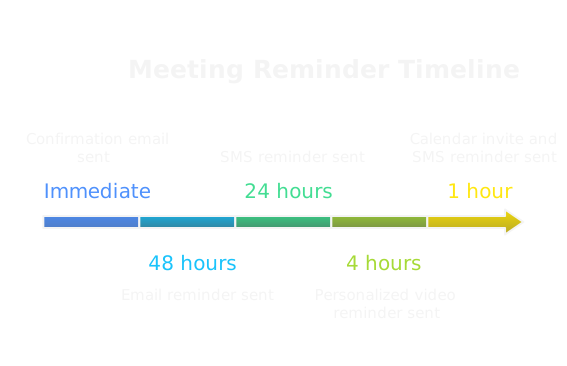
A multi channel cadence blends automated email, calendar events, SMS, and one human touch. Start with an immediate confirmation email and calendar invite, add an automated SMS for critical meetings, and layer in a short personalized video or voicemail before the call for high-value prospects. Let signals drive channel escalation, for example, if the confirmation email was never opened, send an SMS. Treat outbound like a marketing motion, use automation for scale, and reserve human touches for where signal suggests higher intent.
Sample cadence (30-minute meeting):
- Immediately, confirmation email + calendar invite.
- 48 hours before, value-reminder email.
- 24 hours before, short SMS reminder.
- 4 hours before, personalized video or voicemail for high-value accounts.
- 1 hour before, calendar notification + SMS.
Adjust frequency by prospect segment and deal value.
How To Time Email Reminders Effectively
Email reminders should be sparse, strategic, and different each time. Useful timings: immediately, 48 hours, 24 hours, and 3 hours before. Each email should add new value or clarity, not just repeat logistics. Use subject line variations that surface outcome, for example:
- Confirmation: "Confirmed, 30m with [Rep] — Agenda inside"
- 48 hours: "How we cut [metric] at [similar company]"
- 24 hours: "Prep note for our 30m on [date]"
Send emails in the prospect's local business hours, not late evening or weekend.
When To Use SMS And Phone Touches
Use SMS for urgent confirmations or same-day updates when you have explicit consent or a clear prior text exchange. Keep SMS under 160 characters, include time, a clickable meeting link, and one required action. Phone calls are for VIPs, executive-level prospects, or when a human nudge is likely to salvage a missed meeting. Sequence idea:
- 24 hours: SMS, confirm or reschedule.
- 1 hour: SMS with quick agenda and link.
- If VIP, phone call 24 hours prior and again 10 minutes before.
Respect do-not-disturb windows and legal rules for messaging in each region.
How To Use Video And Personalized Voicemails
Use short, personal videos to humanize automated cadence. Keep videos 20 to 40 seconds, mention prospect name, restate the meeting outcome, and say why it's worth their time. Host the video on a fast-loading platform and paste a thumbnail into the email and SMS. Voicemails should be 15 to 20 seconds, include the meeting time and one outcome, then a single CTA like "reply to confirm or I'll send one alternative slot." Both formats raise perceived value and decrease no-shows for target accounts.
What Same Day Confirmations Should Look Like
Same day confirmations must be minimal and actionable. Three lines are enough: time, one-line agenda or outcome, single-click action to confirm or reschedule. Example SMS:
"Reminder: 30m with [Rep] today at 10:00 AM ET. Agenda: 1 quick audit of [problem]. Join: [link]. Reply YES to confirm, RES to reschedule."
Also send a 1-hour calendar push and ensure the invite still contains dial-in and a plain link. The goal is zero thinking, instant action.
How Do You Protect Your Calendar From No-Shows?
How To Implement Buffering And Backfill
Protect rep time by building intentional slack. Block short buffer windows between meetings, for example 10 minutes for 30-minute slots and 15 minutes for 60-minute slots. Reserve a small pool of backfill slots that internal teams or qualified prospects can grab when cancellations appear. Use your booking tool to mark some slots as "backup" so they fill only when genuine openings occur. This reduces context-switching and lets you repurpose empty time quickly.
How To Build Fallback And Auto Reschedule Paths
Make rescheduling trivial. Include a one-click reschedule link in every reminder and a calendar action that proposes three alternative slots. If a prospect misses a meeting, trigger an automated "we missed you" flow that offers new slots, provides a short recap of what was planned, and asks for preferred times. For high-value prospects, escalate to a personal outreach from the AE within one business hour. Automate these paths so reps don't lose time chasing basic logistics.
When To Use Waiting Lists Or Standby Slots
Use waiting lists for scarce assets like product team demos or founder time. Let prospects join a short standby list and notify them by SMS when a slot opens, aiming to confirm within 5 to 10 minutes. Keep standby slots limited and clearly communicated so expectations are realistic. This creates legitimate scarcity, increases perceived value, and often swaps out low-commitment bookings for engaged prospects.
How To Coordinate Team Handoffs For Key Prospects
For high-value meetings, wire an internal handoff process into the invite. When a meeting is booked, auto-send a prep packet to the assigned AE and their backup, plus a Slack alert with a one-paragraph context and links to recent outreach. Designate a backup owner in case the primary cannot attend, and include a quick checklist: decision makers confirmed, tech checks done, and required assets attached. Clear ownership and fast internal signals prevent no-shows from turning into dropped opportunities.
How Can You Use Incentives And Deposits?
When Do Deposits Or Prepayment Make Sense?
Deposits or prepaid tokens work when a meeting represents scarce rep time or real delivery risk. Good use cases:
- Paid workshops, onboarding calls, or limited product reviews where an engineer or founder must attend.
- High deal-value demos where the rep’s calendar is constrained.
- Resource-intensive assessments you would otherwise prep for free.
Rules of thumb
- Small token amounts for early-stage offers, for example $50 to $200, or a credit applied to future invoices.
- For workshops or multi-day sessions, 5 to 10 percent of expected project value is fair.
- Refundable tokens reduce friction, nonrefundable credits drive commitment.
How to present it
- Frame it as priority access and protection of attendees’ time, not as a penalty.
- Offer a clear refund policy and show how the deposit converts into service credit.
- Make deposits optional and reserved for a premium, limited-capacity track.
Compliance and UX
- Watch regional payment rules and tax implications.
- Use a one-click refund process and surface the deposit in the invoice or proposal so it’s transparent.
How to use Clay for deposit targeting
If you want precision, enrich prospects with Clay to surface accounts more likely to accept deposits, for example companies with procurement teams, recent funding, or a history of vendor trials. Using this link, https://clay.com/?via=salescaptain, gives you 3,000 free credits to test segmenting offers and measuring acceptance rates.
How To Use Pre Meeting Deliverables To Increase Show Rate
Pre meeting deliverables convert a vague appointment into a concrete promise. Good deliverables are short, specific, and clearly tied to the meeting outcome:
- 1-page pre-call audit highlighting 2 to 3 issues.
- A simple ROI calculator populated with company-level defaults.
- A tailored agenda plus 1 example case relevant to their vertical.
Timing and delivery
- Send the deliverable immediately after booking, then remind 24 hours before.
- Require a one-click confirmation to unlock the deliverable, that action itself increases commitment.
- Include the deliverable preview in the calendar invite so it appears in the calendar client preview.
Operational tips
- Automate generation where possible, but let reps add one personalized sentence before sending for higher impact.
- Host the file on a fast, shareable link rather than as a heavy attachment.
- Track open and download signals to escalate follow-up for unengaged prospects.
What Micro Commitments Boost Attendance?
Micro commitments are tiny asks that create behavioral momentum. Use them in the booking flow and reminders:
- Click-to-confirm in the confirmation email, one word reply in SMS, or a calendar RSVP.
- Ask the prospect to pick the two most important agenda items from a short list.
- Request the name of other attendees or confirm decision timeframe.
- A single quick task, like upload one KPI or paste an org chart link.
Why they work
- Each micro action increases psychological investment and reduces ghosting.
- They provide signal for routing and preparation, so reps spend time on real opportunities.
Examples with expected lift
- Click-to-confirm, plus one KPI request, often increases show rate by 10 to 20 percent in practice.
- Requiring attendee names drops no-shows sharply when decision-makers are explicitly invited.
Keep it simple
- One to two micro-asks only. Any more creates friction and reverses the gain.
How To Reward Attendance With Exclusive Value
Make attendance the path to something they can’t get otherwise. Options that work:
- Live, tailored 15-minute audit delivered only on the call.
- Priority pilot window, limited to attendees that week.
- Discount or waived setup fee applied if they attend and sign within a window.
- Access to an executive office hours or a product sandbox restricted to attendees.
Execution tips
- Communicate the reward in the invite and the confirmation sequence.
- Deliver the reward immediately or within 48 hours of the meeting to reinforce the behavior.
- Track redemption so you can measure which rewards actually convert.
Ethical use
- Don’t overpromise. Make rewards measurable and tied to real business outcomes.
- Use scarcity honestly, for example limited pilot seats, not fake countdowns.
What Should You Do Immediately After A No-Show?
What To Say In The First 15 Minutes
Act fast, keep tone neutral, and make rescheduling trivial. Short templates work best:
Email/SMS template (first 15 minutes)
"Hi [Name], we missed you for our 30m at [time]. Tech trouble or scheduling conflict? Here are 3 quick options to reschedule: [slot 1], [slot 2], [slot 3]. Or reply with a better time and I’ll book it. If helpful, here’s the quick prep I was going to share: [link]. — [Rep]"
Why this format
- Assumes a benign cause, so no guilt.
- Provides immediate action, minimizing back-and-forth.
- Offers value even if they can't reschedule now.
Channel strategy
- Send email plus SMS if you have consent.
- For high-value accounts, have the AE call within the hour.
How To Follow Up At 24 Hours
If no response, escalate the value and diagnosis.
24-hour follow-up structure
- One-sentence recap of planned agenda.
- A short question to learn why they missed it, for example "Was timing, scope, or tech the issue?"
- Three fresh slots and a one-click reschedule link.
- One low-friction content piece or the pre-meeting deliverable attached.
Sample 24-hour email
"Hi [Name], sorry we missed each other yesterday. I wanted to share the 3-minute pre-audit I’d prepared and offer these new slots: [slots]. If now isn’t the right time, tell me which reason fits best: a) wrong timing, b) wrong topic, c) tech issue, d) other. I’ll update accordingly."
Why ask for a reason
- Helps routing and future messaging.
- Signals can move the lead to nurture or to a higher-touch path.
How To Reengage Or Fast Track Rescheduling
Triage quickly based on signal.
If warm and responsive
- Fast track with a shorter 15-minute "reschedule priority" slot, waive small friction like deposits, and have the AE confirm by phone.
If low engagement but strategic account
- Offer a value-first touch, like an asynchronous audit or a brief recorded insight, and schedule follow-up only if they respond.
If cold
- Move to a nurture sequence with timed value emails and requalification checks at 30 and 90 days.
Tactics to fast track
- One-click reschedule links that propose the next available slot.
- Temporary priority queues for prospects who accept a short follow-up window.
- Use calendar waitlist notifications to swap in high-signal prospects quickly.
When To Mark Leads As Lost And Reallocate
Set clear, objective exit rules so reps stop wasting time.
Suggested criteria
- No response after 3 reschedule attempts across 14 days, move to nurture.
- No opens or replies in 30 days from paid or inbound sources, mark as cold.
- Repeated no-shows from the same contact with no mitigation, mark as low propensity and reassign.
Operational steps
- Update CRM stage, add a "lost reason" tag, and set a requalification trigger, for example, a new event like funding or traffic spike.
- Reallocate rep capacity to live pipeline and use automated nurture to keep the account warm.
- Review lost tags weekly as part of your GTM feedback loop to spot bad messaging, broken booking flows, or source quality issues.
Which Metrics Prove Improvement?
How To Calculate No-Show And Show Rates
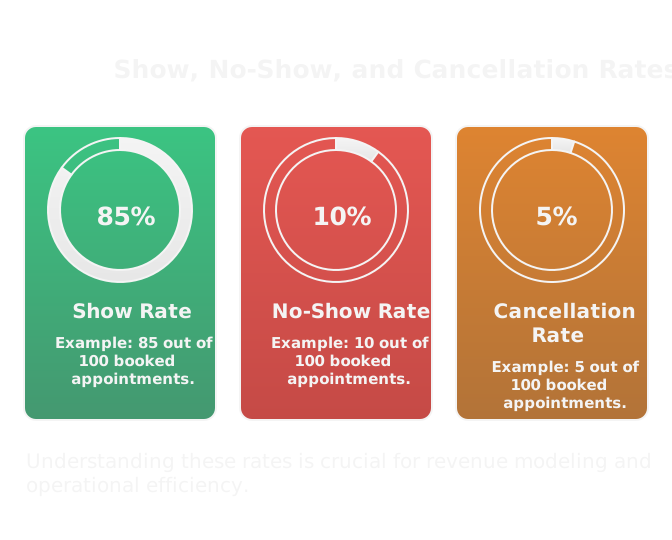
Define your terms and keep formulas simple.
Basic formulas
- Show rate = Attended meetings / Scheduled meetings.
- No-show rate = Missed meetings without cancellation / Scheduled meetings.
- Cancellation rate = Cancelled meetings / Scheduled meetings.
Nuances
- Exclude internal cancellations or double-books from the denominator.
- Track "rescheduled within 24 hours" separately, those are low-cost misses.
Example
If you scheduled 200 meetings, 140 were attended, 40 were cancelled ahead of time, and 20 were no-shows:
- Show rate = 140 / 200 = 70%
- No-show rate = 20 / 200 = 10%
- Cancellation rate = 40 / 200 = 20%
What Pipeline Metrics Matter Most
No-show improvements affect more than just calendar hygiene. Watch these:
- Meetings needed per closed deal, changes indicate improved efficiency.
- Pipeline coverage ratio, to ensure you have enough live opportunities.
- Conversion from meeting to qualified opportunity.
- Average deal size and win rate, to see whether quality shifted.
- Time-to-close, since fewer no-shows shorten sales cycles.
Tie metrics together
- A higher show rate should reduce meetings needed per win and improve velocity. Model the end-to-end impact, not just the meeting-level metric.
How To Segment No-Shows By Source And Rep
Identify where the problem lives.
Segmentation axes
- Source or campaign (outbound sequence, inbound form, paid).
- Rep or team to spot coaching or process issues.
- Time zone or booking method, for operational errors.
- Persona, industry, or company size to find mismatches.
What to look for
- One rep with a disproportionate no-show rate suggests coaching or template issues.
- A single campaign with low show rate points to messaging or qualification problems.
- Time-of-day patterns reveal scheduling mismatches for target personas.
Dashboard suggestions
- Heatmap of show rates by source and rep.
- Cohort trend lines for new campaigns over the first 30 days.
- Alerts for sudden deviations so ops can intervene.
How To Measure Revenue Impact Per Meeting
Translate meetings into dollars so leadership cares.
Two practical approaches
1) Historical attribution: Revenue per meeting = Total closed revenue from meetings in period / Number of meetings that led to those wins.
2) Expected value model: Revenue impact = (Meetings scheduled) x (Show rate) x (Conversion from meeting to win) x (Average deal value).
Example using expected value
- 1,000 scheduled meetings x 60% show rate = 600 attended.
- Meeting-to-win conversion 5% = 30 wins.
- Average deal value $50,000 = $1.5M revenue.
Now improve show rate to 75
- 1,000 x 75% = 750 attended.
- 750 x 5% = 37.5 wins.
- 37.5 x $50,000 = $1.875M, an increase of $375k.
Use this modeling to prioritize investments
- If a tool or workflow increases show rate by X percent, you can estimate incremental revenue and justify the spend.
- Track over time and run A/B tests on reminders, deposits, and incentives to measure lift against this revenue model.
What Tools Should You Use?
Choose tools that fit a GTM system, not just a point problem. Look for scheduling and reminder platforms that play well with your CRM, webhooks, and automation stack so you can treat outbound like marketing at scale.
How To Compare Popular Scheduling Tools
Score tools by these practical criteria, not brand hype:
- Booking speed, minimal clicks from link to calendar add.
- Timezone clarity and daylight saving handling in UI and invites.
- Native reschedule and waitlist support, not a manual back-and-forth.
- Round-robin and priority routing for reps, with buffer slot options.
- Built-in reminders, SMS support, and two-step confirmations.
- API/webhook coverage and native CRM sync.
- Analytics surface show, reschedule, and no-show reasons.
- Support for deposits or paid slots if you use them.
Tools to consider, by use case:
- Fast, simple booking: Calendly, SavvyCal.
- Enterprise scheduling and routing: Chili Piper.
- Built-in CRM option: HubSpot Meetings.
- Embedded UX for product pages: SavvyCal or custom widget.
How to prioritize: pick the smallest set of tools that remove friction and give you webhooks for every important event.
How to use Clay for scheduling intelligence
Clay can enrich bookings with company signals so you only automate reminders for accounts that matter. Use it to score prospects before a calendar invite is created, then trigger scaled personalization in reminders. If you want to test enrichment quickly, this link, https://clay.com/?via=salescaptain, gives you 3,000 free credits.
Which Reminder Automation Tools Help Most
Match the tool to the channel and scale of personalization:
- Sequence platforms for outbound at scale, with A/B testing: Outreach, SalesLoft.
- CRM-built sequences for inbound consistency: HubSpot, Salesforce Pardot.
- SMS and programmable messaging: Twilio, Sakari, MessageMedia.
- Short personalized video hosts: Loom, Vidyard.
- Call campaign and voicemail drops: Slybroadcast, Aircall integrations.
- Workflow glue: Zapier, Make, and native webhooks to route events.
Pick one sequence engine for high-volume outbound and one reliable SMS provider for confirmations. Use video tools sparingly for high-value targets.
How To Integrate With CRM And Workflows
Treat integration as the backbone of your playbook, not an afterthought.
- Log every scheduling event as an activity with type, source, and booking metadata.
- Two-way calendar sync prevents double books and stale invites.
- Add meeting outcome fields, no-show tags, and reschedule counts on the contact and company record.
- Use webhooks to trigger reminder escalations based on engagement signals, for example, no calendar click within 10 minutes.
- Standardize meeting types and map them to pipeline stages so downstream automation fires correctly.
- Capture UTM and campaign IDs on booking links for attribution.
If you lack ops bandwidth, an outbound agency like SalesCaptain can wire these integrations and design the routing rules for you as a GTM accelerator.
What Analytics And Call Tracking To Add
Measure the behaviors you want to change, not vanity metrics.
- Must-have KPIs: show rate, no-show by source, reschedule rate, meeting-to-opportunity conversion, and revenue per attended meeting.
- Instrument tracking: unique booking URLs for each campaign, UTM parameters, and booking-source fields.
- Call tracking: use Gong or Chorus for call QA and sentiment, CallRail or Aircall for phone-number level attribution.
- Error telemetry: log failed conferencing joins, dropped connections, and dial-in failures for ops fixes.
- Dashboards: heatmap of show rates by time-of-day, campaign, and rep; open/click rates of confirmation emails; reschedule latency.
Use data to close the loop: feed analytics back into your booking rules and reminder cadence so the system improves continuously.
What Is A Repeatable No-Show Playbook?
A playbook is a sequence of deterministic steps, triggered by signals, with clear owners and SLAs. Repeatability is the goal, so automate everything you can and reserve human time for exceptions.
Step 1: Pre Qualification Workflow
Keep qualification light but signal-driven.
- Capture 3 to 5 high-signal fields at booking, then enrich via data services.
- Auto-score and route only above-threshold prospects to calendar slots that matter.
- Micro-asks, like “confirm two attendees,” filter casual bookers.
- For borderline cases, route to a 10-minute screen call instead of a full demo.
Make qualification a binary gate, not a negotiation. That reduces downstream no-shows.
Step 2: Booking And Confirmation Steps
Convert a click into commitment immediately.
- Instant confirmation email with one-click confirm CTA and an “Add to calendar” button.
- Put a clear agenda and expected attendees in the invite title and body.
- Include multiple connection options and a reschedule link in every confirmation.
- If you use scarcity or paid slots, surface that honestly in the booking UI.
Require a confirmation action when rep time is scarce. That single habit lifts show rates.
Step 3: Reminder Cadence And Day Of Execution
Layer channels by signal and value.
- Base cadence: confirmation, 48 hours, 24 hours, 4 hours, 1 hour. Vary by segment.
- Use email for context, SMS for urgent confirmations, and a short personalized video for VIPs.
- Day of: rep checks in, does a tech test, and sends a one-line agenda reconfirm.
- Escalate to a live call only when the prospect shows strong intent or the slot is high value.
Make one channel authoritative, for example SMS for same-day actions, to avoid mixed signals.
Step 4: Post Meeting And No-Show Follow Up
Automate speed and clarity after a miss.
- Within 15 minutes send a neutral “we missed you” with three reschedule options and the prep you would have used.
- At 24 hours escalate value, ask for the reason for the miss, and offer a fast-track reschedule slot.
- For high-value accounts, have the AE follow up within one business hour by phone.
- Maintain objective exit rules, e.g., three reschedule attempts over 14 days moves the lead to nurture.
The objective is to recover the meeting when possible, and to label and reallocate quickly when not.
How To Iterate The Playbook With Data
Run micro-experiments, measure lift, and lock winners into the system.
- A/B test single variables, not entire cadences, for clear signal. Test SMS wording, confirmation CTA, and deposit vs no deposit.
- Track experiments against revenue-per-meeting models so you can prioritize interventions that move dollars.
- Weekly ops review, identify top no-show campaigns, and create action items: tweak qualification, change reminder timing, or coach reps.
- Use feedback loops between analytics, booking rules, and sequence content so the system evolves.
Iteration keeps the playbook tight. GTM is a system, treat it that way.
Which Templates And Checklist Help?
Practical, short templates are better than clever long ones. Below are ready-to-use options that respect prospect time and maximize clarity.
Invitation And Confirmation Email Templates
Invitation, three lines:
Subject: 30m to cut [metric] at [Company] on [date]
Body: Hi [Name], quick intro, one-line relevance, proposed outcome. Confirmed attendees: [names]. Pick a slot: [link]. — [Rep]
Immediate confirmation:
Subject: Confirmed: 30m with [Rep] — Agenda inside
Body: Thanks for booking. Agenda: 1) 5m context, 2) 15m audit + tailored idea, 3) 10m next steps. Add to calendar [button]. If you need to reschedule, click [link].
SMS And Voicemail Scripts For Reminders
24-hour SMS:
"[Name], reminder: 30m with [Rep] tomorrow at 10:00 AM local. Agenda: quick audit of [problem]. Join: [link]. Reply YES to confirm, RES to reschedule."
1-hour voicemail (15 seconds):
"Hi [Name], [Rep] here. We’re on for 10:00 AM. Quick audit and one recommendation ready. Reply to confirm or I’ll send a new slot."
Keep SMS short, actions explicit, and voicemails human and fast.
No-Show Follow-Up Message Templates
Immediate (within 15 minutes):
"Hi [Name], we missed you for our 30m at [time]. Tech or timing issue? Here are 3 quick options to reschedule: [slots]. If easier, reply with a time and I’ll book it. — [Rep]"
24-hour value-first:
"Hi [Name], sorry we missed each other. I attached a 2-minute pre-audit I prepared. If one of these slots works, I’ll book it: [slots]. If now isn’t right, tell me why: timing, scope, or other."
These keep tone neutral, restore value, and reduce friction to reschedule.
Pre-Meeting Checklist For Reps
A one-page checklist reps actually use:
- Confirm attendee names and roles are on the invite.
- Review pre-call deliverable and add one personalized sentence.
- Test conferencing link and backup dial-in.
- Prepare two tailored insights, one quick win and one strategic next step.
- Log prep done in CRM and set meeting outcome default.
- Notify backup owner and attach any slides or links.
Short, repeatable, and tied to CRM fields.
Manager Dashboard And Weekly Audit Checklist
Focus on signal and actionables, not raw noise:
- Show rate by campaign and rep, week over week.
- No-show reason tags and top three causes.
- Time-of-day and day-of-week heatmap for bookings.
- Reminder open and SMS reply rates.
- Reschedule latency and number of reschedules per booked meeting.
- Experiment outcomes and next actions.
- Reassign accounts where reps exceed no-show thresholds.
Weekly ritual: review the dashboard, pick one experiment to run, and assign fixes to owners. Keep the audit tight and action-focused so you can scale improvements across the GTM system.
What Common Mistakes Cause No-Shows?
Why Relying On One Channel Fails
Single-channel booking assumes one inbox or one notification path reaches everyone, and it rarely does. Email gets filtered, calendar clients render invites differently, and people prefer different touchpoints at different times. Treat outbound like marketing, use multiple channels in a coordinated way, and let signals drive escalation. If the confirmation email goes unopened, escalate to SMS or a short voicemail. Automation makes this cheap and scalable, so don’t leave attendance to chance by relying on a single thread.
How Vague Meeting Purpose Reduces Attendance
Vague invites create low perceived value, and low perceived value gets deprioritized. If the calendar title is "Intro call," people won’t block time for it. Always state the outcome, attendees, and one concrete deliverable. Example: "30m, reduce onboarding time by 7 days — bring head of ops." Clarity reduces the mental cost of attending and makes it easier for prospects to justify the time to their manager.
Why Booking Without Qualification Backfires
Booking anyone who clicks the link increases volume but destroys signal. Unqualified meetings generate low commitment, high churn, and wasted rep hours. Use lightweight qualification gates, like two high-signal fields or a 10-minute screener, so calendar slots are earned. When outbound is automated and cheap, qualification becomes the gatekeeper for quality, not a nice-to-have.
How Ignoring Data Prevents Improvement
If you don’t measure who misses and why, you’ll repeat the same mistakes. Segment no-shows by source, rep, time of day, and meeting type. Run small experiments, for example A/B test SMS copy or a single confirmation CTA, and measure lift against revenue-per-meeting. Treat GTM as a system with feedback loops: feed results into routing rules, reminder cadences, and qualification thresholds until show rates move consistently upward.
FAQs
RELATED ARTICLES
Check out more articles on our blog!


RELATED ARTICLES
Lorem ipsum dolor sit amet, consectetuer adipiscing elit, sed diam nonummy nibh euismod tincidunt ut laoreet dolore magna aliquam erat volutpat.