LinkedIn For B2B Lead Generation: Ultimate Guide To Strategy And Tools



You’re on LinkedIn late, sending a handful of connection requests and a templated note because replies are better than cold email, right? The hidden problem is you’ve treated it like another mass outreach channel: shallow personalization, an under-optimized profile, and no playbook for buying committees or in-platform signals, so most touches never turn into meetings. This piece will walk you through when LinkedIn actually wins for B2B, how to build an ICP that stops wasting outreach, map the buying committee, tune profiles and company pages to convert, run signal-driven multithreaded sequences, and measure ROI so your time and ad dollars create real pipeline rather than noise. Read on and you’ll finish with a practical checklist and templates to start turning LinkedIn activity into qualified meetings.
Why Use LinkedIn For B2B Leads?
Who Benefits Most From LinkedIn?
LinkedIn works best when the sale is relationship driven, the deal size is meaningful, and buying decisions involve multiple people. Typical winners are B2B SaaS with mid to high ACV, professional services, consultancies, recruiting firms, and enterprise vendors. If you sell a commodity low-ticket product to consumers, LinkedIn is the wrong channel.
Use LinkedIn when you need credibility, context, and multi-touch engagement. It lets you surface buyers by role and company, demonstrate authority through content, and build warm relationships before the first pitch. Outbound is now a marketing motion, so use LinkedIn to create those marketing-driven touches that feed sales.
What Advantages Over Email Outreach?
LinkedIn gives three things most cold email can’t match: context, visibility, and social proof. You see profiles, posts, shared connections, recent activity. That context lets you personalize at scale, not just insert a name. Public engagement is visible to the buyer’s network, which makes introductions and endorsements more powerful than a single email.
Deliverability is simpler, response rates are often higher, and you can layer signals, like profile views and content interactions, into your sequence. AI and automation make outbound cheap and signal-driven now, but LinkedIn preserves the human context that converts audiences into opportunities. Think omnichannel sequences where LinkedIn touches are an intentional part of the workflow, not a random add-on.
Which Lead Types Suit The Platform?
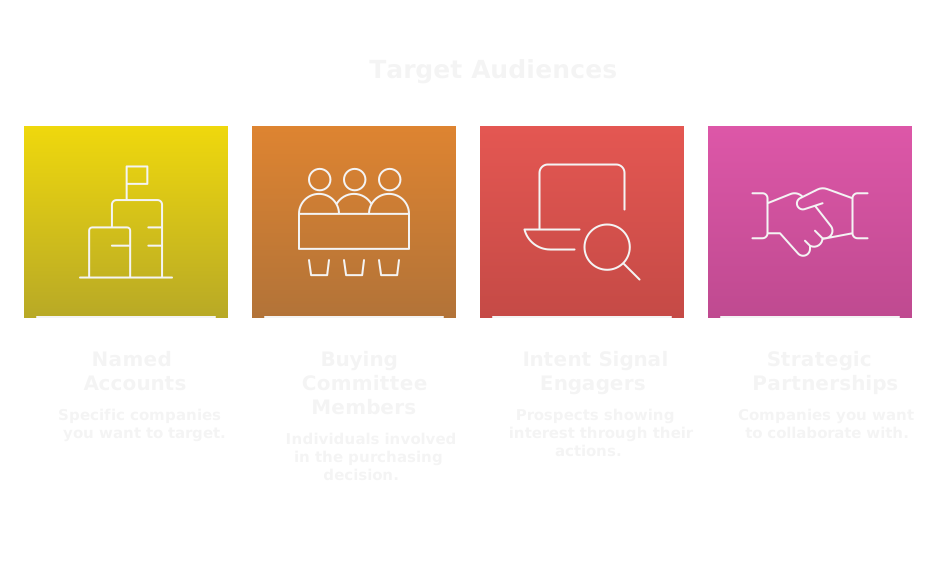
Use LinkedIn for:
- Named accounts and account-based plays, where you need to reach specific people inside target companies.
- Buying committee members, influencers, and champions who aren’t on procurement mailing lists.
- Leads showing intent signals on-platform, like content engagement or profile visits.
- Strategic partnerships and channel conversations that need visibility.
Avoid using LinkedIn as the only tool for very transactional, impulse purchases. For complex sales, LinkedIn is ideal for finding the right people, starting the conversation, and enabling the trust that closes deals.
Who Should You Target?
How To Build An Ideal Customer Profile?

Start with your best customers, not assumptions. Pull 10 to 20 top accounts and identify shared attributes: company size, industry, tech stack, revenue band, org structure, procurement cadence, buying triggers, and churn causes. Quantify attributes, then create tiers: Tier 1 named accounts, Tier 2 lookalikes, Tier 3 opportunistic.
Include negative criteria. An ICP that ignores “no-go” signals wastes outreach and spoils domain reputation.
Use data to close the loop. Feed results back into the ICP monthly. GTM is a system, not a one-off doc. Establish workflows that move closed-won signals into model updates.
How to use Clay for ICP
If you want to operationalize ICP building, start with Clay. Use Clay to import your customer list, enrich firmographics and technographics, dedupe records, and generate lookalike segments. Clay’s enrichment and custom fields help you build the quantifiable ICP attributes you need. Using this link gives you 3,000 free credits: https://clay.com/?via=salescaptain.
How To Map The Buying Committee?

Map roles first, not titles. Ask who signs the PO, who owns budget, who vets the tech, who uses the product, and who influences the evaluation. Typical roles are economic buyer, technical evaluator, user champion, procurement, and external influencer.
On LinkedIn, map committees by:
- Tracing org charts via connections and team lists.
- Reviewing past project announcements and people tagged in posts.
- Looking for consistent content consumers, not just titles.
Assign CRM tags for each role and build role-specific messaging. Sequences should be multi-threaded, because one successful thread rarely comes from a single person. Treat SDR automation and tooling as the engine, but keep humans in the loop for complex negotiations.
Which On‑Platform Signals Indicate Interest?
Prioritize signals, because not every like is intent. Useful signals include:
- Multiple profile visits within a short window.
- Repeated likes/comments on your content.
- Sharing your posts with their network.
- New job titles or hires indicating expansion.
- Public funding, M&A, or product launches.
- Job postings for roles related to your product area.
Create simple rules, for example: any account with 3+ engagement events in 30 days moves to active outreach. Use automation to surface these accounts, then have a human step in for the tailored touch. AI can score signals, but your playbook must define thresholds and next actions.
How To Optimize Profiles?
What To Include On Personal Profiles?

Make the profile do pre-sales work. Key elements:
- Headline that names the audience and the outcome, not a job title only.
- About section that opens with a problem statement, a simple value prop, and a one-line CTA.
- Featured media: a 60-second case study clip, a PDF one-pager, and a recent relevant article.
- Clear contact method, and a link to a booking page for qualified traffic.
- Recommendations from buyers, with quotes that reference metrics and outcomes.
Publish short posts that solve a single buyer problem. Make it easy for prospects to evaluate you before they reply.
How To Optimize Your Company Page?
Your company page should convert visitors to leads, not act like a brochure. Focus on:
- A concise tagline that names the buyer and the primary benefit.
- Case study snippets with measurable outcomes pinned to the feed.
- Regular posts that address distinct stages of the buyer journey.
- Employee amplification, encourage sellers to reshare and add personalized notes.
- Lead gen forms or CTA buttons linked to persona-specific landing pages.
Track follower quality and inbound leads, not vanity metrics. GTM needs feedback loops, so connect page interactions back to your CRM and adjust content based on which posts generate pipeline.
How To Use Social Proof And Case Studies?
Use proof where decisions happen. Formats that work on LinkedIn:
- One-paragraph case studies that lead with a metric, for example, "Cut churn 22% in 6 months."
- Short video testimonials that name the company and role.
- Single-slide before and after snapshots for posts.
- Client logos in the Featured section and company header, but only when relevant to the prospect.
Tailor proof to the persona and role. Technical buyers want architecture or integration wins, economic buyers want ROI and payback periods, users want time saved or ease. Convert case studies into outreach snippets and social posts so proof appears naturally in your outbound and inbound motions.
If you need help turning case studies into high-converting outbound sequences, outbound agencies like SalesCaptain operate as GTM accelerators, helping translate proof into messages that scale. Use agencies when you need a technical operator to run the system end to end, not just a vendor to write copy.
What Content Drives Conversions?
Which Formats Generate Leads Fast?
Short, outcome-first posts convert fastest because they cut through noise and invite a next step. Best formats for quick leads:
- Single-stat case posts that open with a metric, then a one-sentence hook and a CTA to book or DM.
- Short demo clips, 60 seconds or less, showing the exact widget or outcome the buyer cares about.
- Carousel slides that walk a buyer through a 3-step ROI story, ending with a clear ask.
- Polls and event invites that surface intent and create a permissioned follow-up.
- Sponsored single-image posts with Lead Gen Forms for bottom-funnel prospects.
Fast leads need clear intent paths, not education. Match format to stage, and use proof or a low-friction CTA to convert interest into a meeting or form submission.
How To Build Thought Leadership Content?
Thought leadership wins when it solves a buyer problem, not when it flatters the author. Build it this way:
- Pick a repeatable framework, then produce micro-content that applies the framework to different verticals.
- Lead with proprietary insight or a contrarian move, then prove it with one concrete example and a metric.
- Publish a short playbook or checklist, then republish excerpts as posts and carousels.
- Invite customer voices into the thread, so authority becomes social, not solo.
Treat leadership as a system, with content briefs, an editorial calendar, and amplification rules. Thought leadership should feed outbound sequences, so every piece has a narrow CTA that maps to a selling motion.
How To Repurpose And Distribute Content?
Repurpose with intent, not laziness. Convert one asset into:
- 6-8 short posts from one long article.
- A 60-second clip from a webinar plus three slide images.
- Outreach snippets and email subject lines from bold post hooks.
Distribute where your buyers are:
- Seed on personal profiles, then promote via the company page.
- Use employee resharing with instructions, not blind asks.
- Push high-intent engagers into retargeting audiences and messages.
- Run sponsored promotion selectively to expand reach for top-converting posts.
Measure distribution by pipeline created, not impressions. Create a feedback loop that tags the content source in CRM so you know which repurposed format delivers actual meetings.
What Posting Cadence Works Best?
Consistency beats frequency. Practical cadences:
- Personal seller profiles: 3 to 5 posts per week, mix of proof, POV, and direct CTAs.
- Company page: 2 to 3 posts per week, focused on case studies and product updates.
- Long-form articles or newsletters: 1 to 4 per month, used as cornerstone assets.
Time sequences to outreach. When launching an ABM sequence, publish a set of posts a week before outbound touches begin so prospects see context when they get messaged. Track which cadence correlates with higher reply rates and double down there.
How To Run Effective Outreach?
What Outreach Sequences Convert?
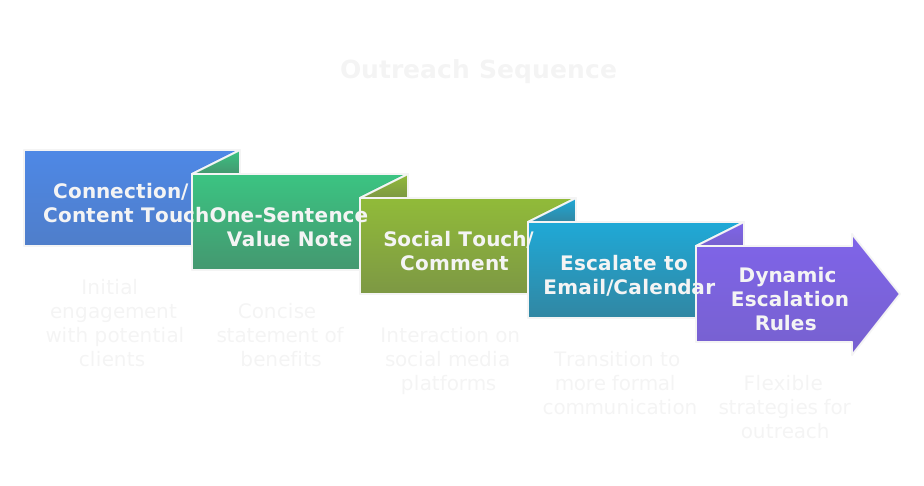
High-converting sequences are multi-threaded, signal-driven, and short.
- Start with a lightweight connection or content share tied to a specific pain.
- Follow with a one-sentence value note and a single, low-friction CTA like “30 minutes to review X.”
- Add a social touch, for example, comment on their recent post or share a relevant case study.
- Escalate to email or calendar invite after 3 to 5 touches or when the prospect signals intent.
Make sequences dynamic. If a prospect watches a demo or revisits your profile, escalate immediately. Outbound is now a marketing motion, so integrate content and signals into sequences, not just templated messages.
Which Message Templates Work?
Effective templates are tight, relevant, and outcome-oriented. Three compact examples:
Connection request
Hi [Name], we’ve helped [peer company] cut [metric] by [percent]. I’d like to share a one-page example that’s relevant to [their function]. Can I connect?
Follow-up after connect
Thanks for connecting, [Name]. Quick note, we helped [similar company] reduce [pain] and freed up [time/money]. If a short case study would be useful, I can send it over. Interested?
Direct meeting ask after signal
Noticed you viewed our [post/product]. We run a 20-minute walkthrough that shows how to get [specific result] in 60 days. Open to a quick slot next week?
Keep asks simple, limit the ask to one action, and always surface a measurable outcome.
How To Personalize At Scale?
Personalization should be signal-led, not vanity-led. Use three layers:
- Firmographic triggers, for example revenue band or tech stack.
- Intent signals, like multiple profile visits or content engagement.
- Human cues, such as mutual connections or a recent role change.
Automate assembly, humanize the opening. Use templates that inject 1–2 personalized lines derived from the signals above, then use a standardized value line and CTA. AI can generate the personalized sentence, but set strict templates and human review for high-value targets. This is why SDR roles are shifting toward technical operators who run the systems that assemble personalization at scale.
How to use Clay for personalization at scale
If you want to automate enrichment and personalize reliably, Clay is a good starting point. Workflow:
- Import your target list to Clay and enrich firmographics, technographics, and recent events.
- Create custom fields for intent signals, for example “profile views in 30 days” or “engaged with X post.”
- Use Clay to auto-generate a personalized one-liner based on those fields, export clean records to your sequence tool.
- Sync replies back to Clay or CRM for feedback loops.
Using this link gives you 3,000 free credits: https://clay.com/?via=salescaptain. That helps you test enrichment and templated personalization before scaling.
When To Move Off Platform?
Shift channels when value or sensitivity increases. Move off LinkedIn when:
- You need to share confidential materials or an NDA.
- The prospect asks for a screen share or scheduling link.
- You require a formal calendar invite or contract exchange.
When moving off platform, confirm the preferred email or calendar, send a one-line confirmation in LinkedIn first, then hand over the next action. Don’t push email too early, it reduces reply rates. Move only when it accelerates the deal.
Which Ads And Formats Work?
How To Choose The Right Ad Objective?
Pick the objective that matches the buyer’s stage and the action you can deliver:
- Awareness, use video views or brand reach when testing messaging.
- Consideration, use website visits or engagement to build intent pools.
- Conversion, use Lead Gen Forms or website conversions when you want meetings or signups.
For ABM, use Sponsored Content and Message Ads to land in specific accounts, then retarget engagers with conversion-focused offers that can be enhanced by partnering with an ABM agency. Align creative and objective from the start.
How To Use Lead Gen Forms Effectively?
Lead Gen Forms work if you reduce friction and act fast.
- Keep forms lean, 2 to 4 fields: email, role, company, and one qualifying checkbox if needed.
- Offer immediate value, for example a one-page ROI calculator or a calendar link.
- Trigger an automated follow-up within 15 minutes, either an email or a thank-you message with next steps.
- Sync form data to CRM and tag the origin so sales can prioritize warm vs cold responses.
Test form length and follow-up cadence. Faster human follow-up increases conversion from form to meeting significantly.
How Much Do Ads Typically Cost?
Costs vary by audience seniority and region, but ballpark figures:
- CPM: $8 to $30+
- CPC: $3 to $15 depending on ad type and targeting
- CPL: $50 to $300 for mid-to-senior B2B decision makers
Expect higher costs for narrow ABM lists and enterprise buyers. Measure against ACV and LTV, not raw CPL, and iterate until the funnel economics make sense.
How To A B Test Creative And Targeting?
Run clean tests and isolate variables:
- Test one creative variable at a time, headline or image, keeping audience constant.
- Mirror tests on targeting, swapping one audience attribute per experiment.
- Run tests long enough to get meaningful sample sizes, typically 7 to 14 days and at least several hundred impressions.
- Use conversion rate on the desired action as the signal, not CTR alone.
Document learnings and bake winners into templates so you can scale winning combos quickly.
Paid Versus Organic Comparison
Paid and organic solve different problems and must work together.
- Paid buys precision and speed, ideal for ABM and scaling validated messages.
- Organic builds credibility and lowers acquisition friction over time, ideal for relationship-driven sales.
Best practice, validate messaging with organic posts and outreach, then scale the proven creative with paid. Use paid to amplify top-performing organic posts and to build retargeting audiences for outreach. GTM is a system, so coordinate paid, organic, and outbound into a single workflow that feeds pipeline and learning loops.
How To Use Sales Navigator?
Sales Navigator is the most powerful LinkedIn product for targeted B2B outbound, because it turns profile data and activity into repeatable lists and signals. Use it as the discovery and intent layer of your GTM system, not just a list builder.
How To Build High Value Prospect Lists?
- Start with outcome-driven filters, not vanity fields. Filter by company headcount band that maps to your ICP, department, seniority, and recent changes like "joined within 90 days."
- Use Boolean in the keyword field to capture role variants and exclude false positives. Save the best-performing boolean strings in a shared doc.
- Prioritize technographics and trigger events, for example companies using a competitor tag or hiring for specific roles. Treat those as high-intent attributes.
- Create list tiers inside Navigator: Tier 1 named accounts, Tier 2 lookalikes, Tier 3 opportunistic. Export or sync only the tiers you plan to touch that week. That keeps cadence realistic and deliverable rates high.
- Enrich lists before outreach. If you use an enrichment tool, add fields like buying committee role, tech stack, and last funding date. Enrichment converts a raw list into a sequence-ready roster.
- Keep lists small and testable. A tight list of 50 to 200 qualified leads yields cleaner learnings than 2,000 generic prospects. Run a pilot sequence, measure replies and meetings, then scale.
How To Use Saved Searches And Alerts?
- Save searches for each ICP segment and subscribe to alerts. Treat saved searches as active watches, not passive reports.
- Use alert triggers as sequence signals. Example rule: if a saved search shows "new hire + post engagement" within 14 days, move the account to an active 5-touch outreach path.
- Combine multiple saved searches into an account-level view. If one account appears in three searches, boost priority and personalize heavier.
- Forward alerts into your automation stack or Slack channel so operators and account owners can act fast. Speed matters, because intent decays.
- Prune and iterate monthly. Remove noisy queries, tighten keyword logic, and retire low-performing searches. Your saved searches should become leaner and higher-signal over time.
How To Use InMail And Credits?
- Treat InMail as a high-value touch reserved for Tier 1 prospects or accounts where you can’t access email. InMail still beats random connection messages for senior buyers.
- Optimize for response, not length. Two to four clear sentences, one outcome metric, and one simple CTA. Example: “We helped [peer] cut X by Y. 20-minute demo next Wed or Thu?”
- Track InMail performance by reply-to-meeting conversion, not open rates. Use UTM-tagged links to measure downstream activity.
- Conserve credits through sequencing. If a prospect viewed your profile, engaged with content, or has a mutual connection, prioritize InMail there. If they haven’t shown any signal, start with connection + content share.
- If you run out of credits, export those profiles to your enrichment/sequence tool and switch channel to email or sponsored message where appropriate. Maintain a credit budget per rep and monitor ROI per credit.
Which Tools And Services Help?
When choosing tools, think system, not point solution. Your stack must support discovery, enrichment, sequencing, and feedback loops.
What Free Tools Can You Use?
- LinkedIn free features, saved searches, and organic posting for discovery and credibility.
- Google Sheets as a lightweight operational system for lists, with simple formulas for scoring and export.
- Zapier / Make free tiers to glue basic automations, for example pushing new saved search exports into a sheet or Slack.
- Hunter or Snov.io free credits for quick email discovery on a small scale.
- Free browser extensions for quick data capture, but use sparingly to avoid rate limits and suspicious activity.
Free tools are great for pilots, but plan upgrades once you need reliable enrichment and sync.
Which Paid Tools Are Worth It?
- Clay, first on the list, if you need automated enrichment, dedupe, and workflow orchestration. Clay makes it easy to enrich prospect lists, build custom segments, and export clean records. Using this link gives you 3,000 free credits: Clay.
- Sales Navigator for targeted search and account signals, plus TeamLink and CRM integrations.
- A sequence/orchestration tool that supports multichannel plays, reply parsing, and CRM sync. Choose one that lets you pause, route, and A/B test templates.
- A verified email provider and a deliverability service if you plan to scale email outreach.
- Analytics or BI layer to measure pipeline attribution, not just response rates.
Buy tools that solve a single friction point well, then connect them into a workflow.
How to use Clay for lead lists and enrichment
- Import your Sales Navigator exports or CRM segments into Clay, run enrichment and dedupe, then add custom fields like “intent score” or “role tag.”
- Use Clay to auto-generate personalization tokens and export clean CSVs into your sequence tool.
- Create a feedback loop by tagging records with outcomes and importing those back to Clay for model refinement. The free credits help you test enrichment at scale.
How To Evaluate Lead Gen Services And Pricing?
- Benchmark by outcome, not hourly rates. Ask providers for example deals closed or meetings booked for clients with similar ACV.
- Demand transparent pricing per booked meeting or qualified opportunity, with clear definitions for “qualified.” Don’t accept fuzzy KPIs.
- Require a pilot with measurable gates, for example 30 meetings or a 90-day trial with weekly reporting. Use those weeks as real experiments, not demos.
- Validate their data sources and compliance practices. Cheap lists are often low-quality and harm deliverability and reputation.
- Prefer providers that operate as GTM accelerators, offering technical operators who can plug into your stack and hand over running systems, not just campaign copy. Ask for playbook access and handoff documentation.
How To Automate Without Violating Policies?
- Prefer official APIs and integrations. Where API access exists, use it. Avoid scraping that repeatedly hits LinkedIn pages.
- Emulate human rhythms, not bursty bot traffic. Space connection requests and messages, cap daily actions per account, and add manual review points.
- Don’t use automation to fake engagement. Automated likes, generic comments, or misleading identity tactics will get accounts restricted.
- Keep two-way human oversight on Tier 1 sequences. Automate assembly and routing, but require human approval for the first message to high-value targets.
- Monitor account health metrics, for example response rate to connection requests and restriction warnings. If an account flags, pause automation and remediate.
- Maintain explicit opt-out handling and mirror privacy expectations. Treat LinkedIn as a permissioned channel, and move to corporate email when the conversation crosses a confidentiality threshold.
How To Build A Lead Gen Playbook?
A playbook is the operational blueprint that turns lists into pipeline. Keep it precise, measurable, and iterated every sprint.
What Campaign Workflow Should You Use?
- Define campaign intent and audience, then map a 4 to 8 touch multichannel sequence. Example sequence: warm content touch, connection request, value note with case snippet, comment on prospect content, InMail or email, calendar ask.
- Assign triggers and escalation rules. If prospect views content twice or replies, fast-track them to a demo cadence. If no activity after 5 touches, retire for 90 days.
- Timebox experiments. Run each variant for a defined cohort and interval, measure meeting rate, and promote winners.
- Add feedback loops: every reply is classified, CRM is updated, and outcomes feed back into targeting logic. Your playbook must include who fixes data drift and when.
How To Qualify And Score Leads?
- Use both explicit and implicit criteria. Explicit: budget, timeframe, role, authority. Implicit: profile views, post engagement, company triggers.
- Create a simple numeric score. Example: role match 30, company fit 25, intent signals 30, engagement recency 15. Thresholds determine routing: 80+ to sales, 50 to nurture, Keep scoring rules visible and adjustable. Score decay matters, drop points after 30 days without reengagement.
- Capture a short qualification snippet in CRM on first meaningful conversation: problem, urgency, decision maker, and next step. That one-line summary saves hours for closers.
How To Route Leads To Sales And CRM?
- Define routing rules up front. Example: Tier 1 responses go to named AE within 1 hour; Tier 2 to SDR queue for qualification within 24 hours. Automate routing via your orchestration tool.
- Use Slack or email alerts for hot replies with context and a one-line summary. Include meeting links and required prep.
- Push every qualified lead into CRM with tags that preserve sequence history, content that triggered engagement, and the calculated score. Don’t lose the signal trail.
- Measure handoff quality with two KPIs: time-to-first-contact and lead-to-opportunity conversion. Hold teams accountable monthly.
Real Campaign Examples And Results
- Example 1, SaaS mid-market ABM: 120 named contacts, 6-touch LinkedIn-first sequence, targeted carousel post, and 15-minute ROI demo CTA. Results: 18 replies, 7 meetings, 2 opportunities in 60 days. Key driver: a peer-case carousel that was referenced in outreach.
- Example 2, professional services: 250 prospect list enriched with technographics, warm introductory post, email follow-up. Results: 22 meetings, 6 proposals. Key driver: fast human follow-up within 30 minutes of form fills.
- Example 3, enterprise play: 40 Tier 1 accounts with multithreaded buying committee sequence. Combined sequence plus executive intro campaign produced 4 pipeline opportunities in 90 days. Key lesson, heavy role-specific personalization and executive-level touchpoints mattered.
Use these as templates, then adjust timing, content, and signals for your ICP.
Ready To Use Templates And Checklist
- Quick connection template: one short sentence that names outcome and asks to connect. Keep it specific to a peer or metric.
- Post-to-outreach snippet: 1–2 sentence case study line you can paste into messages. Always include a measurable result.
- Meeting request template: 2 sentences, outcome metric, and two proposed times or a Calendly link.
- Campaign checklist before launch: goal, ICP definition, list size, enrichment pass completed, sequence steps with exact timing, routing rules, CRM fields mapped, A/B test variants, and success criteria.
- Weekly operations checklist: new replies triaged, score recalibration done, account list pruned, sequence performance reported, and next-week hypothesis set.
Use the checklist to run consistent sprints. Outbound is now marketing, and your playbook must be a repeatable machine with clear inputs, outputs, and learning loops.
What Metrics Should You Track?
Which Top Funnel Metrics Matter?
Top funnel metrics measure visibility and initial interest, they tell you if the machine is attracting the right audience.
- Impressions and reach on posts and sponsored content, to know if your message is being seen by target accounts.
- Profile views and saved searches triggered, those are lightweight intent signals you can act on.
- Engagement rate, not raw likes, meaning comments and shares that indicate meaningful attention.
- New connections from target accounts, tracked by ICP segment and role.
- Lead velocity, how many prospects move from passive signals to being added to an outreach list each week.
Track these by cohort and segment, not as single absolute numbers. A spike in profile views from low-value accounts is noise. Use thresholds, for example 3+ relevant engagements in 30 days, to promote an account to active outreach.
Which Middle And Bottom Metrics Matter?
Middle and bottom metrics measure conversion and revenue, they prove whether your LinkedIn touches actually create pipeline.
- Reply rate to outreach, broken out by channel and message variant.
- Meeting booked rate per 100 targeted touches, the practical productivity metric for GTM operations.
- MQL to SQL conversion and time-to-first-contact, to surface process bottlenecks.
- Pipeline created and pipeline value attributed to LinkedIn sequences.
- Opportunity conversion rate and win rate, by campaign and by buying committee thread.
- Average deal size and sales cycle length for LinkedIn-sourced deals.
Measure velocity and quality together. A high meeting count with no opportunities is a targeting problem, not a messaging one.
How To Calculate Cost Per Lead And ROI?
Be explicit about costs and attribution, so your numbers mean something.
- Define cost pool, include ad spend, tool subscriptions, prorated headcount and agency fees, plus creative costs. Don’t forget overhead for automation and data enrichment.
- CPL = Total LinkedIn-related cost / Number of marketing-qualified leads attributed to LinkedIn.
- Cost per meeting and cost per opportunity are often more useful than CPL alone, calculate both.
- ROI or payback: (Net revenue from LinkedIn-sourced closed deals over a period - LinkedIn costs for that period) / LinkedIn costs. Use contribution margin, not gross contract value, for realistic ROI.
Example: if costs = $20,000 for a quarter, you booked 10 meetings, 2 opportunities, and closed $120,000 in ARR with 70% contribution margin, ROI = (120k * 0.7 - 20k) / 20k = (84k - 20k) / 20k = 3.2x. Track over the sales cycle and use cohort windows to avoid mixing new and legacy pipeline.
How To Set Benchmarks And Targets?
Benchmarks should be rooted in your economics and in experiments.
- Start with your ICP and ACV. Use conversion math to derive acceptable CPL: acceptable CPL = (Target CAC per customer) * (Expected lead-to-customer conversion rate). Work backward from a target LTV:CAC ratio you need.
- Set tiered targets for named accounts, lookalikes, and top-of-funnel programs. Expect lower conversion and higher CPL for enterprise targets.
- Use rate-based operational KPIs: replies per 100 touches, meetings per 100 touches, time-to-first-contact. Those are easier to optimize than raw cost.
- Establish rolling benchmarks from pilot cohorts, run 4 to 8 week tests, then freeze metrics for scale. Update quarterly.
One rule, don’t optimize for vanity. If a post gets lots of likes but no meetings or pipeline, lower its weight in future tests. GTM is a system, so calibrate targets across discovery, enrichment, and handoff stages.
What Common Mistakes To Avoid?
Why Mass Messaging Fails?
Mass messaging sacrifices relevance for scale and then wonders why response rates drop.
- Generic templates trigger buyer skepticism and reduce reply rates, and they damage sender reputation.
- Mass sends miss intent signals, so you spend outreach budget on uninterested accounts.
- Automation without human oversight produces repetitive, tone-deaf messages that get reported or ignored.
Treat outbound as a marketing motion, not a blunt sales broadcast. Use signal-driven personalization, and reserve automation for assembly and routing, not the first meaningful sentence to Tier 1 targets.
Why Skipping Profile Optimization Hurts?
Your profile is a conversion asset. If it’s not optimized, every outreach touch loses credibility.
- Poor headline and About sections force prospects to guess what you do and who you help.
- No proof or CTAs means prospects have nowhere to go after they click, reducing conversion from profile views to meetings.
- Missing role-specific content makes it harder for buying committee members to see relevance.
Fix the basics, then use profile elements as micro-landing pages: a headline that names the outcome, a featured case study, and a clear booking path. Small profile improvements lift reply and meeting rates materially.
How To Prevent Marketing And Sales Misalignment?
Alignment fails when teams own different definitions and metrics.
- Agree on lead definitions, scoring thresholds, and SLAs before campaigns launch. Document them in the playbook.
- Share a single source of truth in CRM, include sequence history, content that triggered the lead, and score decay rules.
- Run a weekly ops meeting where marketing hands off context, and sales reports back objections and outcomes. Use that feedback to update ICP and messaging.
Treat GTM as a system with feedback loops. If marketing is the new outbound engine, it must deliver sales-ready context, not just names and emails.
What Compliance Pitfalls To Watch For?
Compliance mistakes cost trust and cause platform action.
- Respect privacy laws like GDPR and regional email rules. Collect consent where required and document legal basis for outreach.
- Don’t scrape LinkedIn or use techniques that violate the platform terms. Use official integrations where possible.
- Store personal data securely, implement opt-out handling, and honor requests promptly.
- Avoid misleading identity tactics, fake endorsements, or automated comments that impersonate humans. Those trigger restrictions and reputational damage.
Build compliance checks into your automation, and stop campaigns immediately if accounts receive warnings from LinkedIn or legal raises concerns.
How To Get Leads For Free?
How To Leverage Groups And Communities?
Groups still work if you add value and don’t sell.
- Join niche groups where decision makers discuss problems, then show up with useful answers, short playbooks, and case examples.
- Run targeted threads or AMAs that solve one concrete buyer question, and invite participants to a follow-up session.
- Use community members as warm introductions into accounts, then multithread outreach based on that context.
Measure success by conversations started and meetings booked, not by membership counts. A small, active group beats a large, passive one.
How To Use Employee Advocacy Programs?
Employees extend reach and credibility at zero media cost.
- Give sellers and subject matter experts ready-to-use snippets, a featured post cadence, and clear CTAs that funnel to persona landing pages.
- Train staff on simple best practices, for example adding one-line context when resharing company posts and avoiding overly promotional language.
- Incentivize top performers with recognition, not cash, and surface success stories internally so behavior spreads.
Make advocacy measurable by tracking downstream meetings and tagging the referrer in CRM. Small amplification from 10 engaged employees often outperforms paid reach.
How To Host Webinars And Events?
Webinars are lead factories when tightly focused and well-promoted.
- Pick a specific problem for a specific persona, keep sessions 30 to 45 minutes, and invite a customer or peer as co-presenter.
- Promote via personal posts, company page, and targeted invites to saved Sales Navigator lists. Use a simple registration form and immediate confirmation with next steps.
- Follow up immediately, route registrants by engagement level, and repurpose the recording into short clips and outreach snippets.
The key is follow-up speed. Automated registration is cheap, but human follow-up within 30 to 60 minutes converts registrants into real pipeline.
How To Use SEO And Organic Search?
Organic search brings sustained free demand if you target commercial intent.
- Publish buyer-focused long-form content that answers search queries prospects use at decision time, for example "how to evaluate X vendor" plus comparison pages.
- Optimize your company page and blog for keywords tied to outcomes, and surface proof and CTAs near the top of the page.
- Repurpose long-form LinkedIn articles into blog posts, use backlinks from partners and customers, and make sure pages load fast and are mobile friendly.
Track organic landing pages by meetings and pipeline they create, not just traffic. SEO is slow but persistent, and it reduces CPL over time when paired with the outbound system that converts visitors into conversations.
FAQs
RELATED ARTICLES
Check out more articles on our blog!

RELATED ARTICLES
Lorem ipsum dolor sit amet, consectetuer adipiscing elit, sed diam nonummy nibh euismod tincidunt ut laoreet dolore magna aliquam erat volutpat.
.png)