


Why Deliverability Drops: Causes, Fixes, And Best Practices

.png)

Last Tuesday you sent a routine prospecting blast, watched the send counter hit 100k, then noticed opens and replies crater the next morning. You blame subject lines, but the real problem is often hidden: exhausted engagement signals, a spike in hard bounces, a misconfigured SPF/DKIM, or a new IP that never warmed up. Read on and you'll learn how to triage a sudden delivery drop step by step, how to check rolling 7 and 30 day engagement cohorts, isolate bounce and complaint spikes, validate authentication and return paths, run seed inbox tests, and decide when to pause or warm an IP. I’ll also show the monitoring checks and playbook actions that stop small issues from becoming long outages, so you can recover fast and keep outreach productive.
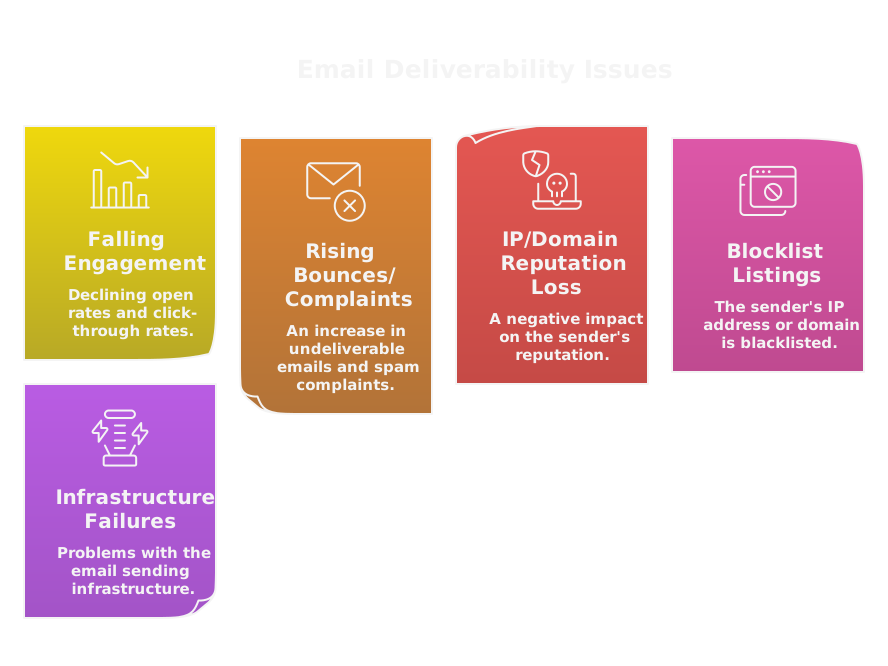
What Causes Sudden Delivery Drops?
Are Engagement Signals Falling?
Inboxes learn from recipient behavior, so a sudden fall in opens, clicks, or replies quickly reduces placement. If recent sends get fewer opens, providers assume recipients don't want your mail and route more messages to spam. Check rolling 7 and 30 day engagement cohorts, not just single campaigns. Look for list fatigue, repeated identical templates, or aggressive daily volume increases that dilute signal. AI made outbound cheap and scalable, which means providers now penalize low-signal senders faster, because volume no longer implies interest. Fixes: pause low-engagement segments, run a short re-engagement drip, prune inactive addresses, and vary creative and cadence.
How to use Clay for engagement monitoring: use Clay to enrich and segment contacts, then export engagement cohorts to your ESP or reporting stack. Clay can automate flags for stale records, so you keep only engaged prospects. Using this link gives you 3,000 free credits.
Are Bounce And Complaint Rates Rising?
Hard bounces, repeated soft bounces, and spam complaints are direct reputation killers. A single campaign with a high hard bounce percentage signals poor list hygiene. Complaints tell providers recipients want you out of their inbox, and rates above 0.1 to 0.3 percent draw attention. Run immediate checks: remove hard bounces, suppress repeated soft bounces, and reconcile complaints from feedback loops. Implement double opt-in where possible, clearly visible unsubscribe links, and a suppression list that never gets reintroduced. These simple controls stop small issues from becoming systemic.
Has IP Or Domain Reputation Dropped?
Reputation sits on IPs and sending domains, and either one can tank deliverability. Sudden reputation drops often follow a volume spike from an exposed list, a compromised account, or a rapid change in sending patterns. Check provider dashboards like Google Postmaster and Microsoft SNDS, and review sending history for sudden increases. If you use a shared IP, a neighbor’s behavior can pull you down. Consider moving to a dedicated IP after traffic stabilizes, but only after a proper warmup plan. Agencies like SalesCaptain exist to diagnose GTM stack problems, but the immediate priority is isolating the root cause, not just buying new infrastructure.
Are You On Any Blocklists?
Being listed on blocklists makes routing and reputation worse overnight. Some lists are automated and temporary, others are human curated. Query major lists and use seed testing to see where mail lands. If you find listings, follow the delisting process, but don’t treat it as a cure. Delisting without changing sending behavior guarantees a quick relist. Fix authentication, clean lists, throttle volume, then request removal.
Are There Temporary Infrastructure Failures?
Not all drops are about reputation. DNS outages, expired certificates, SMTP relay failures, or provider rate limits create temporary delivery failures that look like drops. Check your sending service status pages, DNS resolution, SPF/DKIM records, and bounce logs for 4xx temporary errors. Queue backlogs can exhaust retry windows, converting transient failures into permanent bounces. Treat deliverability as a GTM system, your workflows and infrastructure must include monitoring and automated alerts so transient problems never become long term.
How Do Spam Filters Block Emails?
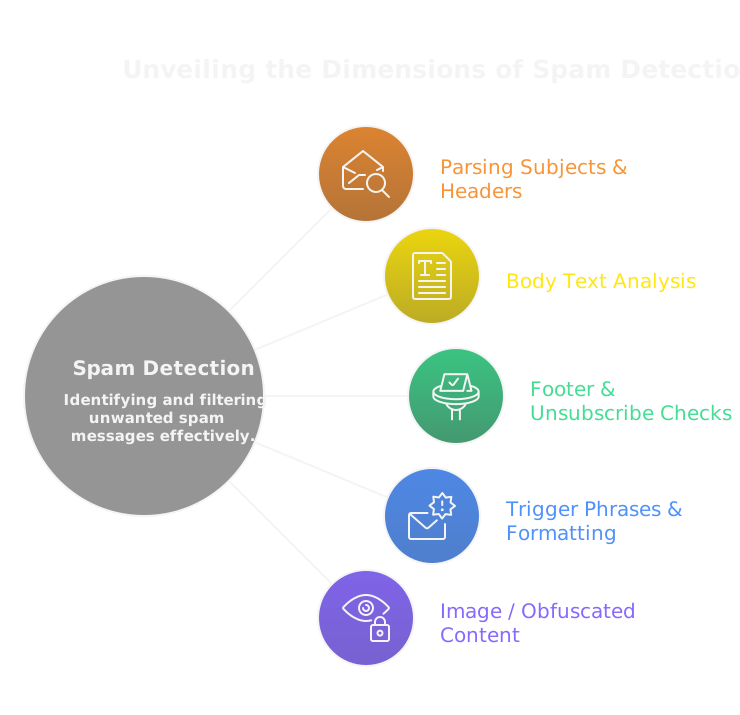
How Do Content Filters Score Messages?
Content filters parse subjects, headers, body text, and footers to generate a spam score. They look for trigger phrases, excessive capitalization, misleading subjects, missing unsubscribe details, and template signatures that match known spam. Image-only messages, hidden text, or obfuscated content raise suspicion. Scoring is contextual, so a phrase that’s safe in a transactional email can be risky in cold outreach. Test with seed accounts and subject line variations, reduce promotional language, and always include a clear, compliant footer.
How Does Engagement Based Filtering Work?
Engagement based filtering weights recipient actions heavily, because behavioral signals are harder to fake. Providers track opens, clicks, replies, time to open, moves out of spam, and deletions without opening. Low-engagement streams degrade placement fast, even if content looks clean. That’s why outbound is now a marketing motion, not just a sales tactic, and why segmentation matters. Tactics that work: segment by recent activity, reduce send volume to unengaged cohorts, and run focused re-engagement sequences that encourage replies rather than clicks.
Do Links And Domains Trigger Flags?
Links are attack surfaces. Shortened URLs, redirect chains, or domains with poor reputation trigger filters. Tracking domains that differ from your sending domain, or multiple disparate domains in one message, increase risk. If your links resolve through marketing redirectors or blacklisted CDNs, you’ll see worse placement. Use consistent, reputable link domains, minimize redirects, and align clickable domains with your sending domain to preserve trust.
How Do Attachments And Images Affect Scoring?
Attachments escalate risk, especially executable files, archives, and docs with macros, because those are common malware vectors. Large embedded images or image-only emails also harm scoring, since spammers use them to hide content. Host images on reputable CDNs, include a plain-text alternative, and prefer links to landing pages rather than attachments. If you must attach files, use widely accepted formats and explain the attachment in the body so filters and recipients see legitimate intent.
How Does List Quality Hurt Delivery?
Are You Sending To Purchased Contacts?
Purchased lists almost always contain stale, fake, or spam-trap addresses. Sending to them spikes hard bounces and complaints within a few campaigns, which mailbox providers interpret as intentional abuse. AI made outbound cheap, so the temptation to buy lists is higher, but cheap volume destroys long term placement. If acquisition speed matters, invest in verified enrichment and intent-driven sourcing rather than third party dumps, then baseline new cohorts with low-volume, high-signal sends.
Are Many Addresses Invalid Or Role Based?
Invalid addresses inflate bounce rates and trigger automated throttles. Role accounts, like info@ or sales@, often reject or filter cold outreach, and they never give the individual engagement signals filters prefer. Run address validation before import, suppress role addresses unless you have a relationship, and treat role-heavy segments as low-trust until they prove otherwise.
Are Inactive Subscribers Dragging Metrics Down?
Dormant records dilute open and reply rates, which degrades sender reputation faster than a handful of bounces. Instead of blasting everyone, segment by recent activity and treat re-engagement as a mini-campaign focused on replies, not clicks. If subscribers ignore a re-permission sequence, prune them. A smaller, engaged list beats a large, passive one for placement and pipeline efficiency.
Do You Lack Proper Consent Records?
Mailbox providers and regulators both treat lack of consent as a risk signal. If you can’t show when and how someone opted in, complaints and abuse reports carry more weight. Keep timestamped consent, source metadata, and the exact messaging used at signup. For outbound prospecting, document the sourcing workflow and evidence of business relevance. Treat consent records as part of your GTM infrastructure, not paperwork.
Why Do Email Authentication Fail?
Are SPF DKIM And DMARC Configured Correctly?
SPF needs the right include mechanisms and a concise record under 10 DNS lookups. DKIM requires valid selectors, matching private keys on your mail server, and consistent headers being signed. DMARC enforces alignment rules, so a passive policy will report problems while a reject policy will expose misconfigurations quickly. All three must align to give providers a clear trust signal.
Is Forwarding Or Third Party Sending Breaking Auth?
Traditional forwarding often breaks SPF because the forwarder’s IP is not in the original sender’s SPF. DKIM survives forwarding when headers stay intact, so relying on DKIM is important. Third party senders, marketing platforms, and CDNs must be explicitly authorized in SPF or configured to sign with your DKIM keys, otherwise DMARC will flag the mail. Treat vendor onboarding as a technical step, verify their ability to preserve or delegate authentication before you send.
Are Subdomains And Return Paths Misconfigured?
Many teams use subdomains for campaigns, but forget to align DKIM selectors and DMARC policies across parent and child domains. Return path domains used for bounces must be owned and authenticated, because filters inspect them for consistency. If return path points to a vendor domain without proper branding, providers may distrust the stream. Use predictable naming and document which subdomains serve which use cases.
How Do You Validate Authentication Quickly?
Start with DNS checks, confirm SPF, DKIM, and DMARC records resolve and contain expected values. Send test messages to seed accounts at Gmail, Outlook, and major ESPs and inspect authentication headers. Review DMARC aggregate reports for delivery failures and use forensic alerts for rejections. Automate daily checks into your monitoring stack so a single change in a vendor or DNS does not silently break auth. Fast validation is operational hygiene, part of GTM feedback loops.
Should You Use Dedicated Or Shared IPs?
When Does Dedicated IP Improve Results?
A dedicated IP helps when your sending volume is high enough to build a stable reputation, and when you can maintain consistent cadence and engagement. If your team sends predictable, well-segmented campaigns and monitors metrics closely, a dedicated IP isolates your reputation from noisy neighbors and lets you scale deliverability intentionally. It becomes a performance lever for technical GTM operators, not a shortcut for bad lists.
When Is Shared IP Safer?
Shared IPs are safer for low or variable volume senders because reputation is pooled across multiple customers. If you don’t have the traffic to warm an IP or the discipline to protect it, shared IPs absorb early volatility. For many small outbound programs, the shared model reduces operational risk while you build processes and data signals that justify a dedicated IP later.
How Do You Warm Up A New IP?
Start very small, send only to your most engaged recipients, and ramp volume incrementally over weeks. Prioritize replies and opens over clicks, use identical authentication and templates you’ll run once at scale, and keep cadence predictable. Monitor bounces and complaints after each ramp step, and pause if engagement drops. Warming is not arbitrary, it’s a controlled experiment that creates positive behavioral signals.
How Do You Monitor IP Reputation?
Track provider dashboards like Google Postmaster and Microsoft SNDS, inspect bounce and complaint trends, and seed-test across major inboxes to map placement. Supplement with reputation services and blocklist checks, but put more weight on engagement metrics and delivery logs for your actual streams. Build alerting into your GTM system so reputation regressions trigger throttles, list audits, or warmup pauses. Reputation monitoring is continuous, the same way pipeline health is continuous.
How Do Sending Platforms Affect Delivery?
What Risks Come From Platform Migrations?
Moving ESPs or SMTP relays resets a lot of implicit signals providers use to judge you. New IPs lack reputation, DKIM selectors can change, and your bounce handling or suppression lists may not map cleanly, which together trigger immediate throttles and higher bounce conversion. Migrations often introduce subtle header changes, different Return-Path domains, or new link domains, all of which filters notice. Plan migrations as a staged experiment: run dual sends, warm the new IPs with your most engaged cohorts, reconcile suppression lists and complaint histories, and validate SPF/DKIM/DMARC before full cutover. Treat a migration like a GTM release, with rollback criteria and monitoring baked into the workflow.
Are Throttles And Rate Limits In Play?
Every provider enforces throughput limits, per-connection caps, and recipient-domain pacing, and hitting those limits causes deferrals not hard bounces. Deferrals pile up in queues, retry windows expire, and transient failures turn permanent. Throttles are domain specific, so you may see normal delivery to Gmail and heavy deferrals to Outlook at the same time. Implement per-destination rate controls, backoff strategies for 4xx responses, and priority routing for engaged recipients. Rate limits aren’t just technical friction, they’re reputation signals, so automated scaling without pacing invites deliverability drops.
Do Third Party Integrations Break Delivery?
CRMs, link trackers, analytics pixels, and enrichment scripts change message surfaces. They can alter From addresses, insert redirect links, add tracking domains, or break DKIM signatures by modifying headers. Any integration that adds a new domain to the email path is a potential red flag. Audit vendors before onboarding, require DKIM signing or SPF authorization for every relay, and map exactly which subdomain each vendor will use for return-paths and links. Treat vendor configuration as part of your GTM stack, not an afterthought.
How Should You Configure Your MTA?
Configure the MTA to present consistent, authenticated, and observable signals. Use a stable HELO/EHLO hostname that matches reverse DNS, enable TLS and strong cipher suites, publish precise PTR records, and keep SMTP banners clean. Set sensible concurrency and retry policies, implement SRS for forwarded mail, and ensure proper DSN handling so bounces don’t loop back to your main sending domain. Expose granular logs, monitor 4xx/5xx trends, and automate alerts tied to reputational thresholds. Your MTA is part of the GTM infrastructure, so treat it like an ops system with tests, knobs, and rollback paths.
Why Does Outlook Mark Emails Junk?
How Does Microsoft SmartScreen Work?
SmartScreen blends network reputation, historical engagement, URL reputation, and machine learning to decide placement. It looks at IP and domain histories, complaint and bounce patterns, recipient interaction, and whether links resolve to suspicious destinations. Client-side junk filters add another layer, using heuristics from message headers and content. Because Microsoft has wide visibility across Office 365 and Outlook clients, a single stream with poor signals is penalized quickly. Fixes must address both technical trust and recipient behavior.
What Triggers Office 365 Throttling?
Office 365 throttles for rapid volume spikes, high bounce or complaint rates, excessive recipients per message, and unusual concurrency from a mailbox. Authentication failures, pattern anomalies like sudden header or domain changes, and traffic resembling automated scraping also trigger throttles. Microsoft treats anomalous accounts as potential abuse vectors and constrains them before reputation is irrevocably damaged. Prevent throttling by pacing sends, keeping per-account volumes stable, and fixing authentication errors immediately.
How Do You Improve Inboxing For Outlook?
Start with airtight authentication, alignment, and a consistent sending identity. Warm IPs and domains into Outlook with small, highly engaged cohorts, then scale slowly. Remove high-risk links and shortened URLs, keep unsubscribe and contact info clear, and favor reply-focused sequences over click-bait. Monitor SNDS and Exchange Online Protection telemetry, run seed tests to watch placement, and react to any uptick in deferrals or complaints by pausing and pruning. Encourage replies and moves to folders, those signals matter a lot. Operationalize these steps inside your GTM system so technical operators can iterate fast.
How Do Content And Cadence Affect Inboxing?
Do Subject Lines And Preview Text Help?
Yes, subject lines and preview text are frontline signals for both humans and filters. A relevant, honest subject and supportive preview text increase opens and reduce spam complaints. Avoid spammy words, excessive punctuation, fake urgency, and all caps. Use preview text to add context or a call to reply, not to repeat the subject verbatim. Test variations, but prioritize subject lines that generate replies or quick engagement, because behavioral signals drive placement more than clever copy.
Is Your HTML And Plain Text Balanced?
Filters expect a faithful plain-text alternative that mirrors the HTML. Image-only messages, heavy base64 embedding, or mismatched content look suspicious. Keep HTML simple, valid, and accessible, host images on reputable CDNs, and include alt text. Limit external trackers and ensure MIME boundaries are correct. A clean two-part message reduces parsing errors and lowers the chance a filter treats your email as obfuscated or malicious.
Are You Sending With Predictable Patterns?
Consistency beats randomness. Predictable cadence and volume help mailbox providers learn healthy behavior, so sudden bursts, multiple identical sends across accounts, or daily spikes will raise flags. Automate cadence but introduce realistic variability that mimics human outreach when appropriate. For outbound at scale, use controlled ramping, per-domain pacing, and cohort-based scheduling to keep patterns steady and signals positive.
Are You Personalizing And Segmenting Properly?
Personalization should signal relevance, not be a glib token swap. Use firmographic and behavioral data to craft messages that invite replies, reference context, and respect the recipient’s relationship stage. Segment by recent activity, source, and intent signals to avoid blasting cold contacts with broad promos. AI can personalize at scale, but quality control and human review must catch awkward merges or irrelevant tokens. Proper segmentation reduces complaints, increases engagement, and protects your sending reputation.
How To Monitor Deliverability Proactively?
Should You Run Seed Inbox Tests?
Yes. Seed tests give an objective view of placement across providers and clients, which raw delivery logs do not. Build a seed pool that mirrors your target domains, providers, and geographic mix, then include brand, free, and corporate mailboxes. Run tests after every template change, IP move, or authentication update, and on a rolling schedule for steady-state monitoring. Interpret results by cohort, not single addresses, because occasional placement variance is normal. Use seeds to validate fixes and to detect slow degradation before complaint or bounce rates spike.
How Do Real Time Alerts Work?
Real time alerts translate delivery signals into action. Feed bounce spikes, complaint surges, sudden drop in inbox placement, and DMARC reject counts into your alerting system. Set thresholds that matter operationally, for example a 3x increase in hard bounces over baseline, or inbox placement falling below 85 percent for a major provider. Route alerts to engineering and GTM ops channels, include recent sample headers and timestamps, and require a triage owner. Alerts are not noise if they contain context and a next step.
What Should Feedback Loop Monitoring Show?
Feedback loops show who complained, when, and under which campaign. Map complaints back to campaign IDs, recipient cohort, and source of acquisition. Monitor complaint velocity, repeat complainants, and whether complaints cluster by template or IP. Use FBLs to update suppression lists immediately and to identify problematic segments or creative. Treat FBLs as a control in your GTM feedback loop, the same way you treat conversion telemetry for paid channels.
Which Tools Should You Use?
Start with platform-native telemetry, then add specialized deliverability tooling and alerting.
- First, use Google Postmaster and Microsoft SNDS for provider-level signals, they show spam rates, authentication status, and volume trends.
- Use DMARC aggregate and forensic reports to catch alignment failures and unauthorized senders.
- For inbox placement and seed testing use services like GlockApps, InboxReady, and Mail-Tester to map inbox vs spam across providers.
- Check blocklists and DNS health with MXToolbox and Talos.
- For reputation scores, consult Validity SenderScore and provider dashboards, but treat them as one input among many.
- Tie everything into your ops stack with Datadog, PagerDuty, or simple Slack alerts so technical operators can act fast.
How to use Clay for seed testing and segmentation
Clay can enrich and segment prospects into cohorts that mirror real sending mixes, then export those cohorts to seed-test providers or your ESP. Use Clay to automate flags for stale records and to maintain a rotating seed list that matches your prospect composition. Using this link gives you 3,000 free credits: https://clay.com/?via=salescaptain
Pick tools that fit your team. Outbound is now a marketing motion, and monitoring must live with your GTM system, not in a silo.
Which Metrics Should You Track?
Is Inbox Placement Different From Delivery Rate?
Yes. Delivery rate measures acceptance at the receiving MTA, who returned 2xx or accepted the message. Inbox placement measures where that accepted mail landed, inbox or spam, and requires seed testing or provider telemetry to measure. You can have a high delivery rate but poor inbox placement, which looks healthy in logs but fails at driving engagement. Track both, and prioritize inbox placement for business outcomes.
What Bounce Types Matter Most?
Hard bounces matter most, because they permanently damage reputation and indicate invalid addresses or spam traps. Repeated soft bounces are the next biggest risk, they show transient delivery problems that can convert to hard bounces if retries exhaust. Pay attention to 5xx SMTP codes for permanent failures, 4xx patterns that persist beyond retry windows, and specific domain responses like recipient policies or throttling notices. Role account bounces and spam trap hits deserve immediate suppression and investigation.
What Is A Healthy Complaint Rate?
Aim for a complaint rate under 0.1 percent for scalable programs. Between 0.1 and 0.3 percent is a warning zone, you must prune lists and rework messaging. Above 0.3 percent is dangerous, expect throttles and placement hits. Use absolute counts and complaint velocity, not only percentage, because a small list can spike quickly. If you cross thresholds, pause segments and run a re-permission sequence before continuing.
Which Engagement Metrics Predict Inboxing?
Reply rate and move-to-inbox actions predict inboxing most strongly. Opens and clicks help, but they are noisier and subject to proxying by providers. Time-to-open and repeat interaction over weeks show sustained interest. Also watch low delete-without-open rates and low read timeouts. For outbound, prioritize replies and conversational signals, because providers weight those behaviors more than passive clicks.
Should You Track Sender Reputation Scores?
Track them, but do not treat them as the single truth. Scores from Google Postmaster, Microsoft SNDS, and third-party services like SenderScore provide useful context, but they lag and can be opaque. Use scores as diagnostics when correlated with bounces, complaints, and placement. If scores fall, use them to prioritize investigation, not as the final verdict.
How To Recover From A Deliverability Drop?
What Are Immediate Triage Steps?
Stop the bleeding fast. Pause or throttle suspect campaigns, isolate the impacted IPs or sending domains, and run seed tests to verify placement. Check SPF, DKIM, and DMARC, inspect bounce logs for error codes, and review complaint feeds. Identify whether the root is list hygiene, auth failure, content, or infrastructure. Assign a single incident owner and an SLA for the first remediation actions, then escalate if the metrics don't improve within the window.
When Should You Pause Sending Or Suppress Lists?
Pause or suppress when you see rapid increases in hard bounces, complaints beyond threshold, DMARC rejections, or blocklist listings. Prefer targeted suppression over blanket shutdown, pause the cohorts causing the issues, for example recent imports or low-engagement segments. If core authentication or infrastructure is broken, pause all streams until fixed. A controlled pause is better than burning reputation trying to prove a point.
How Do You Fix Authentication And Infrastructure?
Validate DNS records first, confirm SPF includes and permutation limits, rotate and test DKIM keys, and push a working DMARC policy with reporting enabled. Check PTR records, HELO/EHLO hostnames, and TLS configuration on the MTA. If using vendors, ensure they sign with your domain or are authorized in SPF. After fixes, send small, engaged batches to rebuild positive signals and monitor telemetry closely.
How Should You Reengage Subscribers Safely?
Reengage in small, staged waves starting with highest-engagement cohorts. Use plain text, reply-focused messages that ask for a one-line confirmation or opt-out. Limit initial volume and ramp only when opens and replies are strong. Avoid promotional blasts during reengagement, and run a re-permission campaign that only promotes active consent. If recipients don't respond after the sequence, prune them; a smaller, engaged list is safer than a large unresponsive one.
When Should You Escalate To ISP Support?
Escalate when placement remains poor after you have: fixed auth, pruned bad addresses, paused offending cohorts, and run seed tests that confirm the issue. Also escalate for persistent 550 rejections with no clear cause, or when a major provider lists you and delisting steps require documentation. When opening a case, provide timestamps, sample headers, sending IPs, campaign IDs, seed test results, and DMARC aggregates. ISP support can help unblock a stream, but they rarely remove systemic penalties caused by bad sending behavior.
What Common Mistakes Kill Delivery?
Why Is Buying Lists Dangerous?
Purchased lists often contain stale addresses, spam traps, and recycled inboxes that turn into hard bounces and complaints within a few sends. Mailbox providers learn fast, they see the sudden surge of bounces and complaints and throttle or demote your streams. Short-term volume gain becomes long-term reputation debt. If acquisition speed matters, build intent-driven sourcing, verify addresses before import, and run small, low-volume tests to validate a new cohort before you scale.
How Does Ignoring Reengagement Harm Metrics?
Keeping dormant records dilutes open and reply rates, which are the signals providers use to decide placement. If you never run re-permission or reply-focused sequences, your engagement curve trends down and filters treat you like noise. Reengagement must be staged, not broadcast. Start with highest-engagement slices, use plain-text ask-to-reply messages, then prune nonresponders. That maintains a smaller list that actually moves the inboxing needle.
Why Does Over Sending Backfire?
High cadence to marginally interested contacts converts to deletions, spam reports, and moves to junk, all of which lower your sender reputation. Sending more often is not the same as sending more effectively. Pace outreach by cohort, prioritize sequences that elicit replies, and throttle total sends per domain and per recipient. When AI makes outbound cheap, volume without intent is a fast path to a drop.
How Does Neglecting Monitoring Cause Drops?
Without continuous monitoring, small problems compound until placement breaks. Missed SPF changes, a spike in soft bounces, or a vendor misconfiguration can silently erode trust. Monitoring needs thresholds, ownership, and actionable alerts, not only dashboards. Tie alerts to playbook actions so the first person who sees a metric knows exactly what to do, who to call, and when to pause sending.
How To Prevent Future Drops?
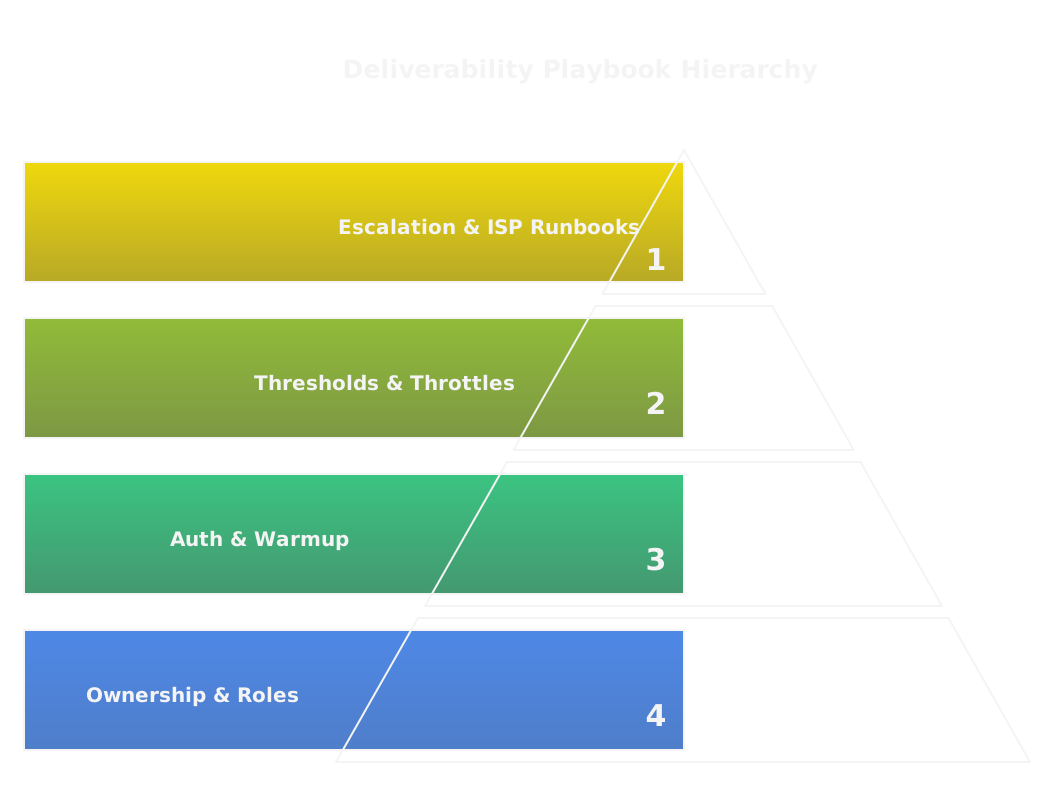
How Do You Build A Deliverability Playbook?
Document the who, what, and when for every threat and routine operation. Include:
- Ownership for IPs, domains, and vendor configs.
- Authentication checklists, warmup plans, and migration runbooks.
- Thresholds for bounces, complaints, and placement that trigger throttles or pauses.
- Escalation steps for ISP cases, what data to collect, and SLA expectations.
Treat the playbook as living GTM infrastructure, versioned and reviewed after incidents.
What Should A Weekly Monitoring Checklist Include?
Keep it short and signal-driven:
- Inbox placement by provider, from seed tests.
- Hard and soft bounce counts, compared to baseline.
- Complaint velocity and top complaint templates.
- SPF/DKIM/DMARC resolution and DMARC aggregate report spikes.
- Blocklist checks for your sending IPs and domains.
- Any unusual 4xx/5xx SMTP codes.
If any item deviates, run the playbook triage and assign an owner immediately.
How Do You Onboard New IPs And Domains?
Onboarding is a staged experiment, not a flip of a switch:
- Start with authentication and DNS verification, then one small engaged cohort.
- Follow a warmup ramp that prioritizes replies and low-volume steady cadence.
- Run seed tests after each increase, monitor ISP telemetry, and hold cadence if engagement drops.
- Document every step and the performance signals that justify the next volume increase.
Never move to production until you have stable positive signals from multiple providers.
Who Should Own Deliverability Governance?
Deliverability is cross-functional, but it needs a single operational owner. That person coordinates engineering, GTM ops, and vendor relationships, enforces the playbook, and runs weeklies on signals. For organizations where outbound is a marketing motion, the owner often sits in GTM operations or a technical marketing role, not in sales alone. Agencies can advise, but internal governance must own the keys and the accounts.
FAQs


RELATED ARTICLES
Lorem ipsum dolor sit amet, consectetuer adipiscing elit, sed diam nonummy nibh euismod tincidunt ut laoreet dolore magna aliquam erat volutpat.
.png)


