Why Great Outbound Campaigns Still Lose Revenue After the Lead Replies

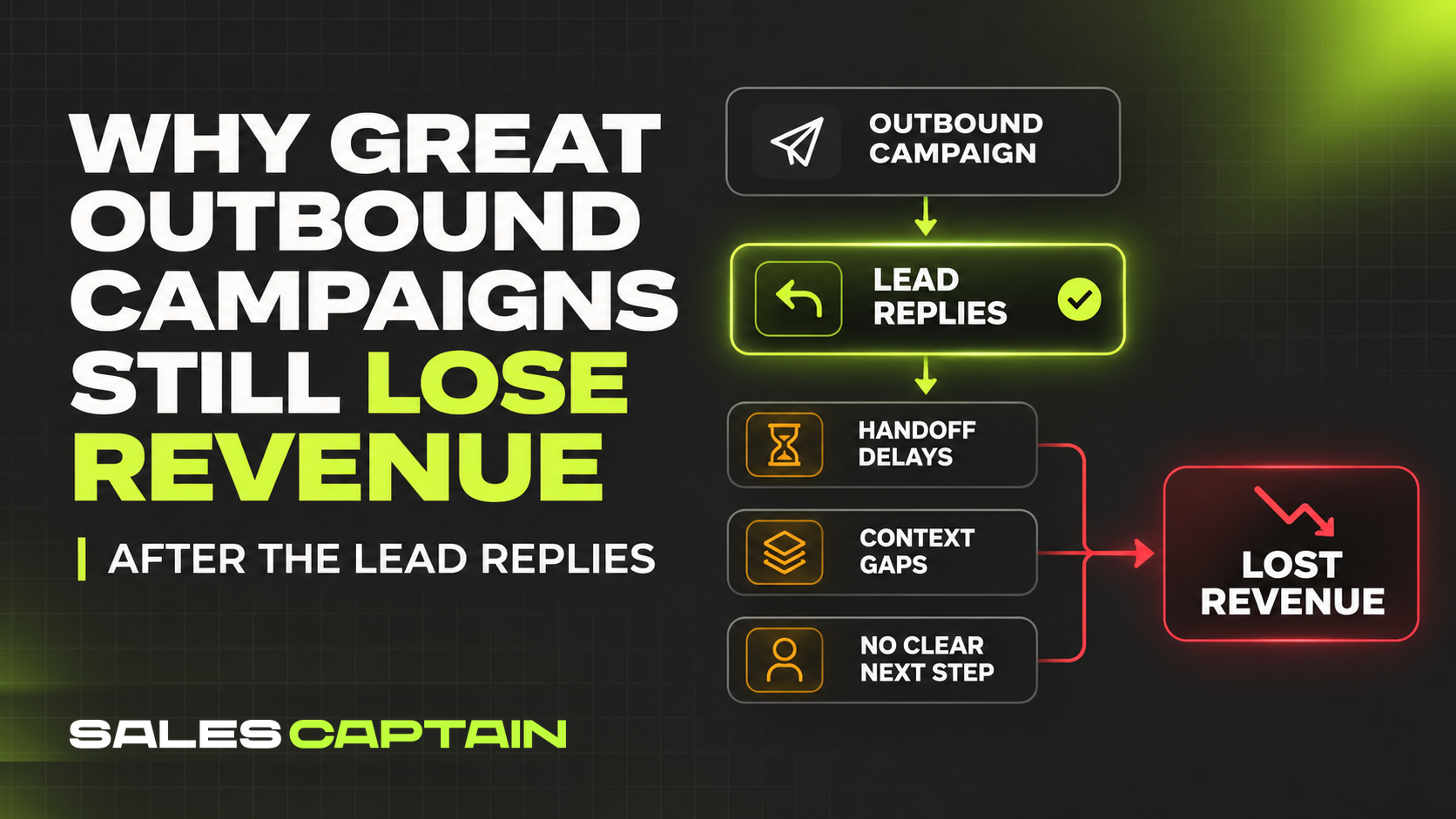

Getting a positive reply from an outbound campaign is only the beginning. If nobody takes ownership, responds quickly, or records the conversation in the CRM, that interest can disappear before it becomes a qualified opportunity.
In reality, a positive reply might never turn into a booked meeting, with a lead sitting in the CRM system until a manager accidentally stumbles upon it, only to realize that the precious time when the prospect was most interested has been lost.
Even though you pay for contact databases and tools that you use for outbound campaigns, a positive reply that waits a day without an owner is still counted as a win in the report. But if it goes cold, you've spent all your effort for nothing.
That's why many outbound teams start adopting a performance-marketing mindset.
The good news is that with lead routing rules set up in advance, your team can reach warm B2B leads faster and better understand their needs. Every reply gets an owner on arrival, a rep who reads the full thread and answers.
Who Picks Up the Reply
Imagine a reply to an outbound campaign. It lands in the sequencing tool's inbox when the prospect's company account in the CRM is assigned to a different rep. The initial agent who sent the first email assumes the account executive (AE, the rep who runs meetings and closes deals) will take it from here. The AE finds out when the rep remembers to log it, and the prospect waits the whole time.
If that rep spends the day on calls, the reply can sit in the inbox until the next morning. Nobody else on the team knows it arrived since the CRM looks untouched. That's why more and more businesses adopt lead distribution software with advanced routing.
In many teams, the rules for distributing outbound campaign replies were never written down, and everyone acts on whatever seems logical. When a team is small, one or two people, and leads are few (a handful per week or even per month), the work often gets done manually. Once the number of prospects or reps grows, manual handling stops keeping up.
Lead routing automates distribution and reduces human error. Say an employee of a company your colleague is already negotiating with replies, and it is unclear who should write back. Or an auto-reply arrives saying "back on the 20th," and someone has to remember that email on exactly the twentieth. When nobody decides these edge cases in advance, the reply goes to whoever saw it first. If nobody noticed, it remains in the system with no response.
To test your lead routing, take the ten most recent positive replies to your outbound campaign and find out who owned each one during the first hour. If it takes more than a minute per reply to find that out, you effectively have no rules.
How Long the Prospect Waits
The clock on a reply starts the moment the prospect clicks Send. If you decide to do routing manually, the team learns about the lead later. Each step may take minutes or hours, and together they add up to an unplanned delay.
- Sorting. Replies arrive in one stream, and lead qualification starts only when a person flags a reply as positive. Until then, it looks like one more row in the feed.
- Inbox check. If the rep opens the inbox twice a day, a gap of several hours is already in the schedule. Nobody logs when the email was read, so the gap doesn't show up in any report.
- Time zones and weekends. A reply sent at 6:40 p.m. on a Friday, prospect's local time, may wait for the team until Monday.
To answer outbound campaign replies faster, set an SLA (service level agreement), a deadline for each reply type, and let lead routing software track it.
Each team picks defined deadlines to fit its deal cycle:
- Positive reply: the fastest response.
- Question about price and terms: a little longer.
- Out of office message: the return date logged.
First, automate sorting. Pick a few reply types and write down a response due date and an owning role for each.
Replies That Never Reach the CRM
Replies to an outbound campaign arrive in the marketing automation tool, the program that sends the automated email series. The CRM is a separate program, and a reply reaches a contact's card there only if an integration copies it over.
Four things can break in the sync, and each one has a setup that prevents it:
- The reply creates no record. When the sequencing tool isn't connected to the CRM, a reply stays in the tool's inbox, and the CRM has no record of it. Before launch, send a test reply and look for the card in the CRM.
- One person shows up twice. The same prospect can enter the system from a contact database and from LinkedIn, and the CRM ends up with two cards for the same outbound campaign reply. Matching records by email address before a new card is created keeps it to one. Lead distribution software then assigns that card to a single owner by pre-defined routing rules.
- Statuses don't match. The sequencing tool marks a lead as replied, and the CRM sorts deals into stages (new, qualified, and meeting booked). Write rules so a platform automatically gives a correct status.
- The reply text never reaches the card. If the integration passes only the status, the card shows that a prospect replied. Ensure the platform copies conversations so it can analyze them and pass insights to other reps if needed.
When the card lacks the reply, the next rep has to ask again, and the prospect repeats the same information several times. With the text in the card, the call can start from the prospect's own words, helping reps avoid unnecessary questions and move the conversation forward.
When a Closed Deal Loses Its Source
CRM attribution can become unreliable when new interactions overwrite the original lead source. For example, if a prospect initially responds to an outbound email but later fills out a website form to schedule a demo, the CRM may attribute the conversion to the website rather than the outbound campaign.
Outbound teams can prevent this by capturing the original campaign or sequence ID when a prospect enters an outbound sequence and preserving it throughout the sales cycle. That identifier should remain connected to the contact and any resulting deal, even when the prospect interacts with other marketing channels.
This makes it possible to trace closed deals back to the outbound campaigns that initiated the conversations, rather than relying solely on the latest recorded interaction.
Conclusion: Where to Start with an Outbound Campaign Audit
Open the CRM cards of the last few positive replies and check five things on each:
- who answered the reply
- how long after it arrived the answer was sent
- whether the reply text is in the card's history
- whether the deal carries the sequence ID
- what the source field shows now
If nobody can say who answered a reply, start with lead routing. A response deadline needs a named owner to apply to. Next, add deadlines for each reply type, and make the time a lead has been waiting visible to the whole team.
The other three checks are fixed in the CRM settings. The integration copies the reply text into the card, and the sequence ID is captured when the prospect enters the campaign and carried into any resulting deal. The original source should be preserved in a dedicated field that isn't overwritten by subsequent interactions.
After the fixes, an outbound campaign report can carry additional columns next to replies and booked meetings: closed-won deals and revenue per sequence. The same five checks on a fresh batch of positive replies show whether the changes work. Revenue from outbound leads should then stay attached to the sequence that started the conversation.


RELATED ARTICLES
Lorem ipsum dolor sit amet, consectetuer adipiscing elit, sed diam nonummy nibh euismod tincidunt ut laoreet dolore magna aliquam erat volutpat.