How To Improve Show Up Rate: Proven Strategies To Boost Attendance


On Monday you open the team dashboard expecting to see the pipeline you booked last week, only to find half the meetings marked no-show or rescheduled and your forecast looks optimistic for the wrong reason. You assumed booked equals real conversations, but the hidden problem is that scheduling UX, inconsistent reschedule rules, weak confirmations, and poor tracking turn booked slots into phantom pipeline and higher cost per opportunity. After reading this piece you'll know exactly how to calculate a consistent show up rate, realistic benchmarks by channel, how attendance affects forecasts and cost math, what meeting metadata to capture to link invites to closed deals, and which scheduling and reminder fixes actually move attended-per-booked. Use the checklists and playbook guidance here to stop treating booked slots as wins and start running meetings that actually drive pipeline.
What Is A Show Up Rate?
How Do You Calculate It?
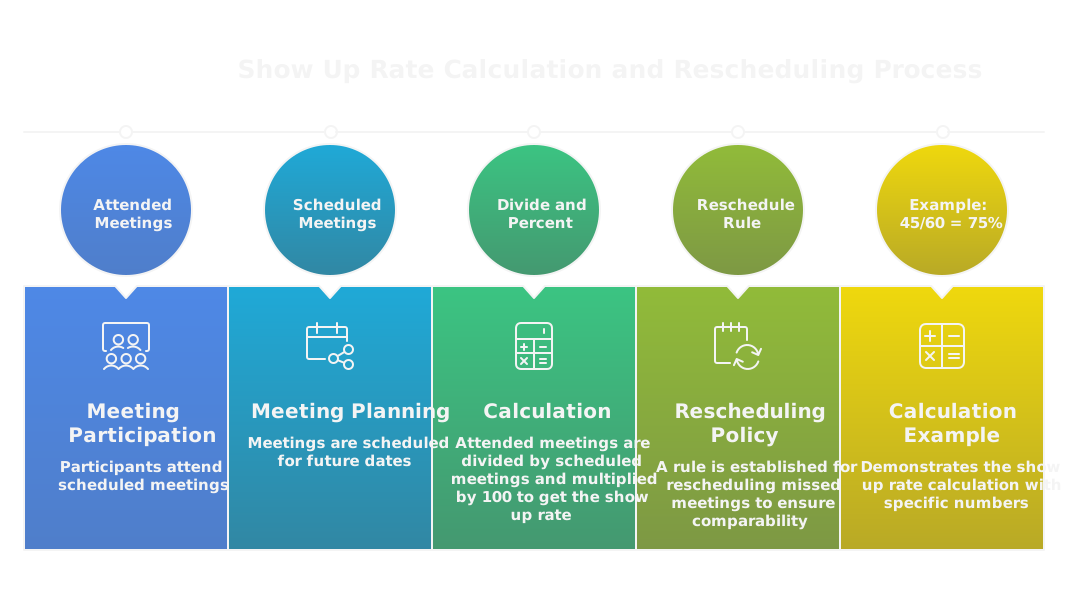
Show up rate = attended meetings divided by scheduled meetings, expressed as a percentage. Decide what counts as a "scheduled meeting" for your org, include only confirmed invites, and exclude obvious duplicates or internal test bookings. Treat reschedules consistently, either as the original booking or as a new one, so your metric stays comparable over time. Example: 45 attended of 60 scheduled = 75% show up rate.
What Is A Good Show Up Rate Benchmark?
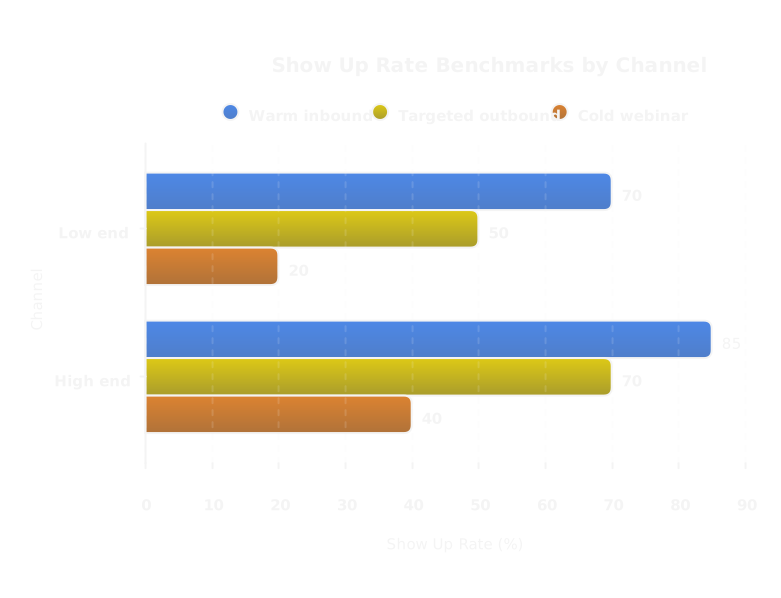
Benchmarks depend on channel and meeting type. Reasonable targets:
- Warm inbound demo or discovery: 70 to 85%
- Outbound meetings from targeted outreach: 50 to 70%
- Cold webinar attendance: 20 to 40%
Hit the high end only if your qualification, calendar UX, and confirmation sequence are tight. Use these as directional goals, then segment by persona, industry, and rep to set realistic targets per cohort.
How Is It Different From Close Rate?
Show up rate measures attendance, close rate measures closed deals divided by opportunities or meetings. Show up is a leading indicator, close rate is an outcome metric. Improving show up increases the number of actual conversations, which can increase total closed deals even if per-meeting close rate stays the same. But higher show up alone won’t lift win rates if meeting quality is poor. Track both, and watch lead quality and agenda clarity when show up climbs but close rate stalls.
Why Do Show Rates Matter For Revenue?
How Do Show Rates Affect Sales Forecasts?
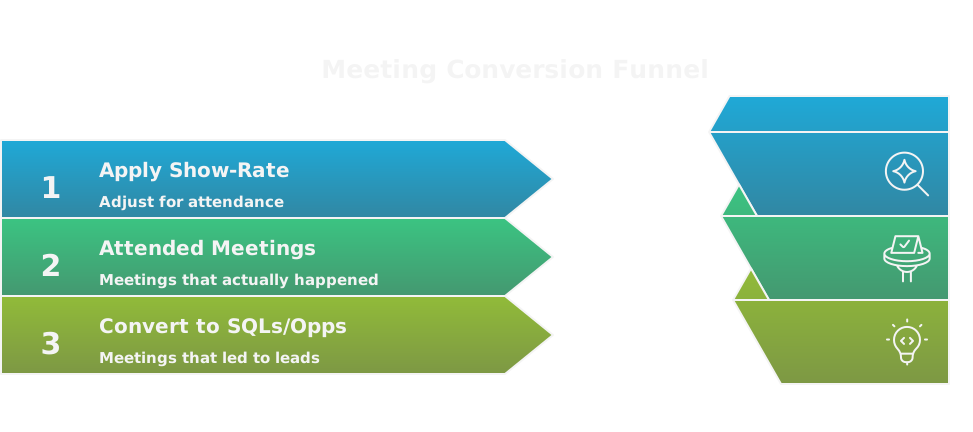
Show rates change pipeline visibility and forecast reliability. Low show rates create phantom pipeline, optimistic numbers that never convert. When you model forecasts, apply a show-rate multiplier to scheduled meetings before extrapolating to SQLs and opportunities. Recalibrate weekly, and bake show-rate trends into your velocity assumptions so forecasts reflect actual meeting yield, not wishful booked counts.
How Do They Change Cost Per Opportunity?
Cost per opportunity rises when show rates fall. If it costs $200 to generate a booked meeting and only half show up, effective cost per attended meeting doubles. AI and automation have driven outreach costs down, so marginal acquisition cost can be low, but wasted touches still eat gross margin and rep time. Track cost per attended meeting and cost per closed deal, not just cost per booked slot.
How To Link Attendance To Closed Deals?
You need deterministic tracking from invite to deal. Steps that work:
- Standardize meeting types and populate a meeting outcome field in your CRM right after the call.
- Ensure each meeting has a unique ID, link that ID to the contact and opportunity, and capture source and campaign metadata.
- Run cohort analysis, tracking attended meetings through to opportunities and wins within a defined attribution window.
- Use lift testing, for example A/B different reminder cadences, to prove causality, not correlation.
How to use Clay for meeting-to-deal tracking
- Use Clay to enrich contact records, fill missing firmographic fields, and generate consistent meeting metadata that syncs to your CRM.
- Automate reminders and sequence triggers from Clay, then tag which reminders correlate with attended meetings.
- Clay link, with this referral, gives you 3,000 free credits and speeds up enrichment and syncs so your meeting data is cleaner for attribution.
If you outsource outbound, ask your partner for the meeting metadata feed. Agencies like SalesCaptain can act as GTM accelerators, they should hand you clean meeting-to-deal telemetry, not just booked counts.
What Causes No-Shows?
Do Prospects Simply Forget?
Sometimes yes, but forgetting is often a symptom. Overloaded inboxes, vague subject lines, and unclear stakes let invites slip. Fixes that work: short confirmation emails, calendar attachments, SMS or Slack reminders where appropriate, and a one-sentence agenda in every invite. Remind at 48 hours, 4 hours, and 30 minutes for higher impact.
Is The Scheduling Experience Frustrating?
Clunky booking flows kill conversion. Long forms, unclear availability, forced account creation, and timezone confusion all raise friction. Offer single-click scheduling, show rep availability in local time, let prospects reschedule without email tennis, and keep the booking UX mobile friendly. Treat scheduling as marketing, because outbound now lives inside your marketing motion, not just sales.
Are Prospects Unqualified Or Unengaged?
Bad targeting produces high no-show rates. If your outreach is generic or the value proposition is unclear, prospects book out of curiosity and bail later. Qualify earlier with a one-question form, be explicit about who benefits from the meeting, and use intent signals or enrichment to prioritize high-signal accounts. AI makes outbound cheap and signal-driven, so build targeting rules that prioritize likely attendees.
Do Timezone And Tech Issues Create Barriers?
Yes. Timezone confusion, calendar integration failures, and flaky meeting links all drive no-shows. Display timezone on the booking page, include dial-in options, send a test link, and avoid niche meeting platforms that block corporate networks. Tech fixes are small, and they compound across volume. Remember, SDR tasks are getting automated, so GTM needs technical operators to stitch these systems together and keep meeting tech reliable.
How To Improve Scheduling Experience?
Should You Let Prospects Self-Select Times?
Yes, in most cases. Self-selection removes friction and reduces back-and-forth, which directly raises conversion from interest to confirmed meeting. But don’t give every time slot. Expose only times that match the rep’s true working hours, include short buffers before and after meetings, and show availability in the prospect’s local time. If you run high-volume outbound, combine self-selection with lightweight qualification questions so low-fit prospects don’t waste slots. Treat the booking page like a landing page, test different layouts, and measure booked-to-attended conversion, not just booked counts.
How Far Out Should You Schedule Meetings?
Match the window to intent and complexity. For discovery calls, 2 to 10 business days out hits the sweet spot, giving prospects time to prepare while keeping momentum. For demos or technical sessions that need prep, allow 1 to 3 weeks. For executive briefings, schedule further but ask for availability windows first. Always offer an earlier slot labeled as “first available” to capture prospects who want to move fast. Track no-show rates by lead source and adjust windows per cohort.
How To Automatically Handle Timezones And Conflicts?
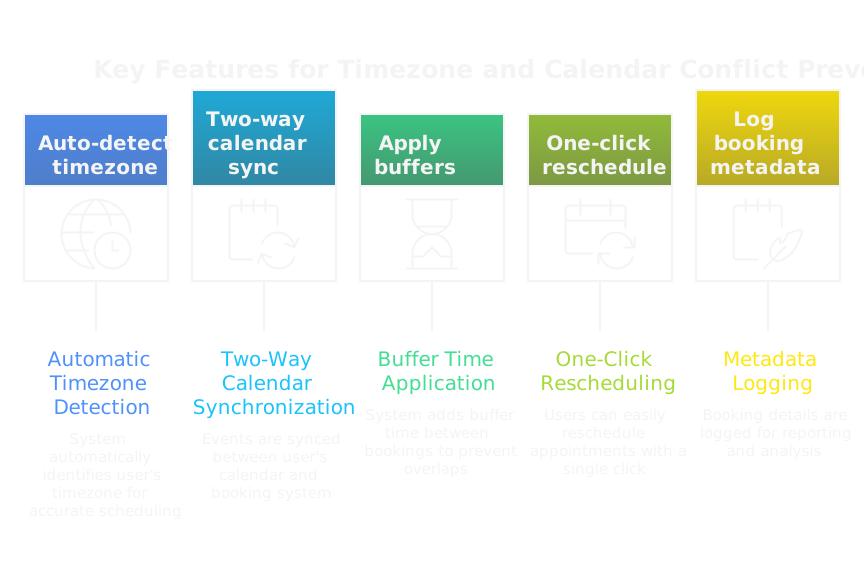
Auto-detect the prospect’s timezone on the booking page and display times in that zone. Sync two-way with calendar APIs so the booking system sees freebusy data, rejects conflicts, and applies buffers automatically. Offer a one-click reschedule link in confirmations that updates both calendars. Log timezone and booking metadata in your CRM so reporting and follow-ups use the correct local time. Technical note, this requires a real-time calendar sync layer and conflict rules, which is where engineering or a technical operator on your GTM team pays off.
Should You Offer Multiple Meeting Lengths And Formats?
Yes, but keep choices intentional. Offer 15-minute options for qualification, 30-minute for standard discovery, and 60-minute for in-depth demos. Include format toggles, video or phone, and a virtual dial-in fallback for corporate firewall issues. Too many options create decision paralysis, so default to the most common length and hide advanced options behind a small link. Map length to outcome: if the booking page promises a checklist review, make that explicit and pick the slot length that fits.
How To Use Reminders Effectively?
When Should You Send Reminders?
Anchor reminders to the prospect’s local time and meeting type. Typical pattern for 1:1s: immediate confirmation, 24 hours before, 1 hour before, and 10 to 15 minutes before. For longer or higher-value sessions add a 48-hour prep reminder with materials. For webinars or group events, send three reminders: one week, one day, and one hour prior. Measure attendance lift per reminder and prune any message that shows diminishing returns.
Which Channels Deliver Best Results?
Email and calendar invite are table stakes. SMS and mobile push have the highest open rates and the best attendance lift for B2B when phone numbers are available. LinkedIn direct messages can nudge executive prospects, and Slack or Microsoft Teams works well for in-company contacts. Choose channels based on the contact’s context and consent. If you use automation to send SMS, always include the rep’s name and a clear opt-out.
How Many Reminders Are Helpful Versus Annoying?
For 1:1 sales meetings, three reminders is a reasonable max: 24 hours, 1 hour, and 10 minutes. For short discovery calls you can drop the 24-hour if the booking was made same-day. For webinars, three reminders are fine because the event is public and preparation matters. Stop automated reminders after the meeting starts if the prospect responds or reschedules. If someone repeatedly ignores reminders, mark the lead for different treatment rather than increasing frequency.
How To Personalize Reminder Content For Higher Attendance?
Personalize with facts that prove relevance. Reference the prospect’s company, the problem you’ll address, the promised outcome, and the rep’s name and phone. Include a short, specific agenda line and a one-click reschedule link. When possible add a tiny prompt like, “Bring your current X spreadsheet if you want a faster diagnosis.” Use behavioral triggers to tailor content, for example, if the prospect downloaded a specific whitepaper mention it. Personalized reminders should reduce friction to attend, not just repeat logistics.
How To Personalize Outreach To Increase Attendance?
How To Qualify Leads Before Booking?
Qualify with minimal friction. Use one or two targeted booking questions, enrichment signals, or intent scores to gate high-value slots. Automate enrichment so the booking page auto-hides for low-signal prospects or routes them to a lighter touch. Use AI to score behavioral signals from email opens, site activity, or demo interactions and surface high-probability prospects to live reps. For outbound-as-marketing programs, bake these rules into the campaign so automation routes prospects into the right cadence.
What Value Should You Communicate Upfront?
Lead with an outcome, not a feature. State what the prospect will learn or get in a single line, quantify the benefit when possible, and call out why this meeting matters to their role. Add one line of social proof, such as a relatable customer or metric, and the exact time commitment. If the meeting is conditional on having a specific stakeholder present, say so. Clarity on value reduces curiosity clicks and increases booked-to-attended conversion.
How To Write An Enticing, Actionable Agenda?
Keep the agenda outcome-driven and time-boxed. Example:
- 5 minutes introductions
- 10 minutes current challenge overview
- 15 minutes tailored solution walkthrough
- 5 minutes next steps and decision criteria
Include any prep items and the decision you want from them by the end. Put the agenda in the calendar invite and the confirmation email. Short agendas set expectations, make the meeting feel productive, and reduce drop rates.
When Should Reps Follow Up With A Call Or Voice Message?
Act fast but smart. If a prospect no-shows, send an automated SMS or email within 10 to 30 minutes offering a one-click reschedule. If there’s no response, a rep should attempt a live call within 1 to 3 hours for high-value meetings. Leave a concise voicemail the same day if no pick-up, then follow up with email and one final outreach the next business day. For lower-ticket leads, rely more on automated reschedule workflows and only escalate to human calls when signals indicate high intent. Use this mix to balance automation scale with the human touch that still closes big deals.
How To Make Rescheduling Seamless?
How To Offer One Click Reschedule Links?
Give every booking a single-use reschedule token that updates both calendars and the CRM. Put the link in the confirmation email, all reminders, and the calendar description so it’s always one tap away. Limit visible options to true availability windows, show times in the prospect’s local timezone, and prevent back-to-back swaps with built-in buffers. Track reschedule events as an outcome in your CRM so you can measure who reschedules frequently and why. Finally, surface the most relevant alternative slots first, for example "earlier this week" and "same day next week," to reduce decision friction.
How To Handle Last Minute Changes Professionally?
Automate the first response, keep the tone human. Send an immediate message offering three options, for example attend via phone, reschedule with one click, or receive the briefing materials and a quick follow-up. If the meeting is high value, trigger a same-day rep outreach: concise voicemail plus a one-line SMS linking to reschedule. Log the cancellation reason and add the contact to a short, behavior-driven re-engagement flow rather than blasting them with generic follow-ups. Closing the loop quickly preserves goodwill and often recovers the conversation.
When Should You Use Deposits Or Cancellation Policies?
Use deposits when a slot carries real cost, like hands-on workshops, bespoke technical demos, or paid onboarding sessions. Apply a small refundable fee or credit card hold to reduce casual bookings, not to punish prospects. Make policy clear at booking, show the refund window, and offer alternatives like a condensed 15-minute screening if they won’t pay. For most standard discovery calls, deposits add friction and hurt booking conversion. Use policies selectively for scarce resources, and treat them as a qualification tool, not a revenue line.
What Technology Increases Attendance?
Do Scheduling Tools Improve Show Rates?
Yes, when they solve real friction: timezone confusion, double bookings, clunky reschedules, and poor reminders. Look for tools that do two-way calendar sync, surface local time, expose limited true availability, and generate one-click reschedule links. Scheduling tech paired with automated reminders and analytics moves outbound from manual outreach to a repeatable GTM system where operators tune workflows, not reps alone. The ROI shows in higher attended per booked meeting and lower time wasted on admin.
Which Reminder Platforms Should You Use?
Pick platforms with reliable deliverability, two-way reply, and template personalization. Email and calendar invites are required. Add SMS for high-value B2B prospects when a phone number is available, and use Slack or Teams for internal or enterprise contacts. Choose providers that support webhooks so reminders can trigger CRM updates and follow-up workflows. Evaluate deliverability, logging, and opt-out compliance before rolling out at scale. Prioritize channels where your target persona is already active.
How To Integrate Booking Tools With CRM?
Map every booking field to CRM fields, include a unique meeting ID, and sync status changes in real time via webhooks. Create meeting outcome fields like scheduled, rescheduled, no-show, and attended, and use those to trigger next actions: task creation for follow-up, automated reschedule nudges, or lead requalification. Ensure two-way sync so calendar changes update the CRM and vice versa. Test edge cases like Organizer changes, time zone shifts, and returned invites. Treat integration as a feature of your GTM system, with runbooks, monitoring, and a technical operator owning uptime.
How To Use Analytics To Spot Attendance Trends?
Track show rate by cohort: source, campaign, rep, time of day, meeting length, and booking lead time. Visualize trends weekly and run lift tests, for example change reminder cadence for a subset and compare attendance. Use cohort analysis to find pockets of low attendance, then segment actions: more reminders by SMS, adjust booking windows, or tighten qualification. Build simple predictive models that score likely no-shows and trigger pre-meeting touches or replacement candidates. Turn findings into rules in your booking and reminder workflows and measure outcome before deploying widely.
What Messaging And Templates Work Best?
What To Say In The Initial Invite?
Lead with outcome and time commitment. One clear subject line, for example "15 minute call to cut your procurement cycle by 20%," then in the body include date, time, duration, short agenda, and one-click reschedule link. Add the rep’s phone and a single prep item if needed. Keep it personal and specific, not generic. That combination sets expectations and reduces curiosity bookings that never convert.
Example subject and one-line body:
- Subject: "15 minutes: reduce X reporting time at [Company]"
- Body: "Confirming our 15 minute call, Tue 11:00 AM local. Agenda: 5 min intro, 8 min problem review, 2 min next steps. Reschedule here [link]."
What To Include In Confirmation Messages?
Immediate confirmation should include time in the prospect’s timezone, calendar file or link, one-sentence agenda, rep contact info, and a single link to reschedule or cancel. Attach any short prep materials and mention the expected outcome. Close with a clear one-line CTA, for example "Reply if you need a different time and I’ll handle it." That keeps confirmations actionable and reduces last-minute confusion.
What Reminder Templates Drive Action?
Keep reminders short, human, and outcome-focused. Email reminders can reiterate the problem you’ll solve, SMS should be a concise nudge with a reschedule link, and calendar reminders should show the agenda line. Use templates that invite a micro-response, for example "Still good for 11:00 AM today? Reply yes or reschedule [link]." Test tone and channel per persona.
Examples:
- 24 hour email: "Quick reminder for our 30 minute call tomorrow at 2:00 PM local. We’ll cover how to reduce X by Y. Agenda attached. Reschedule here [link]."
- 1 hour SMS: "Hi Sam, our 2:00 PM call is in 1 hour. Still on? Reschedule: [link]. - Alex"
- 10 minute calendar note: "10 min — Intro and quick diagnosis. Join via this link."
How To Structure A 15 Minute Agenda Template?
Timebox tightly and state the decision you want at the end.
Template:
- 0:00–01:30 Introductions and outcome statement
- 01:30–06:00 Top challenge or context from prospect
- 06:00–12:00 Quick tailored solution ideas and tradeoffs
- 12:00–14:00 Confirm next steps and who needs to be involved
- 14:00–15:00 Close, confirm timing for follow-up
Add a one-line prep note: "Bring one example of current X so we can diagnose faster." End with the expected decision, for example "Agree on next stakeholder call or conclude no fit." Short agendas keep meetings high signal and reduce no-shows.
What Playbook Should Teams Follow?
What Is A Step By Step Pre Meeting Cadence?
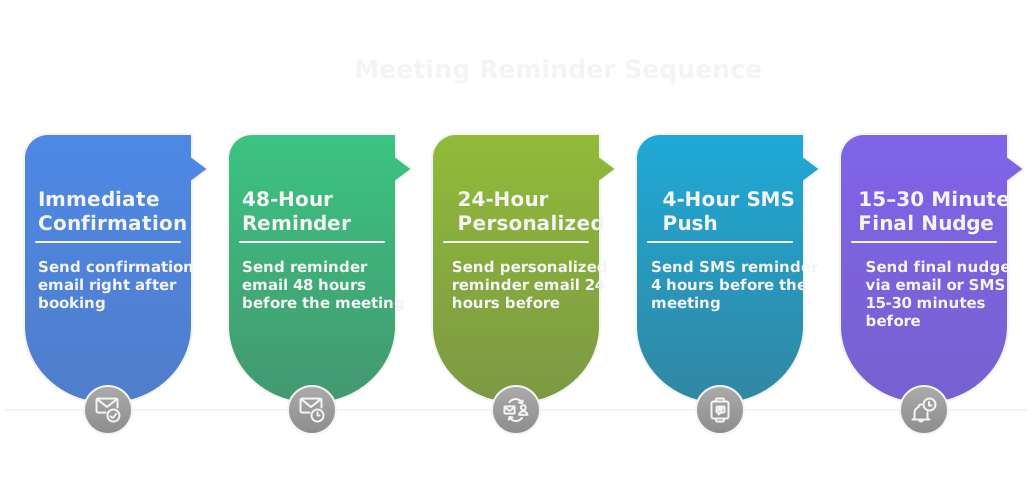
Start with an automated confirmation the moment the slot is booked, then layer signal-driven touches. Example cadence that balances scale and human judgment:
- Immediate confirmation with local time, one-line agenda, and reschedule link.
- 48 hours before, an automated reminder that includes a tiny prep item and the rep’s direct phone.
- 24 hours before, a personalized email or short voice note for high-signal prospects.
- 4 hours before, SMS or mobile push for those who opted in.
- 15 to 30 minutes before, calendar pop and a final SMS with the join link.
Parallel rules: if the prospect clicks the confirmation, downgrade further reminders; if they haven’t opened anything, add a human touch 24 hours out. Treat the cadence as a set of rules, not a single sequence, and let intent signals reroute prospects into lighter or heavier flows.
How To Run A Qualification Checklist Before Booking?
Keep the checklist tiny and binary, so it filters real prospects without rep friction. Required checks:
- Correct role and decision influence verified by enrichment or one micro-question.
- Clear problem statement or outcome alignment captured in one sentence.
- Timeline or urgency window (this quarter, next quarter, no timeline).
- Budget or procurement signal if relevant for the product.
- Technical readiness like required stakeholders or system access for demos.
- Valid calendar address and phone number for reminders.
Implement these as gating questions on the booking page or as automated enrichment that reroutes low-signal bookers to a lighter self-serve path. Log the answers in CRM so the booking itself carries qualification metadata.
How To Route High Value Prospects Differently?
Identify high value with score thresholds, intent signals, or firmographic rules, then trigger a premium path:
- Immediate human handoff within defined SLA, often a senior rep or AE.
- Reserve locked priority slots that require rep approval to book.
- Offer concierge touches, like a short pre-meeting call or preparatory questionnaire.
- Use richer reminder channels, for example a direct phone outreach plus SMS.
- Flag the meeting in CRM with priority tags and a pre-read packet pushed automatically.
Make routing rules explicit, measurable, and auditable. The goal is not to eliminate automation, it is to apply human expertise to the highest-leverage opportunities.
How To Adapt The Playbook For Different Use Cases?
One playbook does not fit all. Tune these levers per use case:
- Cold outbound, targeted accounts: shorter booking windows, stricter qualification, more human follow-up before and after booking.
- Warm inbound demos: lighter gating, heavier prep materials, and higher reminder cadence.
- Technical deep dives: require stakeholder checklist, longer lead time, and an engineering attendee on the invite.
- Executive briefings: concierge scheduling, calendar holds for stakeholders, and pre-call brief sent 48 hours prior.
Run small A/B tests when you change rules, measure attended conversion and downstream pipeline, then bake winning variants into your GTM system. Treat playbooks as living runbooks controlled by operators, not static scripts for reps.
What Metrics Should You Track?
Which KPIs Predict Attendance?
Track leading signals, not just the booked count. Key predictors:
- Confirmation click rate and reschedule click rate.
- Email open and reminder click-throughs prior to the meeting.
- Time from booking to meeting, shorter windows usually predict higher attendance.
- Engagement signals like content downloads, repeated site visits, or product usage.
- Historical rep show rates and prospect-level responsiveness.
Combine these into a simple no-show score that triggers pre-meeting interventions.
How To Segment Show Rates By Channel And Rep?
Segment along axes that matter for action:
- Source and campaign, for example organic inbound, paid demo form, targeted outbound.
- Rep or team, normalized for meeting type and territory.
- Persona and industry cohort, because behavior differs by role.
- Time of day and booking lead time.
Report rolling cohorts, not point-in-time snapshots, and use denominators consistently. Highlight statistically significant deltas before coaching reps or changing channels.
How To Analyze Reasons For No Shows?
Capture reasons with both automation and human follow-up:
- Automated one-click feedback after a no-show, for example "reschedule", "conflict", or "not interested".
- Prompted rep outreach for high-value misses to capture nuance.
- Aggregate reasons into categories like forget, conflict, perceived lack of value, technical issue, wrong contact.
Combine quantitative trends with qualitative notes and look for repeating patterns. If a large share cites tech issues, fix links and dial-in options. If value is the complaint, tighten messaging and agendas.
How To Report Show Rate Impact On Revenue?
Translate attendance into funnel economics. Steps:
- Calculate attended meetings by cohort and multiply by conversion rate to opportunities, using historical conversion.
- Multiply opportunities by average deal size to estimate attributable revenue.
- Track cost per attended meeting to show efficiency improvements.
- Build scenarios, for example a 10 point lift in show rate equals X additional meetings, Y additional opportunities, Z revenue over the next 90 days.
Surface these numbers in weekly GTM reviews. Show-rate lifts should be framed as capacity and revenue multipliers, not vanity wins.
What Common Mistakes Reduce Attendance?
Are You Over Automating The Human Touch?
Yes, when automation removes identity. Automated confirmations with no rep name or human voice reduce ownership. Avoid fully automated paths for priority accounts. Use automation for reliability and scale, but add small human signals, like a one-line voice note or a personalized SMS, for prospects above your threshold. The technical operator should own the handoff rules so reps can focus on conversions.
Are Your Messages Vague Or Value Free?
Vague invites attract curiosity but not commitment. Every invite should state the outcome, time commitment, and who should attend. If the email subject or calendar line reads generically, prospects deprioritize it. Replace generic language with a specific outcome and one supporting data point or customer reference.
Are You Scheduling Too Far In Advance?
Long lead times erode intent. Meetings scheduled several weeks out have higher decay unless the prospect owns the timeline. Match cadence to intent: early-stage interest, aim for days not weeks; complex evaluations can be further out but require stronger prep. Track booked-to-attended decay by lead time and tighten windows where you see slippage.
Do You Overlook Accessibility And Timezone Needs?
Accessibility is not optional. Failing to show timezone, lacking dial-in alternatives, ignoring language needs, or not providing captioning all reduce attendance. Test your booking flow from multiple timezones and devices. Offer phone dial-in and web fallback links, and ask about accessibility requirements when booking high-value sessions. Small accessibility fixes remove last-minute excuses and raise trust.
How To Test And Improve Continuously?
What Should You A B Test First?
Start with changes that move the needle and are easy to implement. Prioritize:
- Confirmation and subject lines, they directly affect confirmation click rate.
- Reminder cadence and channel, they influence last-mile attendance.
- Booking window and available slot granularity, they affect decay.
- Agenda copy and meeting length, they change perceived value.
- Reschedule link placement and booking UX elements, they reduce friction.
Run one variable at a time until you understand directional impact, then test sensible combinations. Use attended-per-booked as the primary KPI, and track downstream conversion so you don’t optimize attendance at the expense of meeting quality. Lean on small cohorts first, then expand when effect size is clear.
How To Experiment With Cadence And Channel?
Treat cadence and channel tests like engineering experiments, not marketing guesswork. Steps that work:
- Form a clear hypothesis, for example, “Adding an SMS 1 hour before will lift show rate by at least 6 points.”
- Randomize and hold out, create control and treatment groups drawn from the same cohort.
- Pick a minimum sample size or time window, for example 2 to 4 weeks or 200 booked meetings, whichever comes later.
- Measure attended rate, downstream pipeline conversion, and cost per attended meeting.
- Review edge effects, like increased reschedules or rep burnout.
Test channels that match persona behavior, email plus SMS for operational buyers, LinkedIn nudges for executives, Slack for in-company contacts. Remember, AI makes outbound cheap and supports many micro-tests, but guardrails matter, make sure automated touches preserve human signals where they matter. Feed winning rules back into your GTM workflows and automation so the system learns, not just the rep.
How To Use No Show Feedback For Improvements?
Capture reasons fast and use them as operating signals. Best practice:
- Offer a one-click feedback path immediately after a no-show, for example "conflict", "forgot", "not relevant", "tech issue".
- For high-value accounts, trigger a rep outreach to collect qualitative context and log it.
- Aggregate feedback weekly, surface the top 3 causes, and map each cause to an action: tweak messaging, tighten qualification, change calendar UX, or swap channels.
- Feed results into your booking rules and predictive no-show model so future bookings get preemptive touches.
Treat feedback as training data, not blame. Patterns tell you whether the problem is UX, targeting, timing, or technical reliability.
When To Scale Successful Tests Organization Wide?
Scale only when three conditions are met:
- Statistically and operationally validated, the lift is repeatable across multiple cohorts and time periods.
- Downstream effects are neutral or positive, for example close rate and rep efficiency do not drop.
- The GTM system and ops can support the change, including integrations, runbooks, and rollback plans.
Roll out in waves: pilot one region or team, monitor for 2 to 4 sales cycles, then expand. Document the change, update playbooks, and provide short training. Make the technical operator responsible for deployment and monitoring, so automation and human workflows stay aligned as you scale.
FAQs
RELATED ARTICLES
Check out more articles on our blog!

.png)
RELATED ARTICLES
Lorem ipsum dolor sit amet, consectetuer adipiscing elit, sed diam nonummy nibh euismod tincidunt ut laoreet dolore magna aliquam erat volutpat.
.png)