Multi-Threading In Sales: Strategies To Engage Buying Committees Effectively


Two weeks before the close you’re polishing a ten minute exec brief because the champion promised an intro, calendar invites are set, and your forecast looks rosy. Then procurement pops a vendor consolidation rule, InfoSec asks for architecture docs, and suddenly the deal stalls because you only ran a single-threaded outreach. That misread of buying committees quietly eats time and pipeline. You’ll learn how to decide when to add threads and when to keep things simple, how to map influence beyond titles, build signal-driven multi-channel sequences, coach and protect real champions, and lock down CRM handoffs and escalation triggers so late-stage surprises stop derailing momentum.
What Is Multi-Threading In Sales?
What Does Multi-Threaded Selling Mean?
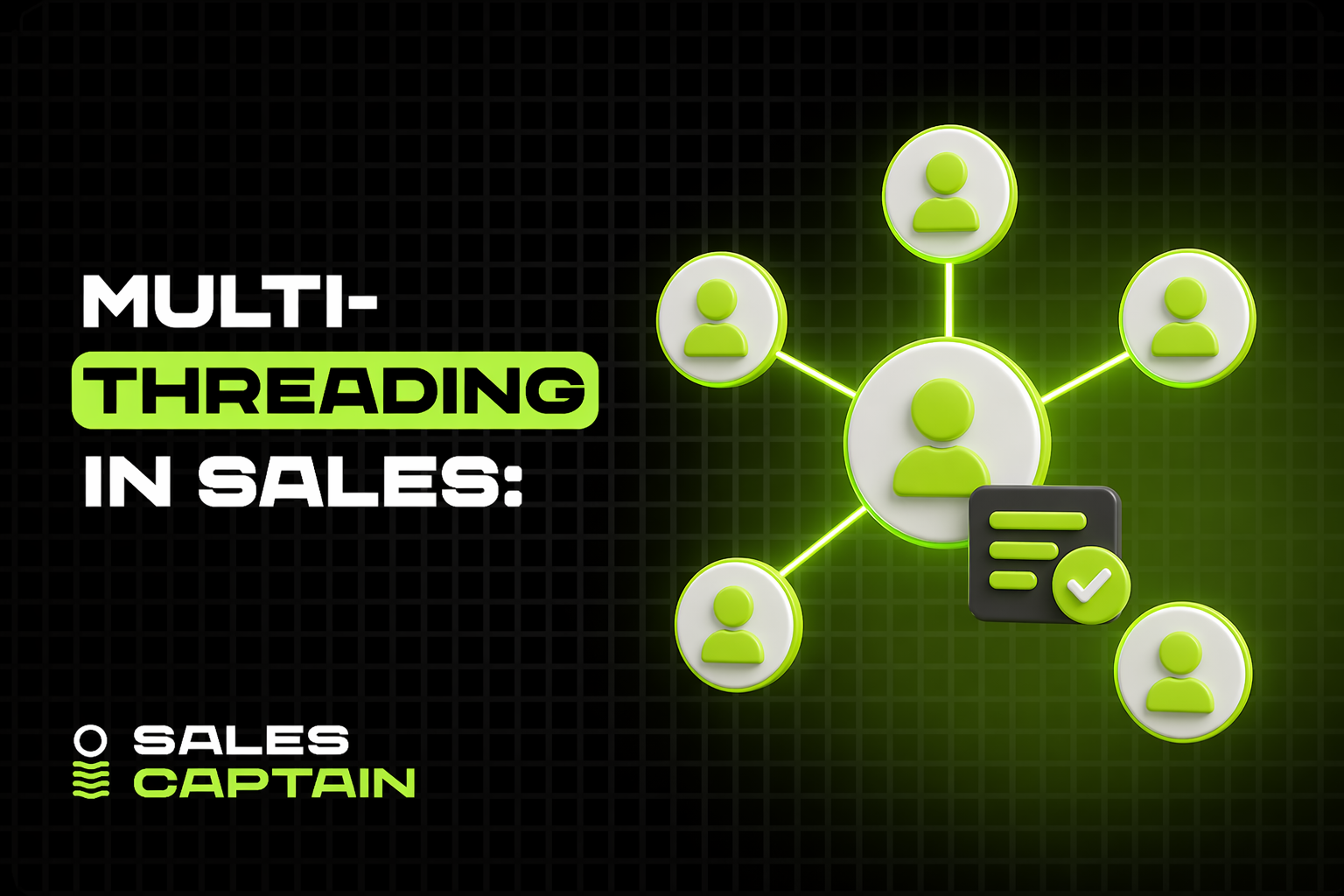
Multi-threaded selling means engaging multiple people inside the same target account in parallel, not relying on a single point of contact. It spreads risk, speeds decision making, and surfaces different buying signals. Instead of one champion carrying the deal, you create several conversational threads across roles, functions, and communication channels. Today that includes human conversations and automated, signal-driven outreach from marketing and outbound systems. When done right it turns sales into a system, workflows and feedback loops that catch problems earlier and keep momentum moving.
What Types Of Multi-Threading Exist?
There are a few practical textures of multi-threading:
- Role-based threads, reaching economic buyer, technical lead, end users, legal, and procurement.
- Function-based threads, where marketing or product teams run parallel education campaigns while sales engages directly.
- Channel threads, engaging partners, resellers, or internal champions in other departments.
- Digital threads, where automated outbound, account-based content, and intent signals create asynchronous touchpoints.
Each type solves a different risk, whether it’s budget authority, technical validation, user adoption, or timing. Combine them selectively, not all at once.
Why Buying Committees Make It Necessary
Buying committees are the norm for mid-market and enterprise purchases. Multiple stakeholders mean different priorities and hidden blockers. A single champion can get crushed by a legal objection or a procurement rule they didn’t own. Multi-threading ensures you meet the committee where they evaluate risk, not just where your advocate sits. It also reduces surprise late-stage objections, which are the most common reason deals stall or die. If your GTM is a coordinated system, multi-threading is how you operationalize stakeholder coverage.
When Should You Use Multi-Threading?
What Deal Sizes And Complexity Demand It?

Use multi-threading when the deal touches multiple teams, has integration or compliance complexity, or when the buy involves significant budget reallocation. Heuristics that suggest multi-threading:
- Deals that change workflows or require integration with core systems.
- Deals with multi-quarter sales cycles or formal procurement processes.
- Commitments that materially affect headcount, security, or compliance.
For many B2B SaaS sellers, transactions above mid-market thresholds warrant at least two threads. AI-driven outbound and intent data make it cheaper to open those extra threads earlier, so don’t wait until late-stage to expand coverage.
When Single-Threading Is Better
Single-threading still wins for low-risk, transactional sales. If the product is self-serve, the buyer set is a one-person shop, or the ACV and complexity are low, coordinating multiple threads wastes time. Single-threading is faster when the buyer is clearly empowered, the value is immediate, and the path to purchase is short. Use multi-threading only when the expected lift in win rate exceeds the coordination cost.
When To Start During The Buyer Journey
Start as early as discovery. Begin with one champion, then map the committee during the first few calls. Add lateral threads once you confirm cross-functional impact or encounter process questions. Waiting until the proposal stage almost guarantees surprises. Use outbound and content as parallel motions during evaluation to seed credibility with technical and executive buyers, and let automation handle cadence so reps focus on high-value conversations. Agencies like SalesCaptain can accelerate that expansion when you need targeted, scaled outreach into multiple roles.
How Do You Map The Buying Group?
How To Identify Roles And Influence
Don’t rely on titles alone. Build an influence map by asking direct questions early, such as “Who else will evaluate this?” and “Who signs off on budget?” Look for behavior signals, like meeting attendance, who asks procurement-style questions, or who escalates security concerns. Classify stakeholders by role: economic buyer, technical buyer, user influence, legal, procurement, champion, and blocker. For each stakeholder capture their primary metric, timeline, and typical objections. Validate the map as you progress, updating relationships and influence as new information appears.
What Tools Help Build Org Maps
Start with tools that enrich and visualize relationships. Clay is a strong first choice for scraping signals, enriching profiles, and building dynamic org maps, https://clay.com/?via=salescaptain. Using that link gives you 3,000 free credits. After Clay, use LinkedIn Sales Navigator for social context, ZoomInfo or Apollo for contact and org data, and Gong or Chorus to mine conversation intelligence that reveals who actually influences decisions. Your CRM is the single source of truth, but these tools reduce manual research and surface hidden stakeholders faster.
How to use Clay for org mapping
- Pull a seed list of contacts or company domains into Clay.
- Enrich each contact with title, email, social links, and inferred department.
- Use Clay’s relationship matching to cluster contacts by team and reporting lines.
- Export the enriched profiles and org clusters into your CRM or a visualization sheet for reps to validate.
This workflow speeds discovery and gives reps a reliable starting map to validate in live calls.
Example Buying Group Map
Economic buyer
- Titles: VP Finance, CFO
- Primary concern: ROI, budget timing, vendor risk
- Typical opener: Quantified savings and contract flexibility
Technical buyer
- Titles: Head of Engineering, CTO
- Primary concern: integrations, security, performance
- Typical opener: Architecture playbook and sandbox access
End users
- Titles: Product Manager, Team Lead
- Primary concern: usability, productivity impact
- Typical opener: Demo focused on daily workflows
Procurement
- Titles: Procurement Manager, Sourcing Lead
- Primary concern: contract terms, SLAs, vendor consolidation
- Typical opener: Clear T&Cs and pricing comparables
Legal / Compliance
- Titles: Legal Counsel, InfoSec
- Primary concern: data processing, liability, compliance controls
- Typical opener: Security documentation and SOC reports
Champion
- Titles vary
- Primary role: advocate inside the company, drives internal political buy-in
- Typical needs: enablement assets, executive intros, proof points
Blocker
- Titles vary
- Primary role: enforces constraints or opposes change
- Typical approach: identify objections early, neutralize with evidence or alternate threads
Map each contact to one of these buckets, note their influence level, and keep the map current. That discipline converts a list of names into a tactical plan for who to engage, when, and with what message.
How Do You Build Outreach Sequences?
How To Single-Thread Every Message
Every message should do one thing and make one ask. Pick a single objective per touch, for example start a conversation, validate budget authority, or request an intro. That clarity forces concise copy and makes responses actionable.
Match the objective to the recipient. Technical messages show architecture and sandboxes. Executive messages show quantified outcomes and risk mitigation. User-focused notes show workflows and quick wins. Don’t cram multiple asks into one email or call.
Use behavioral signals to personalize the single-thread. If a prospect clicked a pricing page, the next message should address budget or pricing scenarios, not demo scheduling. Let engagement dictate the next single-threaded step.
Automate routine personalization, but keep humans in the loop for judgment calls. AI makes outbound cheap and signal-driven, so you can afford to be surgical: send many single-purpose messages, measure which objective pulls which stakeholder, then iterate the sequence.
How To Orchestrate Multi-Channel Cadences
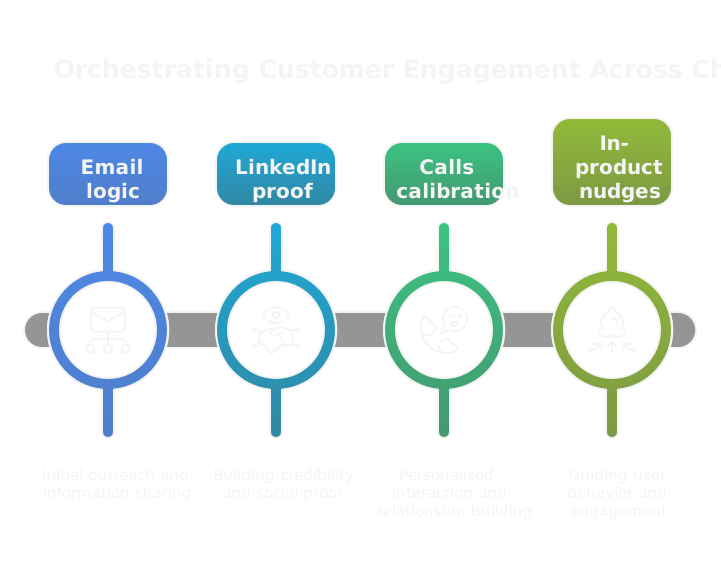
Think of channels as different instruments in the same song. Email is long-form logic, LinkedIn is social proof, calls are calibration, in-product nudges are habit building, and targeted ads serve as ambient reinforcement. Design cadences so channels amplify, not repeat.
Stagger messages so each channel has a distinct role and cadence. Example pattern: intro email, LinkedIn connection with testimonial, call attempt the next week, targeted content sent after a click, executive brief if engagement spikes. Let each touch add new value.
Make the cadence signal-driven. If a user requests a technical doc, pivot to an engineering thread and add a technical channel like Slack or GitHub where relevant. Use automation to execute the choreography, and logging to ensure the human rep sees the context.
Treat outbound as a marketing motion. That means marketing assets and automated sequences should be built into the cadence from day one. This reduces SDR grunt work and lets technical operators focus on high-value moves.
How To Time Messages Up The Ladder
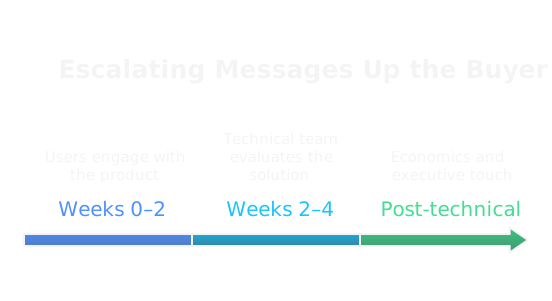
Timing is about respect and leverage. Don’t bring an executive into week one conversations. Build a sequence that surfaces urgency, quantifies potential impact, and then escalates.
Common timing pattern:
- Weeks 0–2: users and day-to-day operators, confirm pain and workflow impact.
- Weeks 2–4: technical stakeholders, validate integration, security, performance.
- After technical greenlight: economics thread, ROI models and procurement prep.
- Executive touch: when you can articulate net impact, timeline, and risk reduction.
Trigger-based escalation beats calendar-based escalation. If a champion references budget or asks for an exec intro, accelerate the economic thread. If a technical blocker appears, delay the executive pitch until that blocker is resolved.
Keep executive touches short and strategic, not repetitive. Send a brief brief that highlights value, risks removed, and the clear decision needed. Timing the ladder well converts single champions into committee-level momentum.
How Do You Find And Coach Champions?
How To Spot A Bulldog Champion
A bulldog champion shows persistent action, not just enthusiasm. Look for these behaviors:
- Pushes internally, schedules follow-ups, and invites other stakeholders.
- Asks procurement or finance-style questions.
- Requests implementation details or pilot commitments.
- Provides usage data or willing internal trial participants.
Titles don’t equal influence. Measure actions: who controls timeline, who can pull budget, who can convene leadership. Watch for soft signals like repeated email threads with execs or calendar invites that include finance or IT.
Beware false positives, people who love the product but lack political capital. If they ask you to "get leadership to care" but never loop others in, they’re not a bulldog.
How To Train Internal Advocates
Give advocates simple, high-leverage assets and coaching.
- One-page value brief tailored to their boss, with three quantified benefits.
- A battle card that answers the two most likely objections from procurement and security.
- A short script for asking leadership for a 15-minute review.
- A mutual action plan template they can circulate internally.
Run a quick prep session, 20 to 30 minutes, to role-play their ask. Record the session and provide the recording plus a checklist they can use before every internal meeting.
Automate delivery of these assets when a champion surfaces. That keeps momentum and reduces hand-holding. The goal is to make the advocate look decisive and informed inside their org.
How To Manage Multiple Champions
Map champions to function and decision power, then assign tailored asks. Avoid redundant requests that create internal friction. Example: ask the product champion for user feedback, the technical champion for integration validation, and the finance champion for ROI sign-off.
Keep champions coordinated with a central artifact, like a shared mutual action plan. Share updates frequently but selectively. Tell each champion what to expect next and how their next action moves the deal forward.
Assign an internal owner on your side to orchestrate champions, close feedback loops, and prevent competing threads. If champions disagree publicly, surface the conflict privately and provide a neutral data point or playbook to resolve it. Protect their political capital, and keep win stories short and replicable so they can promote success internally.
How Should Teams Coordinate Activities?
What Roles Should SDRs, AEs, And CSMs Play?
Redefine roles around systemized outcomes, not just tasks.
- SDRs: run signal-driven outbound, qualify intent, and open threads. In modern GTM they’re technical operators, building and tuning automations and personalization engines.
- AEs: own deal strategy and committee orchestration, manage economic conversations, and convert interest into commitments.
- CSMs: own post-sale threads, retention, and expansion. They also feed customer signals back into the GTM system so sales can multi-thread for renewals or upsells.
Treat GTM as a system: workflows, infrastructure, and feedback loops connect these roles. Remove task silos and define handoffs clearly so threads don’t drop.
How To Assign Multiple Reps Without Conflicts
Use clear ownership rules and a single source of truth.
- Assign by role, not by contact. One rep handles executive outreach, another owns technical threads, and a CSM handles post-sale threads.
- Use CRM fields that show active threads, last touch, and current owner. Automations should block parallel outbound from another rep unless an explicit handoff exists.
- Document simple escalation rules, for example who responds when a prospect asks for a product demo during an exec call.
Add a lightweight RACI for account activities: who is Responsible for outreach, Accountable for the deal, Consulted for technical or legal issues, and Informed for status updates. That prevents inbox chaos and duplicate outreach.
How To Hand Off Responsibly
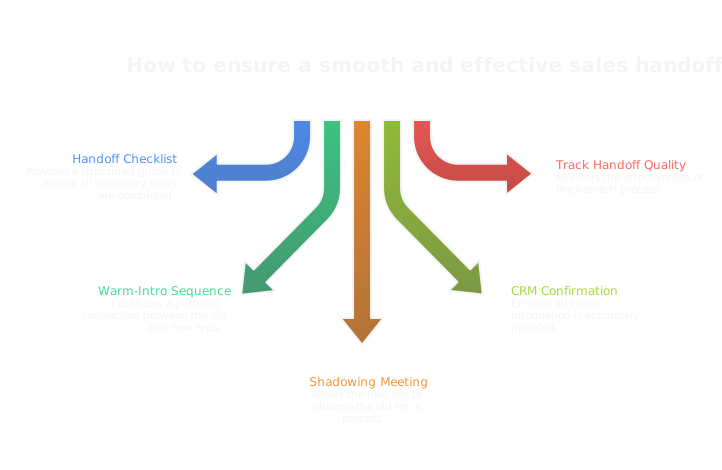
Handoffs are where deals fail. Make them ritualized and measurable.
- Handoff checklist: updated org map, mutual action plan, key artefacts (contracts, security docs), conversation recordings, and next three steps.
- Warm-intro sequence: a short email or call that includes the incoming rep in the thread and clearly states the next action and timeline.
- Shadowing: the outgoing rep should attend the first joint meeting, then step back after the first interaction.
- Close the loop: confirm the receiving rep updated CRM fields and notified all champions. Track handoff quality as a metric, use feedback to refine the checklist.
Automate routine parts of the handoff but insist on a human confirmation step. That preserves relationships and keeps multi-threaded conversations coherent.
How Do You Align Sales And Marketing?
What Shared KPIs Drive Orchestration
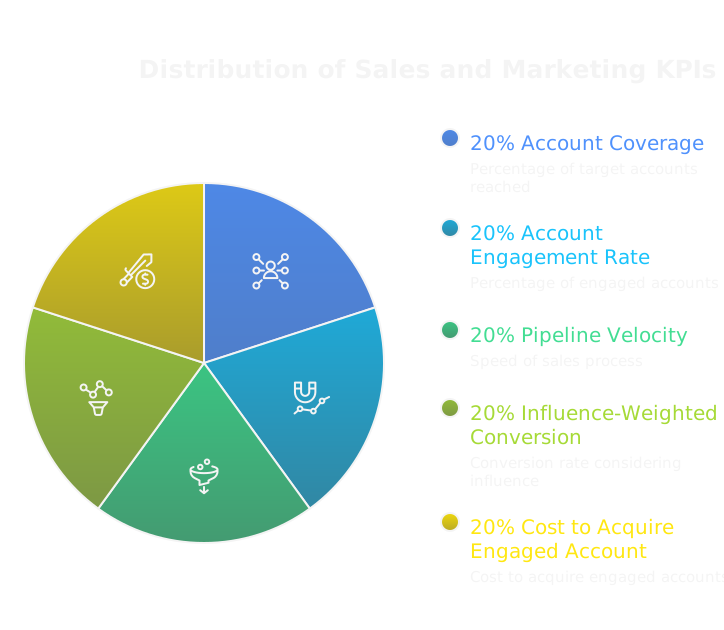
Pick a few shared metrics that force collaboration, not vanity reporting. Useful ones:
- Account coverage, measured as active threads per target account. This shows whether marketing and sales are both engaging the committee.
- Account-engaged rate, percent of target accounts with at least two distinct engaged roles. It ties marketing touches to sales conversations.
- Pipeline velocity by account, the time from first engagement to opportunity creation, segmented by thread count. Faster velocity = better orchestration.
- Influence-weighted conversion, a model that gives more credit when economic and technical buyers engage versus only users. That aligns messaging and prioritization.
- Cost to acquire an engaged account, combining outbound spend, content spend, and SDR/automation hours. This keeps both teams accountable for efficient motion.
Make these shared, visible, and part of weekly reviews. If marketing owns account-engaged rate and sales owns deal conversion, both win only when the other succeeds.
How To Build Multithreaded ABM Campaigns
Design ABM as coordinated plays, not parallel tactics.
- Start with an account brief that names target roles, known champions, and top objections. Share it with the rep before any outbound begins.
- Build role-specific content tracks, for example ROI one-pager for finance, architecture whitepaper for engineering, and product walkthroughs for end users.
- Orchestrate timing so marketing assets warm multiple stakeholders before the first sales touch. Marketing might launch targeted display ads and a short executive brief the week prior to SDR outreach.
- Use channel rules, not duplicated messages. Let email explain the value proposition, LinkedIn supply social proof, and a targeted ad serve as ambient reinforcement.
- Automate and measure. Create templates and playbooks in the engagement platform, but let signal-driven logic choose which track activates when a contact clicks, downloads, or mentions a feature.
Treat outbound as a marketing motion. Marketing should own the top-of-account nurture and assets; sales should own tactical orchestration and direct asks.
How To Activate Demand Gen Before Outreach
Kick off account engagement before a single prospect feels a sales cadence.
- Run a micro-campaign per account with personalized ad creative, tailored landing pages, and an executive brief download. Those serve as warmers and source first-party signals.
- Layer intent and website retargeting to pick up anonymous interest and link it to known contacts via enrichment.
- Send role-specific content via marketing automation to all known contacts simultaneously, then let signal scoring escalate which contact the rep engages first.
- Use short, high-value assets, not generic ebooks. An ROI calculator for finance, an integration checklist for engineering, or a short case study for operations moves heads faster.
- Automate alerts to reps when a campaign produces cross-role engagement. That timing allows a rep to open the right thread with credibility.
Because AI makes outbound cheap and signal-driven, you can safely seed multiple threads at once. The goal is to create recognition and evidence across the committee before the first cold email lands.
What Tech Stack Supports Multithreading?
How To Configure Your CRM For Accounts
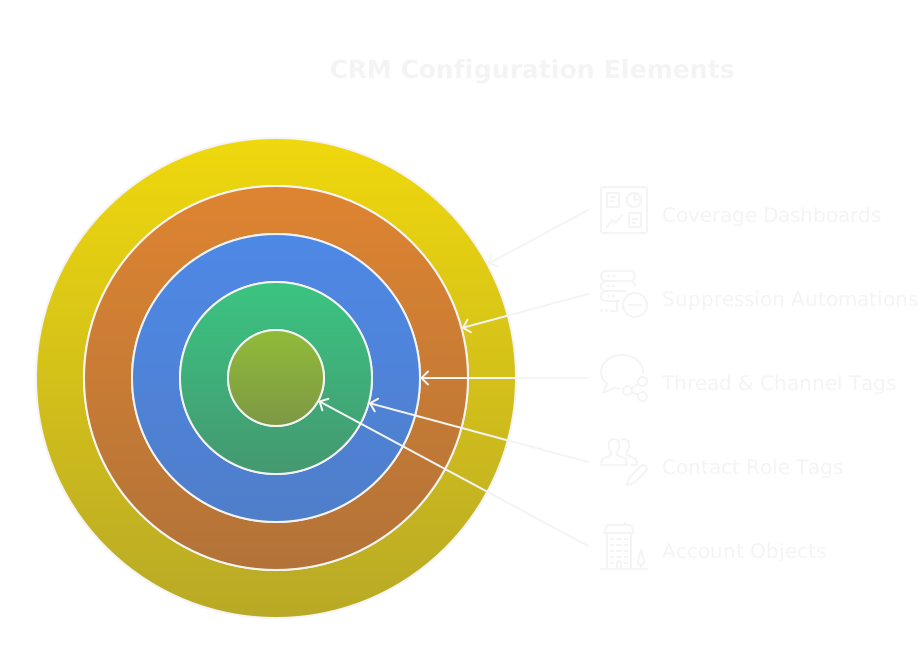
Move from contact-centric to account-first configuration.
- Create account objects with fields for thread count, active roles, influence map link, decision timeline, and mutual action plan status.
- Relate contacts to accounts with role and influence-level fields, for example role = technical buyer, influence = high.
- Add activity types and tags that capture channel and thread, for example thread:technical or channel:executive-email. That makes later attribution possible.
- Enforce ownership and suppression rules with automation, for example block simultaneous sequences to the same contact unless a handoff is logged.
- Build dashboards that show coverage gaps, engagement heatmaps across roles, and handoff quality scores.
Log everything. Conversation records, sequence IDs, and asset hits need to be queryable. A clean CRM is the backbone of a multithreaded GTM system.
Which Sales Engagement Platforms To Use
Pick platforms that think account-first and support multi-contact orchestration.
- Requirements: account-level sequencing, multi-channel orchestration, robust CRM sync, suppression and handoff controls, and analytics that roll up to accounts.
- Strong options: Outreach, SalesLoft, and Groove. Each supports playbooks that can run parallel tracks by role.
- For teams on HubSpot or Salesforce looking for simpler setups, HubSpot Sequences or native automation can work for mid-market accounts.
- Prioritize platforms with AI features that surface best next actions and auto-personalization. That reduces SDR grunt work and lets technical operators focus on strategy rather than message stamping.
Also verify the platform's ability to pause or redirect sequences based on account-level triggers, for example a legal review or a signed pilot agreement. That prevents tone-deaf outreach and preserves relationships.
Which Intelligence And Org Mapping Tools Matter
Start with tools that enrich contacts and visualize relationships.
- Clay is useful for enrichment, relationship clustering, and building dynamic org maps, https://clay.com/?via=salescaptain. Using that link gives you 3,000 free credits. Clay is particularly handy when you need to turn a domain or seed list into a multi-contact account model quickly.
- Complement with LinkedIn Sales Navigator for social context, ZoomInfo or Apollo for contact data, and Bombora or 6sense for intent signals.
- Conversation intelligence tools like Gong and Chorus reveal who asks the real questions in calls, which changes influence scoring.
- Use a CDP or data warehouse to unify these signals, and wire a BI layer like Looker or Tableau to report account-level metrics.
How to use Clay for enrichment and scoring
- Pull a list of target domains into Clay and enrich contacts at scale.
- Add department and inferred role tags so you can filter by function.
- Export relationship clusters to your CRM and flag newly discovered influencers as tasks for reps to validate.
- Use Clay outputs to seed account scores, then fine-tune weights based on in-call intelligence from Gong or Chorus.
Together these tools turn anonymous intent and enrichment into a reliable org map and account intelligence feed for your multithreaded system.
How Do You Measure Multithreading Success?
What Key Metrics To Track
Measure both coverage and outcomes.
- Coverage metrics: average threads per account, percent of accounts with economic and technical threads, contacts engaged per account.
- Engagement metrics: multi-role response rate, cross-role meeting rate, and meeting-to-opportunity rate when multiple roles attend.
- Outcome metrics: win rate by thread count, average deal size by multi-threading level, and cycle time reduction.
- Operational metrics: handoff success rate, duplicate outreach incidents, and automation hit rate.
These numbers tell you whether you’re actually interacting across the committee and whether that interaction moves deals forward.
How To Attribute Activities Across Contacts
Attribution must be account-aware and role-weighted.
- Capture activity at the contact level, tag it with role and channel, and roll it up to the account.
- Use a weighted multi-touch model where interactions from higher-influence roles carry more credit. For example technical approvals and executive signoffs get higher weights than single-user demos.
- Implement event tagging for key triggers, such as technical approval, procurement engagement, or executive meeting, then assign credit to the contacts involved.
- Build attribution views in your BI layer that can switch models, for example first-touch, linear, and role-weighted, to test which correlates best with closed deals.
- Automate this where possible. Manual spreadsheets break down as threads multiply.
A clear attribution model prevents debates and allocates credit to the right motions and teams.
What Leading Indicators Predict Wins
Watch for signals that predict a successful committee sale.
- Non-champion engagement, meaning responses or meetings from at least one contact outside the initial champion.
- Cross-role meetings, especially when technical and economic buyers attend the same session.
- Short time between technical signoff and procurement engagement, that sequence indicates momentum.
- Increase in account-level intent signals, like multiple stakeholders visiting pricing or security pages.
- Champion actions that mobilize the org, such as scheduling exec reviews or circulating the mutual action plan.
Track these as triggers for escalation. They predict wins more reliably than raw touch counts, and they give reps tactical cues on when to pull the executive thread.
What Common Mistakes Should You Avoid?
How To Prevent Message Confusion
Define one persuasive idea per message and stick to it. When everyone on the account is sending different value props, prospects tune out or reply with "who does what?" Build a message hierarchy, for example executive value, technical validation, end user productivity, and map each template to that lane. Store approved templates and playbook snippets in a shared library so reps reuse the same language for the same role. Tie each outbound send to a documented objective in the CRM, subject line category, and thread tag, so you can query why a message went out and what it aimed to trigger. Use limited AI personalization, not freeform rewriting, and require a short rationale when a rep alters a core message. That preserves clarity while still letting reps tailor to real signals.
How To Avoid Sequence Fatigue
Frequency kills engagement faster than anything else. Cap total touches per account across all channels during a rolling 30 day window, and enforce that with automation. Give channels distinct jobs so touches don’t feel like echoes, for example email for logic, LinkedIn for social proof, calls for calibration, ads for ambient reinforcement. Pause or suppress sequences on a per-account trigger, such as a technical discovery scheduled or an executive meeting booked. Monitor soft signals, like opens with zero replies, and reduce cadence automatically rather than escalating. Finally, treat unsubscribe and spam complaints as leading indicators, not anomalies, and remove that account from outbound until a human reviews.
How To Stop Misaligned Incentives
Incentives drive behavior more than playbooks do. Don’t pay people purely for touches or meetings booked. Tie compensation and scorecards to account outcomes that require committee engagement, such as percent of accounts with economic plus technical threads, or win rate when two or more roles are engaged. Make cost-of-outbound visible so teams don’t over-send because AI makes it cheap. Use shared KPIs between sales and marketing, and credit models that reward the role that unlocked the pivotal decision, not the first cold touch. Finally, bake simple guardrails into quota motions, for example sequences per account limits and mandatory handoff SLAs, so reps can’t game the system without flagging governance.
How Do You Scale And Govern Multithreading?
How To Create Playbook Governance
Treat playbooks like product releases. Version control templates, approve changes through a small committee, and publish release notes when you update messaging or cadence. Segment playbooks by account tier and industry so lower-touch accounts use conservative sequences and enterprise deals use bespoke orchestration. Define mandatory elements for every playbook: target roles, sequence objectives, suppression rules, escalation triggers, and a QA checklist. Run a quarterly audit that samples live accounts, checks compliance, and measures playbook efficacy. Assign a single owner for playbooks who coordinates experiments, captures learnings, and retires underperforming templates.
How To Run Coaching And Deal Reviews
Make deal reviews prescriptive. Use a short health scorecard that evaluates thread count, role mix, next-play clarity, and risk. In weekly reviews, focus on two things, not ten, for example unresolved technical blockers and a plan to add an economic thread. Use call recordings and annotated transcripts so coaching is evidence-based, not memory-based. Pair tactical coaching with playbook feedback, so mistakes become updates, not just critique. Run role-specific sessions, where SDRs practice signal-driven cadences and AEs practice escalation scripting. Track coaching outcomes as a metric, for example improvement in thread health after two coaching sessions.
How To Set Account Ownership Rules
Ownership should be clear and enforced. Assign one accountable owner per opportunity, plus role owners for executive, technical, and post-sale threads. Document rules for when role owners can open outreach, and require a logged handoff with the mutual action plan before new threads begin. Enforce ownership in the CRM with blocking automations, for example prevent a rep from enrolling a contact in a sequence if another rep has an active thread without a handoff record. Define reassignment triggers, such as territory changes or rep unavailability, and require a shadowed overlap period for the new owner. Keep ownership visible on the account page so any team member can see who to call when things stall.
What Practical Templates And Checklists Help?
Multi-Threading Implementation Checklist
- Account model created in CRM with role and influence fields.
- Org map validated by rep and stored on the account.
- Playbook assigned by account tier, with approved templates for each role.
- Sequences configured with suppression rules and account-level caps.
- Content library tagged by role and use case, with short briefs for execs, tech, and users.
- Handoff checklist live as a task template: org map, mutual action plan, recordings, asset links.
- Coaching schedule and deal review cadence set and calendared.
- Dashboards for threads per account, engagement by role, and handoff quality.
- Automation rules for pause, escalation, and duplicate outreach prevention.
- Experiment log for A/B tests and playbook changes.
Use this checklist as a launch playbook and audit it monthly.
Email, Call, And Meeting Summary Templates
Email intro, short and direct
Quick intro and one metric for [Company]
Hi [Name], I want to share how we helped [peer] reduce [metric] by [percent]. If that’s relevant, can I send a one-page ROI brief or schedule 15 minutes?
One ask, one value, next action clear.
Call follow-up, confirm and advance
Thanks for the call. Confirmed actions: 1) [Technical sandbox access] by [date], owner [Name]. 2) [Procurement checklist] requested, owner [Name]. Next meeting: [date/time] to review integration. Attached: recording and the sandbox instructions.
Meeting summary, for cross-role distribution
Attendees: [names and roles]
Decisions made: [short bullets]
Open risks: [short bullets and owners]
Next steps: owner, deliverable, due date
Decision point and date for exec brief: [what will be decided and when]
These templates force discipline, capture commitments, and make threads visible across the committee.
Role-Specific Sequences For SDRs, AEs, CSMs
Day 0: Personalized intro email with one ask.
Day 3: LinkedIn touch with social proof.
Day 6: Voicemail referencing emailed brief.
Day 10: Short value-add email addressing a clicked asset.
Day 14: Break or rotate to other contacts, only if no signals.
SDRs operate as technical operators, so templates are signal-driven and automations handle personalization.
AE sequence, objective orchestrate committee and close
Stage 1, Discovery: 1–2 calls with champion and org map validation, technical thread opened.
Stage 2, Validation: Technical deep dive and pilot setup, procurement prep packet shared.
Stage 3, Economic: ROI brief sent to finance, price scenarios discussed.
Stage 4, Executive: 10–15 minute exec brief highlighting impact, risks removed, and decision requested.
Each stage has clear escalation triggers and required artifacts before advancing.
CSM sequence, objective adopt, expand, renew
Onboarding: kickoff call, success metrics, admin access.
Adoption: 30 day usage review, product playbooks for users.
Expansion: detect usage patterns, present targeted case studies, loop AE as needed.
Renewal: 90, 60, 30 day cadence with risk score checks and executive ROI reminders.
Make all sequences templates that can be activated by signal. Automate routine personalization, but keep humans accountable for judgment calls and handoffs. That way you scale without trading cohesion for volume.
How Does Multi-Threading Compare To Single-Threading?
Multi-threading and single-threading are different tradeoffs, not moral choices. One favors speed and simplicity, the other favors risk reduction and committee coverage. Pick based on deal complexity, buyer structure, and the GTM cost you can tolerate.
What Are The Pros And Cons Of Each
Multi-threading pros
- Reduces single-point-of-failure risk, when a champion leaves or stalls.
- Speeds decision making when you get cross-role buy-in in parallel.
- Surfaces late-stage objections earlier, letting you resolve procurement, legal, or technical blockers before exec review.
- Improves win rate on complex deals, and increases average deal size via cross-functional alignment.
Multi-threading cons
- Higher coordination cost, more handoffs, more meetings to manage.
- Greater chance of message confusion unless playbooks and templates are enforced.
- Risk of sequence fatigue if cadence across channels is not capped.
- Requires CRM and orchestration discipline, plus role-based ownership to avoid duplicate outreach.
Single-threading pros
- Faster to close simple, transactional deals.
- Lower operational overhead, fewer meetings and less handoff friction.
- Easier to A/B test messaging because fewer variables move at once.
Single-threading cons
- Vulnerable to blocker risk when buying committees exist.
- Late-stage surprises are common, which lengthens cycles or kills deals.
- Harder to scale enterprise bookings, because single contacts rarely control complex purchases.
When To Use A Hybrid Approach
A hybrid approach mixes both motions, letting you be lean when appropriate and thorough when necessary.
When hybrid makes sense
- Mid-market deals where ACV hovers near a threshold, use single-thread early and add threads as signals show cross-functional impact.
- Resource constraints, where a full multi-thread orchestration is too expensive, use targeted lateral threads only for the highest-risk roles.
- Time-sensitive opportunities, where you run a fast champion thread but run a parallel light-touch marketing motion to warm technical and finance stakeholders.
- Pilot-first sales, where you sell a small scope with a single champion, then immediately open technical and procurement threads as the pilot proves value.
Practical guardrails for hybrid
- Define clear escalation triggers that automatically open new threads, for example a clicked pricing page, a champion’s request for executive intro, or a technical question.
- Limit total touches per account across all channels with automation, to avoid fatigue.
- Assign role owners so added threads have a named contact and a logged handoff.
- Treat outbound as a marketing motion for the lateral threads, using short assets and signal-driven automations so reps focus on high-value human work.
Hybrid is not a messy compromise, it’s a calibrated system. Use cheap AI-driven outbound and automation to seed threads, but keep humans accountable for decisions and handoffs.
FAQs
RELATED ARTICLES
Check out more articles on our blog!


RELATED ARTICLES
Lorem ipsum dolor sit amet, consectetuer adipiscing elit, sed diam nonummy nibh euismod tincidunt ut laoreet dolore magna aliquam erat volutpat.