


Why Cold Email Fails: Common Mistakes And How To Fix Them


You open your campaign dashboard Monday and the subject lines look fine, opens hover around 22 percent, but replies are flat and pipeline shows nothing, so you start rewriting copy again. What you probably missed is that outbound fails because a single leak in the system breaks everything, not because one sentence was lazy. Targets drift, data rots, deliverability gets throttled, follow-ups never close the loop, or SDRs are stretched thin.
By the end you will be able to read the signals—bounces, complaint rates, open versus reply splits, and site clicks—to isolate whether the problem is targeting, data, deliverability, offer, or process, and you will have a clear list of prioritized fixes that stop firefighting copy and rebuild the motion so your next campaign actually converts.
Why Do Cold Emails Fail?
Cold email looks simple, but failure usually comes from broken systems, not bad luck. When you treat outbound like a one-off sales tactic, you get one-off results. Modern outbound is a marketing motion, signal-driven and automated. If your tech, targeting, or feedback loops are weak, your campaign will underperform no matter how clever the copy is.
What Are The Main Failure Categories?
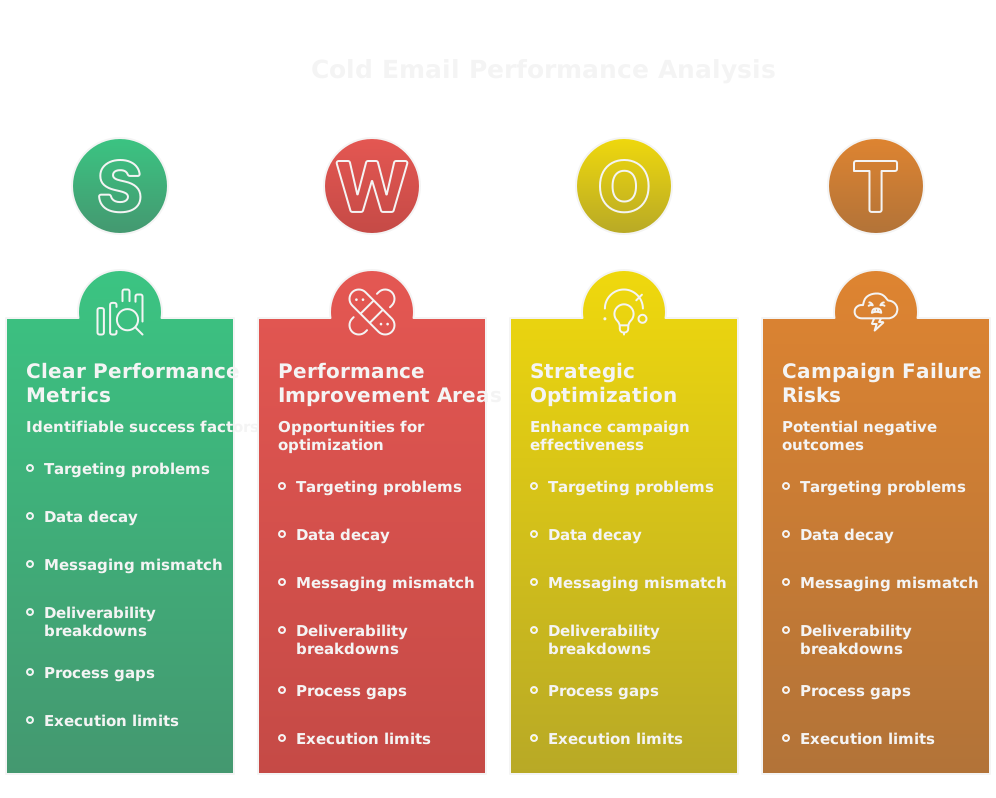
- Targeting problems, you’re emailing the wrong people or the wrong role for the problem you solve.
- Data decay, contact info and job titles change faster than you think.
- Messaging mismatch, emails promise something the prospect doesn’t value.
- Deliverability breakdowns, poor sending reputation, bad auth, or spam traps.
- Process gaps, no nurture, no follow-ups, no closed-loop analytics.
- Execution limits, human SDRs overwhelmed by volume and tasks that automation should handle.
Each category needs a different fix. The common mistake is treating them as one problem and optimizing the wrong thing.
Which Signals Reveal A Broken Campaign?
Look at the signals before you tweak subject lines or templates. They tell you where the leak is.
- Low open rate under 15% means targeting, subject line, or deliverability.
- High bounce rate above 5% screams bad data or bad list hygiene.
- High unsubscribe or spam complaints mean relevance or frequency issues.
- Low reply rate with good opens suggests messaging and value mismatch.
- Lots of opens with no site visits means the CTA or landing experience is broken.
- Short reply-to-demo conversion time with no deals means qualification or handoff issues.
Measure these weekly. GTM is a system, use feedback loops to isolate which component is failing.
What Are The Top Mistakes To Avoid?
- Blaming copy only, when targeting or deliverability was the real problem.
- Treating outbound as pure sales instead of marketing plus sales. You must build awareness and nurture.
- Ignoring automation and signals. AI and automation make scalable personalization doable, stop manually blasting one-off messages.
- Skipping authentication and sending limits, which wreck deliverability fast.
- Using stale lists, not cleaning or verifying.
- No sequencing, or sequencing that looks like a checklist instead of a conversation.
- Handoff chaos, where SDRs or systems miss context captured during outreach.
Fix the system, not just the sentence.
Are You Reaching The Right Prospects?
If you’re not precise about who you’re contacting, everything downstream is wasted. Defining ICP and building disciplined lists are where modern outbound wins or fails.
How Do You Define Your Ideal Customer?

Make it tight and testable.
- Start with revenue, headcount, tech stack, and vertical, but don’t stop there.
- Add outcome-based filters, like companies with churn above X or teams hiring for Y role. That ties your message to a measurable pain.
- Map personas to buying motion, who researches, who signs, who influences.
- Rank segments by conversion potential, not just total addressable market. Focus on high-probability pockets first.
- Continuously iterate from closed deals. What patterns show up? Use those to tighten your ICP.
Treat ICP like a hypothesis you test, not a binder on a shelf.
How Should You Build And Clean Lists?
Quality beats quantity. Build lists you can actually engage.
- Source contacts that match your ICP and buying signals, not just titles.
- Enrich records with firmographic and intent signals to prioritize outreach.
- Verify emails before sending, remove role-based and generic addresses.
- Apply engagement scoring, then prune non-performers quarterly.
- Automate refreshes so your lists reflect job changes and company events.
Bold move: invest in tooling and processes so list building becomes repeatable, not heroic.
How to use Clay for list building and cleaning
Clay is useful for building enriched prospect lists with flexible filters and automation. Using that link gives you 3,000 free credits. Practical playbook:
- Build a seed segment using firmographics and intent filters.
- Enrich contact records automatically, add role and tech stack signals.
- Run built-in verification and export clean batches to your sending system.
- Schedule recurring updates so the list self-heals as people change jobs.
Clay fits when you want data-driven sourcing without manual spreadsheets.
Why You Should Never Use Bought Lists
Bought lists look cheap, but they cost conversions.
- They’re often recycled and already abused by other senders. Deliverability suffers.
- Data is stale, titles and emails change, bounce rates rise.
- Bought lists rarely match your ICP or buying signals. You’ll spray and pray.
- High complaint and unsubscribe rates damage your domain and future campaigns.
- Compliance risk, permissions and consent are murky with third-party lists.
If you need scale fast, partner with an outbound agency that knows how to build fresh, compliant lists. Agencies like SalesCaptain act as GTM accelerators, not just vendors, but only if they operate with modern data and systems.
Is Your Subject Line Getting Opens?
A subject line only has one job, earn an open. Stop over-optimizing for cleverness and start optimizing for clarity and curiosity that matches your prospect’s context.
What Subject Line Formulas Work?
Use simple, repeatable patterns that map to intent.
- Problem-Outcome, example: "Cut onboarding time by 40%?"
- Reference + Proof, example: "How [Peer Company] cut costs in 90 days"
- Event or trigger, example: "Hiring for head of ops?"
- Micro-personalization, example: "Quick question about [tool they use]"
- Short curiosity, example: "One idea for [prospect company]"
Keep subject lines under 50 characters when possible. Match the tone to the persona, business buyers respond to directness, founders tolerate a bit more personality.
How To Avoid Spammy Triggers
Deliverability matters as much as creativity.
- Avoid ALL CAPS, excessive punctuation, and spammy words like free, guarantee, or act now in the subject.
- Keep sender reputation clean, authenticate SPF, DKIM, and DMARC.
- Warm new domains slowly, ramp volume over days not hours.
- Don’t pack links or images into the first email, they can trigger filters.
- Monitor complaint and bounce rates, pause when thresholds spike.
Spam filters change often, so treat deliverability as ongoing maintenance.
How To A B Test Subject Lines
Test smarter, not longer.
- Test one variable at a time, subject line A versus subject line B, with the same body.
- Use statistically meaningful sample sizes, not five opens then call a winner. Aim for at least a few hundred recipients or run tests until you hit a clear lift.
- Segment by persona or company size, what wins for one group may fail for another.
- Run time-boxed tests and adopt the winner, but keep testing second-level variations over time.
- Track downstream metrics, opens alone aren’t enough. Measure reply rate and pipeline impact.
Make A B testing part of your GTM feedback loop, not a one-off experiment.
Does Your Opening Paragraph Hook?
The first paragraph decides if the reader keeps going or archives you. It must establish relevance in seconds, not sentences.
How To Personalize Meaningfully
Personalization is not a name and a company line. Make the first sentence signal you belong in their inbox.
- Use a specific trigger, like a recent hire, funding, product launch, or public quote that ties to your value.
- Reference an outcome their peers care about, not your product. "Your onboarding times" matters more than "our platform."
- Match the persona’s language, technical or business, and aim one level up from generic flattery.
- Pull one crisp data point about their company or role, then show why it connects to your outcome.
Don’t handcraft every email. Use automation to merge dynamic facts and intent signals so scalable personalization feels human.
What Value Should The First Lines Deliver?
The opening lines should do three things, quickly: prove relevance, promise a specific outcome, and reduce doubt.
- Relevance: a short context line that explains why you picked them.
- Promise: a measurable, time-bound benefit or risk you can credibly impact.
- Reduce doubt: a micro-proof element, like a one-line result from a comparable company.
Example: "Noticed you just hired a head of ops after Series B. We’ve helped companies your size cut onboarding time 35% in 60 days, which reduced support churn. Quick question below." That tells them why, what, and why believe it.
How To Keep Intros Short And Clear
Short intros win. Aim for two to three sentences, max 40 to 70 words.
- Sentence 1, context: why this is about them.
- Sentence 2, outcome: what you do, with a specific metric.
- Optional sentence 3, proof or next-step tease.
Trim adjectives, eliminate mission statements, avoid asking generic permission like "is now a good time?" If you need to explain technical details, save them for a follow-up or an attached one-pager.
Is Your Offer Clear And Relevant?
Prospects reply when they see a clear path to a real business outcome. If your offer hangs in abstraction, it dies.
How To Articulate A Compelling Value Proposition
A strong value proposition has four parts: target, pain, outcome, timeframe.
- Target, who exactly benefits.
- Pain, the measurable problem you relieve.
- Outcome, the specific improvement you deliver, with numbers when possible.
- Timeframe, how long it takes.
Template: "We help [target] at [company type] reduce [pain] by [X%] in [Y weeks/months]." Put that near the top of the email. Anchor claims with qualifiers, like sample size or typical range, to avoid sounding implausible.
When To Use Social Proof And Case Studies
Social proof works when it’s relevant and recent.
- Use one-line case studies that match industry or company size, with a concrete metric.
- Reserve full case studies for links or follow-ups, not the first line.
- Use logos sparingly, only if the prospect recognizes them and the use case matches.
Timing matters, place a short proof in the initial email if it directly lowers perceived risk. Otherwise save deeper proof for the second or third touch when the prospect shows mild interest.
How To Avoid Vague Or Selfish Messaging
Vague messaging kills trust fast. Selfish messaging focuses on you, not them.
- Replace "we are a leader in X" with "we helped [peer] reduce [metric]."
- Swap benefits for features. Instead of "a flexible platform," say "reduces manual reconciliation by 70%."
- Use "you" and outcomes, not "we" and capabilities.
Before sending, read the email from the prospect’s point of view: does it answer "what’s in it for me?" If not, rewrite.
Are Your Calls To Action Working?
CTAs are conversion gates. The right CTA converts curiosity into a measurable response.
What Types Of CTAs Drive Replies?
Low-friction, specific asks get replies.
- Reply-based CTAs: "Reply yes if you want the 2-page ROI model."
- Binary choices: "Interested in A or B?"
- Micro asks: "Mind if I send a short case study?"
- Time suggestions with options: "30 minutes Tues 10am or Wed 2pm?"
Avoid open-ended CTAs like "let me know if interested" or asking for a demo as the first touch.
How To Use One Objective Per Email
Each email should aim for one thing, and nothing else.
- First email objective, provoke a reply or permission to continue.
- Follow-up objective, qualify interest or book time.
- Later objective, get commitment to trial or contract.
One objective keeps your CTA crisp, simplifies measurement, and makes sequencing logical. If you put meeting booking and content delivery in the same message you dilute both.
How To Use Micro Commitments To Increase Replies
Micro commitments build momentum by reducing friction and decision cost.
- Ask for a one-word response, "Yes/No?"
- Offer to send one targeted asset, "Want a 90-second screencap of how it works?"
- Use A/B choices, "Would you prefer a 10-minute demo or a 30-minute walkthrough?"
- Confirm tiny permissions, "Can I send one customer story that matches your stack?"
Each affirmative micro-yes makes the next ask easier. Design your sequence so micro-commitments escalate logically toward your main objective. Automation can track these signals and route prospects to the right flow without burning SDR cycles.
Are You Following Up Correctly?
Follow-ups are where modern outbound wins or dies. A single perfectly written cold email rarely converts. Sequences win because they surface intent, reduce friction, and let you escalate value over time. That means your follow-ups must be purposeful, not repetitive nudges.
How Many Follow Ups Should You Send?

Aim for five to eight touches in a single sequence, spread across email and other channels. Why that range?
- Fewer than three often never gives the prospect time or context to reply.
- More than eight without a clear value escalation risks fatigue and complaints.
Start with a short initial ask, then layer increasing value or urgency across touches, for example: intro, micro-proof, short asset, clear choice, time request, last attempt. Track which touch wins most replies and bias future sequences toward that shape.
What Cadence Produces The Best Responses?
Cadence matters more than exact days. A reliable pattern:
- Email 1, day 0: short, relevance + micro-proof, one low-friction CTA.
- Email 2, day 2 to 4: follow-up with new value or a question.
- Email 3, day 6 to 9: social proof or a quick asset.
- Email 4, day 12 to 16: push for a meeting with two time options.
- Email 5, day 20 to 30: break-up or last attempt with an easy out.
Adjust pace by persona, buying cycle, and signals. Enterprise buyers tolerate slower cadences and more proof. SMBs move faster and prefer direct asks. Use engagement signals to accelerate or slow cadence, for example, reply or click should trigger an SDR handoff or a different nurture stream.
When To Change Channel Or Stop Outreach
Change channel when email engagement is neutral but social or direct touch might break through. Stop when signals indicate negative intent or harm.
- Switch channel if you see opens but no replies after three targeted emails. Try LinkedIn with a short contexted note, a single voicemail, or a mutual intro. Keep cross-channel messaging consistent.
- Pause or stop when bounced emails exceed list thresholds, spam complaints spike above 0.03% to 0.05%, or unsubscribes climb. Those are reputation signals, not stubborn prospects.
- Stop outreach to a contact who explicitly says no, asks to be removed, or is a non-decision maker for your use case. Move them to a long-term nurture track if relevant, don’t keep emailing with the same ask.
Automate these rules. Modern GTM is a system, use workflows to change channel, escalate to SDRs, or retire contacts based on signals.
Is Deliverability Blocking Your Sends?
Good copy can’t overcome a poor sending reputation or broken authentication. Deliverability is technical infrastructure plus disciplined operations. Treat it like a product you maintain, not a checkbox you enable once.
How To Configure SPF DKIM And DMARC
Set these before you scale sends. They verify your identity and reduce spoofing.
- SPF, publish a TXT DNS record listing authorized sending servers. Keep the record under DNS size limits and include only needed services.
- DKIM, generate a key pair and publish the public key as a DNS TXT record. Sign outgoing messages with the private key, so receivers can verify the message integrity. Rotate keys periodically.
- DMARC, publish a DNS TXT policy that tells receivers what to do with unauthenticated mail and where to send reports. Start with p=none to collect reports, move to p=quarantine, then p=reject only after you’ve monitored sources and fixed failures.
Collect and review DMARC aggregate reports daily for a few weeks. Look for misaligned senders, third-party services sending on your behalf, and unauthorized sources. These reports are how you discover hidden problems before inboxes punish you.
How To Warm Up A New Domain Or Inbox
Warming is deliberate, slow, and signal-driven.
- Start with a dedicated domain or subdomain for outbound, separate from transactional or corporate mail.
- Send only to highly engaged, known-good contacts for the first 2 to 4 weeks. Those early positive interactions build reputation.
- Ramp volume by small percentages each day, for example 10% to 25%, not by orders of magnitude. Avoid sudden spikes.
- Vary content and recipients, keep low bounce and complaint rates, and include plain-text messages with single links or CTAs early on.
- Use consistent sending patterns and monitor inbox placement with seed lists. If placement drops, pause volume growth and diagnose.
Warming is an operational discipline. Automation and technical operators should own the schedule, not a one-off SDR play.
How To Diagnose Bounces And Spam Placement
Bounces and spam placement are signals, parse them objectively.
- Hard bounces, like 5xx errors, mean remove the address immediately. These kill lists fast.
- Soft bounces indicate temporary issues, monitor frequency, and retry sparingly. Persistent soft bounces should become hard after two to three attempts.
- Analyze SMTP bounce codes and headers for reason, source, and policy details. Save these in your reporting so you can spot provider-specific patterns.
- Use seed inbox tests across major providers to check inbox versus spam placement. Compare subject lines, body formats, and sending IPs.
- Pull complaint and unsubscribe data from your ESP, and cross-reference with open and click cohorts to isolate whether content or targeting triggers complaints.
When in doubt, slow down. Pausing gives you time to patch auth, scrub lists, or adjust content before long-term reputation damage accumulates.
Which Tools Monitor Deliverability Health
Monitoring tools give objective signals and automate much of the heavy lifting. Useful categories and examples:
- Seed testing and inbox placement, for example GlockApps, Mail-Tester, and Validity (250ok). These show where your messages land across providers.
- Provider postmaster tools, like Google Postmaster Tools and Microsoft SNDS, for reputation, spam rates, and authentication issues.
- SMTP and bounce analytics built into sending platforms such as SendGrid, Mailgun, or Postmark, to track bounce codes and throttling.
- DNS and blacklist checks, for example MXToolbox, to spot blacklisting or DNS problems.
- Deliverability consult platforms, for advanced routing and reputation management, like Validity’s suite.
Clay is primarily a data and enrichment tool, but it can reduce deliverability risk through verification and list hygiene. Using this link gives you 3,000 free credits: https://clay.com/?via=salescaptain. How to use Clay here, if useful:
- Run new lists through Clay’s verification to remove invalid and role-based addresses before sending.
- Enrich records to prioritize sending to contacts with up-to-date signals, reducing bounce risk.
- Automate periodic re-verification so lists stay clean as you scale.
Use monitoring tools together, not in isolation. Postmaster tools tell you provider-level reputation, seed tests show inbox placement, and SMTP logs show technical failure modes. Tie them into a single dashboard so your GTM system can react quickly.
Are You Measuring The Right Metrics?
Bad metrics produce bad decisions. Focus on signals that map to economic outcomes, and build experiments around them. Outbound is a marketing motion, so measure it like marketing: awareness, engagement, conversion, and pipeline.
What Metrics Actually Matter For Success?
Prioritize metrics that reveal where the system is leaking.
- Deliverability: bounce rate, complaint rate, inbox placement. If these are poor, everything else collapses.
- Engagement: open rate, click rate, and reply rate. Replies are the most reliable early indicator of interest.
- Quality of engagement: positive reply rate, meetings booked per reply, SQLs per meeting. These map to pipeline.
- Downstream impact: opportunities created, pipeline value, closed deals, time to close, and CAC. Those are the business metrics leadership cares about.
- Operational metrics: list freshness, verification pass rate, and sequence engagement by touch. These tell you where to fix process failures.
Track these by cohort, segment, campaign, and sending domain. A single aggregate metric hides the pockets that win and the pockets that destroy reputation.
What Benchmarks Should You Expect?
Benchmarks vary by ICP, message quality, and list freshness, but use these as starting rules of thumb:
- Open rate, targeted campaigns: 20% to 35% for good lists and subject lines. If under 15% suspect targeting or deliverability.
- Reply rate: 2% to 8% typical for cold outbound. Top-performing segments hit double digits, but that’s rare.
- Positive reply to meeting conversion: 20% to 40%.
- Bounce rate: under 2% for verified lists, immediate removal above 5%.
- Spam complaint: under 0.03% to 0.05%. Anything higher demands immediate pause and audit.
Benchmarks are directional. Use them to flag issues, not as gospel. Context matters, and improving a weak segment by a few points can compound into real pipeline gains.
How To Turn Data Into Actionable Tests
Design tests that answer one question and change one variable.
- State a hypothesis: for example, "Adding a one-line customer result in email 2 will increase reply rate by 25% for mid-market ops."
- Choose a single variable to test, subject line, opener, CTA, or cadence, not multiple at once.
- Define primary and secondary KPIs, sample size, and test duration before you start. Primary might be reply rate, secondary could be meeting rate.
- Run A B tests with statistically meaningful groups or time-boxed cohorts. If you can’t reach sample size, run sequential tests and track directional lifts across repeats.
- Analyze by segment. A win in one persona may be a loss in another. Use cohort analysis to preserve winners and retire losers.
- Close the loop, feed results back into list building, creative, and automation. If a subject line works for a segment, template it and scale with personalization tokens. If a segment consistently underperforms, pause it and try a different offer.
Automate reporting so experiments become routine. GTM is a system, and testing is the feedback loop that optimizes it. Use AI to generate variants and technical operators to deploy and measure them, so SDRs focus on high-value conversations.
How To Audit A Failing Campaign?
An audit finds the weakest link in your GTM system, not just the worst line of copy. You want a fast, evidence-first diagnosis that separates deliverability issues from targeting and messaging problems. The goal is a prioritized list of fixes you can prove with data.
What A Step By Step Audit Looks Like

- Stop the bleeding, then observe. Pause high-volume sends if bounce or complaint rates spike above thresholds. A brief pause prevents long-term reputation damage.
- Snapshot the signals. Export open, click, bounce, complaint, and unsubscribe data for the last 30 days by domain, IP, and sequence. Freeze the dataset so tests are repeatable.
- Triage by signal type. Use a checklist: high bounce? check data hygiene. Low opens? check subject lines and inbox placement. Low replies with good opens? check offer and CTA.
- Verify technical health. Pull DMARC aggregate reports, inspect SPF and DKIM alignment, and review sending IP reputation.
- Audit the list. Sample 100 recent sends, validate emails, role-based addresses, and recent job changes. Check enrichment and verification logs.
- Review content and cadences. For losing sequences, map which touch wins replies and which touch causes complaints.
- Follow the funnel. Match a set of replied prospects back to CRM and analytics to see if the handoff, landing page, or qualification broke the conversion flow.
- Make a prioritized action plan, assign owners, and set quick success metrics. Re-run the same snapshots weekly to measure improvement.
Do the audit in less than a week for a targeted campaign, longer for enterprise programs. The point is speed, not perfection.
Which Logs And Tools To Inspect First
Start where the signal originates, then move outward.
- ESP logs and campaign reports, for bounces, throttling, and complaint rates.
- SMTP logs and bounce codes, to understand failure reasons and which providers are rejecting mail.
- DMARC aggregate and forensic reports, for misaligned senders and unauthorized sources.
- Provider postmaster tools, like Google Postmaster and Microsoft SNDS, for reputation and spam rates.
- Seed inbox placement tests, to see inbox versus spam across major providers.
- CRM sync logs and webhook histories, to catch lost or duplicate leads during handoff.
- Analytics and landing page logs, to verify clicks actually reach the promised content and to measure conversion friction.
- List verification and enrichment reports, to identify percentage of invalid or role-based addresses.
- A/B test results and copy variant performance, to see which touch produced the lift or drop.
Collect these into a single audit doc or dashboard. If you have automation, pull logs automatically with webhooks so audits are repeatable.
How To Prioritize Fixes For Quick Wins
Use two axes, impact and effort, and focus where you can get the biggest reputation or response lift fastest.
- Tier 1, high impact, low effort: fix broken auth (SPF, DKIM), remove hard bounces, pause problem IPs, tighten cadence for high-complaint lists. These stop damage immediately.
- Tier 2, high impact, medium effort: clean core lists, update targeting filters, and fix CTA/landing mismatches. These drive replies and conversions within a couple of weeks.
- Tier 3, medium impact, higher effort: redesign sequences, rebuild ICP segments, or move to a dedicated subdomain and warm it. These matter but take time.
- Tier 4, long term: overhaul GTM workflows, integrate new intent signals, or retrain SDRs for automated handoffs. Plan these after the immediate leaks are closed.
Quick wins usually come from technical fixes and list hygiene. Messaging tweaks are fast wins too, but only if deliverability and targeting are healthy. Assign owners, set measurable targets, and declare victory only when downstream pipeline metrics improve.
What A Winning Sequence Looks Like?
Winning sequences feel like a conversation, not a checklist. They combine relevance, escalating value, and branching based on signals. Automation does the heavy lifting, humans handle nuance.
What Outreach Framework Should You Use?
Adopt a simple, repeatable framework that maps to buyer psychology: Relevance, Value, Proof, Ask.
- Relevance, start with a context line that explains why this matters to them right now.
- Value, promise a specific, measurable outcome or risk mitigation.
- Proof, include a micro-case or quick credential to lower skepticism.
- Ask, one clear, low-friction next step.
Layer these across touches so each message adds a new element. Treat outbound as marketing, build a narrative arc that nudges awareness toward action. Use signals to branch, for example accelerate cadence if a prospect clicks or route to an SDR if they reply.
How To Structure A 6 Step Sequence
This is a practical, signal-aware 6-step playbook you can automate and iterate.
- Day 0, Email 1: Relevance + micro-proof + one-word CTA. Objective, provoke a reply.
- Day 3, Email 2: Short follow-up with a specific outcome case and a binary choice CTA. Objective, get a clarifying response.
- Day 7, Email 3: Quick asset or screenshot tailored to their tech or role, offer to send it. Objective, generate engagement signal.
- Day 12, Email 4: Social proof from a close peer and two time options for a short meeting. Objective, book time.
- Day 20, Email 5: Value escalation, a limited offer or pilot proposal, low-friction ask. Objective, advance committed prospects to trial.
- Day 30, Email 6: Break-up with an easy out and one final high-value nugget. Objective, close loop or move to long-term nurture.
Branching rules: if a prospect clicks or replies at any stage, switch to a qualification path and remove from the cadence. If opens are high but no clicks, try a channel change like a LinkedIn note. Automate those rules, let SDRs focus on qualified conversations.
Which Personalization Elements To Include
Personalization must be signal-driven and scalable. Prioritize elements that prove relevance.
- Intent or trigger: recent funding, hiring, product launch, layoffs, or funding rounds.
- Role-specific metric: a KPI the prospect owns, for example onboarding time for head of ops, MQL to SQL for demand gen.
- Tech or vendor context: mention a tool they use and a specific friction point your solution addresses.
- Peer proof: one named company in the same vertical and size, with a concrete outcome.
- Micro-personal detail: a recent post, interview quote, or a shared connection, used sparingly and accurately.
- Behavioral signals: the asset they clicked, pages they visited, or content consumed.
Automate enrichment so these tokens populate without manual work. But always review the top 10% of outgoing emails manually to catch weird merges or contextual errors. Personalization that’s wrong hurts more than generic outreach.
What Templates And Scripts Work?
Templates are starting points, not final copy. The best templates are short, testable, and built around one clear objective. Use them to scale personalized outreach, not to replace thinking.
Which Short Template Gets Replies?
Short, direct, and outcome-oriented templates win. Example template you can copy and customize:
Subject: Quick idea for [company]
Hi [First],
Noticed you’re using [tool] and saw a spike in [pain metric]. We helped [peer] cut that by [X%] in [Y weeks]. Want a 1-page plan I can send over?
If yes, I’ll send it now.
Thanks,
[Your name]
Why this works: subject ties to company, opener shows relevance, proof is specific and measurable, CTA asks for permission, not time.
How To Adapt Templates By Use Case
Change one or two tokens for different scenarios, don’t rewrite the whole structure.
- SMB SaaS: lean on speed and ROI. Shorten timelines and use smaller proof points. Example tweak, "cut churn 10% in 30 days."
- Enterprise: increase proof and lower risk. Add a short credential and offer a pilot or security review. Example tweak, "we run a 4-week pilot with SOC II vendors."
- Recruiting or talent outreach: use a mutual connection or role-specific pain, and offer to send candidate briefs.
- Agency outreach: highlight outcomes for similar clients and provide a one-page scope template as an asset.
Keep subject -> relevance -> proof -> permission CTA consistent. Swap the metric and ask to match the buying motion.
How To Use AI Without Sounding Robotic
AI should accelerate personalization, not produce final copy without a human pass.
- Use AI to generate 3 to 5 concise variants from a tight prompt that includes the persona, pain, and proof.
- Apply hard constraints: max 50 words, include [metric], include [company detail], avoid superlatives like "best" or "game-changing."
- Post-process manually. Trim filler, confirm factual details, and swap one sentence with a real, specific personal fact.
- Rotate variants. Don’t send the same AI-generated sentence to dozens of people. Use templated permutations and token variation to avoid pattern detection.
- Monitor language fingerprint. If replies start to sound like copy-paste, retrain prompts or increase human edits.
Prompt example for an AI step: "Write three 40-word cold email opens for a head of ops at a 200-person SaaS that recently raised Series B. Include a specific metric outcome, one-line social proof, and a permission CTA asking to send a 1-page plan." Then edit every output. Use AI for scale and hypothesis generation, not for the final voice.
How To Scale Without Breaking Inbox
Scaling outbound is not a ramp, it’s a control system. Increase volume only after you’ve proven the funnel, the list quality, and the technical hygiene can handle it. Treat sending like product launches, with experiments, rollback plans, and observability.
How To Safely Increase Volume
- Segment before you scale, send small, validated cohorts first. Prove reply and complaint behavior on 200 to 1,000 addresses before expanding.
- Ramp by percent, not by absolute jumps, for each sending domain or IP. A sensible cadence is 10% to 30% daily increases depending on provider signals.
- Throttle by provider and by region, because Gmail, Microsoft, and corporate spam filters behave differently. Spread sends across providers and times of day.
- Prioritize quality over raw throughput. Clean lists, remove role accounts, and suppress known negatives before each batch. Even small reductions in bounce rate compound into big reputation gains.
- Use a seed list to monitor inbox placement as you increase volume. If inbox placement falls, pause growth and diagnose.
- Run staged experiments. Scale only the cohorts that hit reply and conversion targets, kill the underperformers fast. Scaling the wrong segment amplifies failure, fast.
What Domain And Sending Strategy To Use
- Use a dedicated subdomain for high-volume outbound, separate from corporate transactional mail. That isolates risk and makes root-domain recovery possible if things go wrong.
- Start on shared IPs for early experiments, move to dedicated IPs only when volume and sending discipline justify it. Dedicated IPs require steady, predictable traffic to maintain reputation.
- Authenticate every sending source with SPF, DKIM, and DMARC, and monitor reports. Misalignment is the fastest path to inbox placement problems.
- Rotate senders logically, not randomly. Use multiple inboxes per subdomain tied to individual senders or roles, with consistent sending patterns for each.
- Keep a suppression layer that operates across domains, lists, and sequences. If a contact unsubscribes or marks spam on one stream, they must be suppressed everywhere instantly.
- Track provider-specific quotas and errors. Some providers throttle based on recipient domain patterns, so map your sends to those constraints.
How To Automate Responsibly
- Automate with guardrails, not just convenience. Build rules that pause sequences on spikes in soft bounces, complaints, or unusual open behavior.
- Use event-driven branching, for example move a contact into a qualification flow when they click, and stop automated follow-ups when they reply. That reduces irrelevant repeats.
- Keep humans in the loop for the top 10% of signals, like warm replies or ambiguous objections. Automation should handle volume tasks, humans handle nuance.
- Enforce content variability rules, swap templates and tokens so patterns don’t trigger filters or feel robotic to prospects.
- Log every action, and expose dashboards that show error states, suppression hits, and domain health. Treat those dashboards like product telemetry.
- Maintain an ethical checklist: correct identity, visible unsubscribe, accurate claims, and lawful targeting. Automation that ignores consent or misrepresents you will scale harm, not growth.
How Does Email Compare To Other Channels?
Email remains the workhorse for outbound because it balances scale and expressiveness. But other channels amplify or offset email’s weaknesses when used thoughtfully. Outbound is a marketing motion, so choose channels by signal, not habit.
How Does Email Stack Up Against LinkedIn?
- Signal: LinkedIn shows professional intent and social proof, email shows private, direct ownership of a problem. Use LinkedIn to warm and validate, email to deliver offers and measurable value.
- Reach: Email reaches wider audiences, including people who don’t use LinkedIn frequently. LinkedIn is stronger for executives who engage on the platform.
- Scalability: Email scales cheaper and faster with automation, LinkedIn has built-in rate limits and higher manual cost unless you use paid InMail.
- Credibility: A short LinkedIn note with a mutual connection can boost response likelihood, but it rarely replaces the need for a clear, outcome-oriented email.
Use them together, not as rivals, with consistent messaging and channel-appropriate CTAs.
How Does Email Compare To Cold Calls?
- Cost per contact: calls are high effort and high friction, emails are low cost and asynchronous. Calls win when the problem is urgent and requires live discovery.
- Signal clarity: a call surfaces intent quickly, an email surfaces interest more slowly but creates traceable signals like clicks and replies.
- Scalability: phones do not scale well without SDR headcount. Automation replaces many repetitive outreach tasks, freeing SDRs for qualification and closing.
- Perception: calls can feel intrusive, emails can be ignored. Use calls selectively for high-value prospects or after an email-triggered signal.
Calls and emails are complementary, sequence them to escalate contact intensity based on signals.
How To Build Effective Multichannel Sequences
- Align the narrative, not the copy. Each touch should add a new piece of value or proof, never repeat the same ask across channels.
- Stagger channels strategically, for example Email 1, LinkedIn connect Day 2, Email 2 Day 4, Voicemail Day 7. Let each channel build context for the next.
- Use channel-specific CTAs, email for downloads and calendars, LinkedIn for introductions and credibility, calls for real-time qualification.
- Branch on engagement. If a prospect clicks an asset, accelerate to a call or SDR handoff. If they only open, try a social warm-up before more email.
- Measure attribution by sequence, not by channel. The right mix depends on ICP. For enterprise buyers, add more proof across channels and slower cadences. For SMB, shorter, direct email-first sequences usually win.
- Respect cadence and privacy. Don’t cross-post the same content everywhere within 24 hours. That feels spammy, not omnipresent.
FAQs

RELATED ARTICLES
Lorem ipsum dolor sit amet, consectetuer adipiscing elit, sed diam nonummy nibh euismod tincidunt ut laoreet dolore magna aliquam erat volutpat.

.png)


