Email List Hygiene: Best Practices for Cleaner Data and Better Deliverability


Email performance problems often begin before a campaign is written.
Invalid addresses, outdated contacts, duplicate records, disengaged subscribers, and ignored opt-outs can distort results and create avoidable deliverability risk.
Good list hygiene gives every contact a clear status and prevents poor data from circulating between signup forms, CRM records, and sending platforms.
This guide explains how to build that process, when to clean a list, which records to suppress rather than delete, and how to measure whether the work has improved deliverability and engagement.
What Is Email List Hygiene?
Email list hygiene is the ongoing process of keeping the records used for email accurate, reachable, appropriate for the campaign, and aligned with each contact's stated preferences.
It covers more than deleting addresses that bounce. A sound process can include:
- Correcting formatting errors
- Removing duplicates
- Validating uncertain mailboxes
- Updating stale details
- Processing delivery failures
- Segmenting inactive contacts
- Suppressing people who have opted out
I find it more useful to judge every record against three questions:
- Is the contact data accurate?
- Can this address be contacted?
- Should this person receive this type of message?
A record may pass one test and fail another. A valid mailbox may belong to someone who changed jobs, no longer fits the intended audience, or has already unsubscribed.
For subscribed audiences, hygiene starts during the email list-building process. Address confirmation, clear signup expectations, and an accessible unsubscribe process reduce the amount of avoidable cleanup required later.
Once someone opts out or objects, deleting the record completely can create another problem. The same address may be imported again through an older spreadsheet, integration, or CRM record.
A clean email list is therefore not the smallest possible list. It is a controlled dataset in which every address has a clear status, purpose, and next action.
Why Email List Hygiene Matters
Poor list hygiene affects both email delivery and the quality of the data used to judge a campaign.
When a list contains invalid or abandoned addresses, sending platforms receive more rejection and deferral responses. Google's email sender guidelines advise senders to monitor delivery responses and reduce their sending rate when bounces or deferrals begin to rise.
Google also considers factors such as recipient complaints, authentication, and domain reputation when deciding how messages should be handled.
Removing bad records can reduce avoidable delivery failures, but I would not treat list hygiene as a complete deliverability fix.
Gmail also requires controls such as SPF and DKIM authentication, with DMARC required for bulk senders, as well as valid DNS records and secure transmission. A verified address can still receive an unwanted, unauthenticated, or poorly configured message.
The broader email deliverability checklist matters just as much as the list itself.
Poor data also makes campaign reporting harder to interpret.
Duplicate records inflate the apparent audience size. Outdated job information sends relevant offers to the wrong person. Unsubscribed contacts left in one connected system may be added back to another campaign.
Cleaning these records can improve reported rates simply by reducing the denominator. The real test is whether valid deliveries, clicks, replies, conversions, and complaints improve as well.
Open rate should not decide who stays on a list by itself. Apple's Mail Privacy Protection documentation explains that the feature can prevent senders from seeing whether a recipient opened an email.
Inactivity decisions should combine recorded opens with stronger signals such as clicks, replies, conversions, website activity, and the time since the contact last engaged.
When Should You Clean Your Email List?
I would not set a cleaning schedule based on list size alone.
A database with 100,000 carefully acquired and recently verified contacts may need less corrective work than a list of 5,000 records imported from old forms, disconnected systems, and third-party sources.
A better approach is to combine continuous controls with event-based reviews.
Clean or review the list when:
- You import contacts from another platform or data source.
- Hard failures, temporary deferrals, or spam complaints begin to rise.
- You are preparing to contact a segment that has not been used recently.
- A CRM migration, enrichment project, or integration changes contact records.
- A re-engagement campaign has finished.
- Sales, support, or marketing teams report frequent job changes, duplicates, or incorrect details.
Do not treat every failed delivery the same way.
Temporary failures may resolve after a later attempt. Permanent failures normally require a change to the address, destination, or sending decision. The exact response code should be reviewed before suppressing a contact after one unsuccessful delivery.
A sudden change in performance should also trigger an immediate review. Monitor server responses, spam complaints, and sending-domain health rather than waiting for the next scheduled cleanup.
Your wider domain reputation may need attention even when the addresses themselves are valid.
Opt-outs and objections should never wait for a scheduled review. Remove affected contacts from active campaigns immediately and update the systems that could add them back later.
A Step-by-Step Email List Hygiene Process
A useful cleaning process should tell you what to correct, what to verify, what to suppress, and what to keep.
Deleting every old or uncertain record may remove viable contacts while leaving the underlying data problem untouched.
1. Create a working copy of the list
Export the relevant data before changing anything.
Include fields such as:
- Email address
- Contact source
- Subscription or consent status
- Last engagement date
- Last successful delivery
- Bounce history
- Unsubscribe or objection status
- Job title and company
- Date the record was last verified
Keep the original export unchanged. This gives you an audit trail and makes it possible to reverse an incorrect bulk update.
2. Standardize and deduplicate the records
Start with obvious data problems:
- Remove spaces before or after addresses.
- Standardize capitalization.
- Correct confirmed domain typos.
- Identify exact duplicates.
- Review contacts that appear under several addresses.
- Merge records only after deciding which source and preference data should take priority.
Do not let deduplication overwrite an unsubscribe, objection, or more recent preference. The surviving record should retain the strictest applicable contact status.
3. Apply suppression rules before validation
Remove unsubscribed and objecting contacts from active marketing audiences before spending time or credits validating them.
Do not erase every trace of the address. The UK ICO's direct-marketing guidance recommends keeping the minimum information needed on a suppression list.
This allows future imports to be checked against previous objections and reduces the risk of adding the same person back later.
Make sure the suppression status is shared across your:
- CRM
- Email platform
- Sales-engagement system
- Marketing automation platform
- Upload spreadsheets
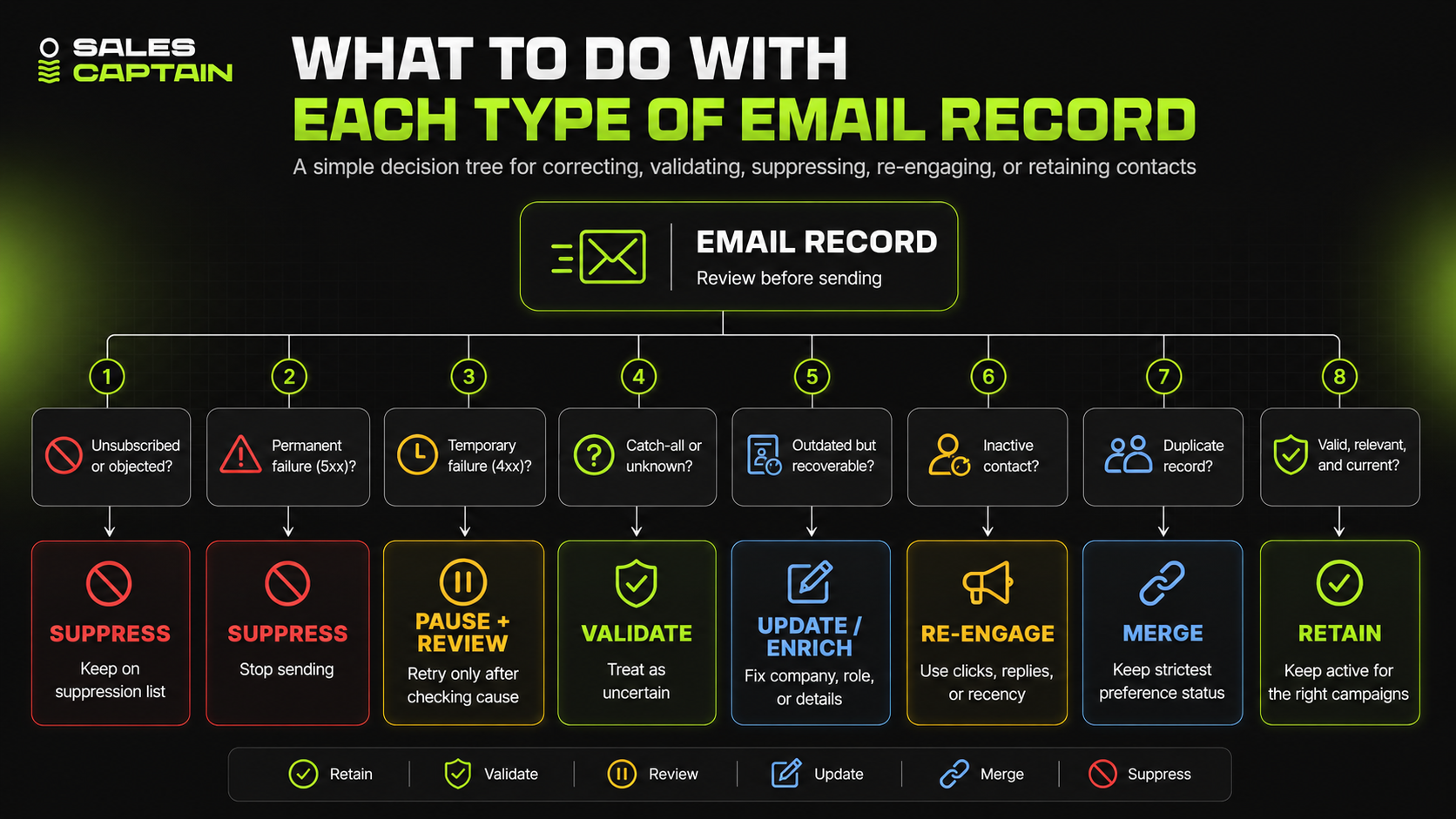
4. Separate permanent and temporary delivery failures
A failed delivery does not always mean the address should be removed immediately.
The IETF's enhanced email status-code standard divides delivery results into success codes, temporary failures, and permanent failures.
A code beginning with 4 indicates a transient failure. A code beginning with 5 indicates a permanent failure. The remaining numbers provide more detail about the address, mailbox, network, content, or policy problem.
Permanent address failures should normally be suppressed from further attempts.
Temporary failures should be paused and reviewed according to their cause rather than retried indefinitely.
5. Validate uncertain addresses
Run addresses without recent delivery evidence through an email-verification service before using them in a large campaign.
Use the results to separate:
- Valid addresses
- Invalid addresses
- Disposable addresses
- Role-based addresses
- Catch-all or accept-all domains
- Unknown results
Treat catch-all and unknown results as uncertain, not confirmed.
Validation can estimate whether an address is reachable, but it does not establish consent, current employment, campaign relevance, or guaranteed delivery.
6. Update records that are outdated but recoverable
Some records need correction or enrichment rather than removal.
Check whether the contact has:
- Changed companies
- Moved into a different role
- Changed departments
- Lost relevance to the campaign
- Been duplicated under another address
Data enrichment tools can help fill missing company, role, and account information, although important records should still be reviewed before sending.
When I look at our work with Awell, the useful lesson is that mailbox validity was only part of the problem.
Their ABM list required significant cleaning and enrichment, so our team used LinkedIn Sales Navigator and Apollo while also tightening the healthcare ICP.
A valid address attached to the wrong person is still bad campaign data.
7. Review inactive contacts using several signals
Do not remove contacts based only on recorded opens.
For a subscribed audience, consider:
- Clicks
- Replies
- Purchases
- Website activity
- Preference updates
- Time since the last meaningful interaction
For an outbound prospect list, consider:
- Current role
- Account fit
- Previous replies
- Objections
- Opportunity history
- Whether the original reason for contacting them still applies
The final action may be to retain, re-engage, suppress, enrich, or remove the record.
"Inactive" should not automatically mean "invalid."
8. Sync the changes and prevent the problem from returning
Push the final statuses into every connected system.
A clean spreadsheet will not help if an older CRM record adds the contact back the next day.
Add controls where data enters the database:
- Validate addresses submitted through forms.
- Record the source and date of acquisition.
- Store opt-outs in a central suppression field.
- Prevent suppressed contacts from entering new sequences.
- Monitor delivery responses after every campaign.
- Stop repeated sends to addresses that continue to fail.
- Review integrations that overwrite newer records.
The goal is not to perform one successful cleanup. It is to stop the same bad records from circulating through the system again.
Subscriber Lists and Outbound Prospect Lists Need Different Rules
The goal is the same for every email database: keep accurate records, respect contact preferences, and avoid sending messages that should not be sent.
The decision rules differ depending on how the address entered the database and what you plan to send.
Permission-based subscriber lists
These lists are usually built through signup forms, purchases, events, content downloads, or other subscription processes.
Their hygiene process focuses on:
- Subscription status
- Contact preferences
- Consent records where required
- Engagement history
- Unsubscribe requests
- Re-engagement and sunset decisions
Double opt-in can help confirm that the address is valid and that the owner intended to subscribe. It should be treated as an acquisition-quality control rather than a universal legal requirement.
Outbound prospect lists
These lists are usually built through prospecting, research, CRM records, enrichment, or account-based campaigns.
Their hygiene process focuses on:
- Current role and employer
- Account and ICP fit
- Previous replies or objections
- Data source
- Verification date
- Opportunity history
- Suppression status
A deliverable business address may still be unusable because the contact changed jobs, moved out of the buying committee, works for a poor-fit account, or previously asked not to be contacted.
A healthy prospect database therefore needs more than mailbox validation. It also needs current role data, company information, campaign history, and a clear reason for contacting each prospect.
Hygiene for subscriber lists
For a permission-based list, the first question is whether the person should still receive that category of email.
Keep records of:
- Where and when the person signed up
- What they agreed to receive
- Their current preferences
- Unsubscribe requests
- Recent meaningful activity
Inactive subscribers may be suitable for a re-engagement campaign before suppression.
The decision should use signals such as clicks, replies, purchases, website activity, and the purpose of the list rather than recorded opens alone.
Hygiene for outbound prospect lists
Outbound records need a different review.
Verification can tell you whether an address appears reachable, but it does not confirm that the contact is relevant, currently employed by the target company, or appropriate for the campaign.
In the UK, the rules can also differ according to the type of business contacted. The ICO's B2B marketing guidance distinguishes corporate subscribers from sole traders and certain partnerships. It also explains that data-protection rules may still apply when a business email identifies an individual.
Our work with Tatton Investment Management shows why deletion is not always the right response to an outdated prospect list.
Tatton had a small addressable market, so our team updated and enriched the old ABM list rather than discarding every stale record.
Keep the statuses separate
Do not use one generic field such as "active" to control every type of email.
At minimum, store separate values for:
- List or campaign purpose
- Contact source
- Subscription or permission status
- Last verification date
- Last meaningful engagement
- ICP or account-fit status
- Suppression reason
A prospect who stops opening a newsletter may still belong in the CRM.
A verified prospect does not automatically become a newsletter subscriber.
Keeping those statuses separate prevents one workflow from making an incorrect decision for another.
Email Validation Tools and Their Limitations
Email validation tools can help identify malformed, invalid, disposable, role-based, and uncertain addresses before they enter a campaign.
They are useful for both bulk list reviews and real-time checks on signup forms. They should not be treated as a substitute for consent records, contact relevance, or accurate CRM data.
What to compare before choosing a tool
I would assess a validation provider based on:
- Bulk-upload and real-time API support
- How it classifies catch-all and unknown results
- Whether it charges for inconclusive checks
- CRM and email-platform integrations
- Credit expiration
- Data retention and deletion controls
- Security and privacy documentation
- Pricing at your actual monthly volume
Accuracy percentages published by vendors are difficult to compare because providers may use different datasets, definitions, and testing methods.
Bouncer
Bouncer's official pricing page lists pay-as-you-go verification starting at $8 for 1,000 addresses. Purchased credits do not expire, and the price per verification falls at higher volumes.
This model may suit teams that clean lists periodically and do not want a fixed monthly commitment.
ZeroBounce
ZeroBounce supports bulk and real-time validation. Its free account currently includes 100 monthly verifications for users who register with a qualifying business or premium domain.
The wider product includes other deliverability and contact-data features, so buyers should check which services consume separate credits before comparing the price with a verification-only provider.
Emailable
Emailable's pricing page currently offers 250 free credits, pay-as-you-go and subscription options, non-expiring purchased credits, and no charge for unknown verification results.
Its documentation also describes a credit-based system covering verification and related services. Check how each planned action consumes credits before estimating the total cost.
Verifalia
Verifalia's plans include a free allowance of up to 25 standard-quality validations per day. Its free account also provides list uploads and API access.
Verifalia offers several validation-quality levels, which can affect both processing depth and credit usage. That may be useful when high-value records justify more detailed checks.
What validation cannot tell you
A “valid” result does not prove that:
- The person agreed to receive the message
- The contact still works at the company
- The address belongs to the intended decision-maker
- The offer is relevant
- The message will reach the inbox
- The recipient will welcome or respond to it
Catch-all domains deserve particular care. The domain may accept mail without confirming whether an individual mailbox exists, so the result should remain classified as uncertain.
Use validation to support a decision, not to make the entire decision. The final sending rule should also consider source, permission or legal basis where applicable, previous objections, current role, account fit, and campaign purpose.
Pricing and free allowances checked in July 2026. Providers may change them.
How to Measure Results After Cleaning Your Email List
A cleaner list can improve reported percentages simply because fewer records remain in the calculation.
That does not always mean the campaign itself improved.
Measure the impact by comparing a consistent period before and after cleaning. Where possible, keep the message type, audience, sending volume, and campaign objective similar so you are not comparing unrelated sends.
Track delivery quality
Start with:
- Successful delivery rate
- Permanent delivery failures
- Temporary deferrals
- Spam complaints
- Unsubscribe rate
- Number of suppressed contacts
Google Postmaster Tools can provide Gmail-specific information about spam rates, authentication, reputation, and delivery errors.
Its data is not real time, and some dashboards may show limited information when sending volume is low. Use it alongside your email platform's delivery logs rather than as the only source of performance data.
Measure meaningful engagement
For subscriber campaigns, compare:
- Clicks
- Replies
- Purchases or conversions
- Preference updates
- Website activity after the send
For outbound campaigns, focus on:
- Positive replies
- Qualified conversations
- Meetings
- Opportunities
- Replies showing that the contact or account is no longer relevant
Do not celebrate a higher click or reply rate without checking the underlying counts. A campaign may show a stronger percentage after removing thousands of contacts while producing the same or fewer conversions.
Monitor complaints and suppression
A successful cleaning process should reduce the number of contacts who should never have entered the campaign.
Yahoo's Complaint Feedback Loop can send reports when recipients mark DKIM-signed messages as spam. Yahoo says those reports can be used to suppress the recipient from future campaigns.
Track whether invalid records, previous opt-outs, and repeated failures continue to reappear. If they do, the problem is probably in your forms, imports, enrichment workflows, or system integrations.
Review the trend, not one campaign
I would assess results over several comparable sends.
One campaign can be affected by the offer, subject line, audience, timing, or seasonality. The cleaning process is working when delivery problems decline, useful engagement holds or improves, and bad records stop returning to the database.
Compliance, Suppression, and Data Retention
Email list hygiene overlaps with privacy and marketing law, but a cleanup checklist is not a complete compliance program.
The applicable rules depend on the recipient's location, the type of contact, how the data was collected, and the purpose of the message.
EU and EEA data requirements
The official GDPR text requires personal data to be accurate and, where necessary, kept current. It also says identifiable personal data should not be retained for longer than the purpose requires.
That does not create one universal retention period for every email list.
Your organisation should define and document:
- Why each category of contact data is stored
- How long the data is needed
- What triggers correction, deletion, or anonymisation
- Which systems receive preference changes
- Who is responsible for reviewing the policy
Article 21 of the GDPR also gives individuals the right to object to the use of their personal data for direct marketing. After such an objection, the data must no longer be processed for that marketing purpose.
Operationally, this may require keeping a limited suppression record rather than deleting the address from every system and risking its later reintroduction.
US commercial email requirements
In the United States, the FTC's CAN-SPAM compliance guide applies to commercial email, including messages sent individually rather than only bulk campaigns.
Its requirements include accurate sender information, non-deceptive subject lines, a valid postal address, and a clear opt-out method. Opt-out requests must be honoured within 10 business days. The FTC also states that a company remains responsible when another provider sends email on its behalf.
Build compliance into the data workflow
At minimum:
- Record where each contact came from.
- Store the purpose for which the data is being used.
- Keep opt-outs separate from ordinary engagement statuses.
- Sync objections across every connected platform.
- Define a retention schedule by data category.
- Document when records are corrected, suppressed, anonymised, or removed.
These are operational safeguards, not legal advice. Organisations sending across several jurisdictions should have their process reviewed by qualified legal counsel.
FAQs
There is no reliable schedule based only on list size.
Review the list continuously as delivery data arrives, then run a broader audit when you import old contacts, change platforms, prepare to use a dormant segment, or see more bounces, complaints, duplicates, and outdated records.
A fast-growing list built from several sources may need attention more often than a larger database with controlled acquisition and recent verification.
Not automatically.
First, decide what “inactive” means for that list. Recorded opens alone are unreliable, so consider clicks, replies, purchases, website activity, and the time since the last meaningful interaction.
You may choose to run a re-engagement campaign before suppressing the subscriber. Yahoo's sender recommendations advise senders to monitor inactive recipients and consider periodic reconfirmation.
Email validation checks whether an address appears technically reachable and may classify it as valid, invalid, disposable, catch-all, or unknown.
List hygiene is the wider process. It also covers duplicates, outdated contact details, subscription status, objections, engagement, account fit, suppression, and synchronization between systems.
A validated address can still be inappropriate for the campaign.
Technically? Sure. Strategically? Don’t.
Running cold email outreach or outbound campaigns on a dirty list is like strapping jet fuel to a rusted engine. You’ll launch fast, then explode.
It only takes a handful of bad sends to kill your domain’s reputation. Throttling, spam folders, bounce penalties, they hit harder and last longer than you think.
Even for warm marketing lists, hygiene is non-negotiable. Think of it as pre-campaign insurance. Skip it, and you're scaling risk, not results.
It can improve the quality of permission-based subscriber lists by confirming that the address owner intended to sign up.
Google's email subscription guidelines recommend confirming a recipient's address after it is submitted and processing unsubscribe requests promptly. Double opt-in should still be treated as an acquisition control, not a universal legal requirement for every type of email.
Permanent address failures should normally be suppressed from future sends.
Temporary failures need more context. A full mailbox, temporary server issue, or policy deferral may resolve, while repeated or permanent address failures usually require suppression or correction.
Review the delivery code instead of treating every bounce as identical.
t can reduce failures caused by invalid, outdated, or inappropriate records, but it cannot fix every deliverability issue.
Authentication, sending infrastructure, complaint rates, domain reputation, message relevance, and sending patterns also affect how mailbox providers handle email.
List hygiene is one part of a wider deliverability process.
.png)

RELATED ARTICLES
Lorem ipsum dolor sit amet, consectetuer adipiscing elit, sed diam nonummy nibh euismod tincidunt ut laoreet dolore magna aliquam erat volutpat.