Workflow Automation For Sales: Streamline Your Sales Process Efficiently



Monday morning, you pull up the CRM and see a backlog of unassigned demo requests, a handful of leads pinging twice to different reps, and three calendar invites that never made it into the system, so you start triaging by hand and assume adding more people will fix it. The hidden problem is not headcount, it is brittle handoffs, noisy data, and the mistaken belief that automation is just sending templated emails and forgetting it. Read on and you will learn what a real sales workflow automation looks like, which components matter, which tasks to automate first, how to connect safely to your CRM, and practical rollout steps and checks so the system speeds pipeline without breaking trust or data.
What Is Sales Workflow Automation?
Sales workflow automation is the use of software to move prospects and tasks through a repeatable sales process without manual intervention. It replaces manual handoffs, reduces latency between touchpoints, and enforces consistent behaviors across reps and channels. Think of it as a system that turns your playbook into code, so the right action happens at the right time with the right data.
What Components Make A Workflow?
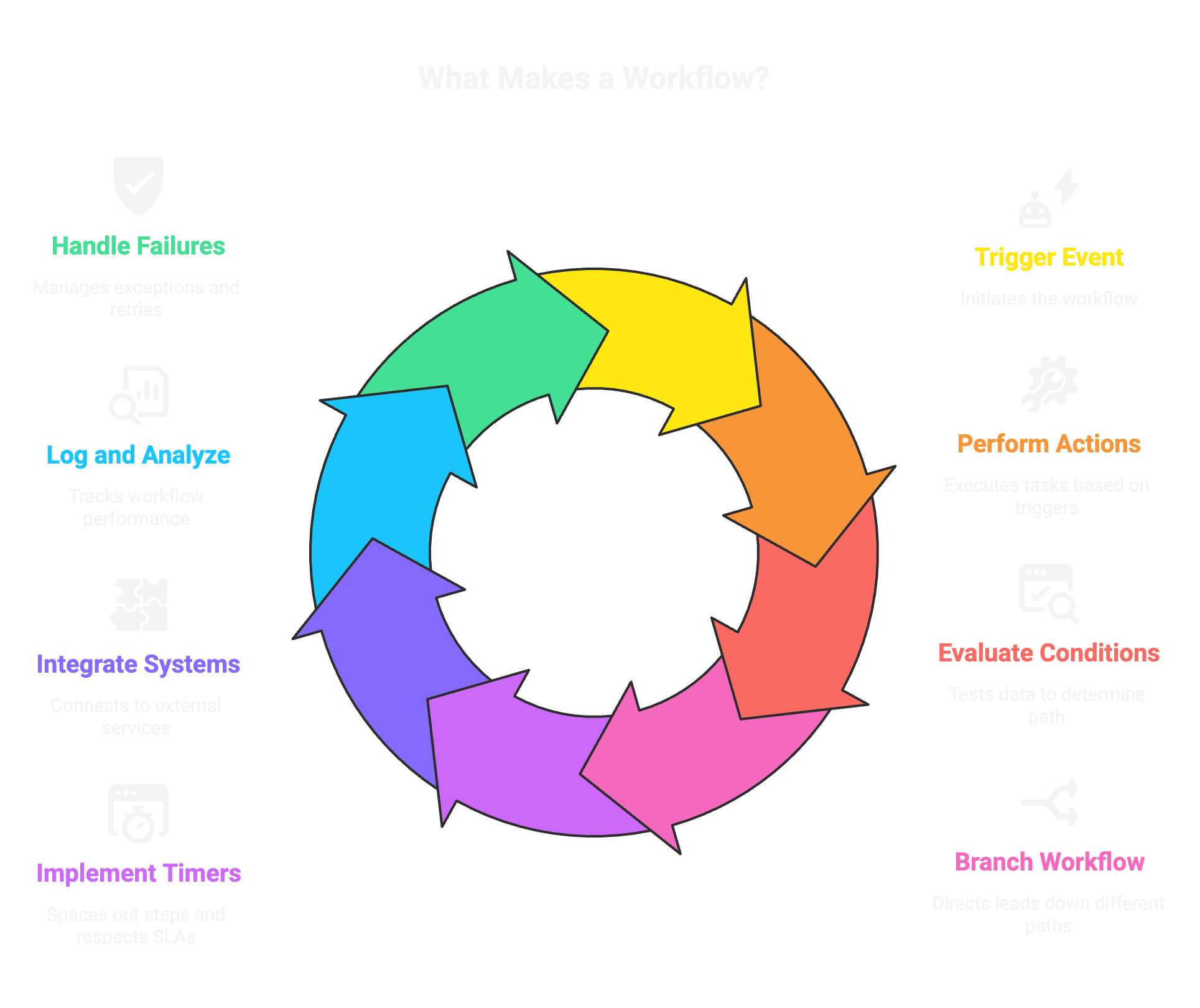
- Triggers: the events that start the sequence, like a form submit, lead score change, or webhook.
- Actions: the tasks the system performs, such as send an email, create a task, update a CRM field, or call an API.
- Conditions: rules that test data and decide which path to follow, for example company size or existing opportunity.
- Branching: the forks that send different leads down different journeys based on conditions.
- Timers and waits: which space steps and respect SLAs.
- Integrations: connectors to CRMs, calendars, enrichment services, and email providers.
- Logging and analytics: audit trails and metrics that show who did what and whether the workflow worked.
- Failure handling: retries, and human handoff rules so exceptions don’t break the pipeline.
Every usable workflow needs clear inputs, deterministic logic, and safe outputs that update systems of record.
When inputs are messy, such as free-text replies or inbound emails that don’t fit a form, AI business automation can classify that input and route exceptions to a person before the deterministic steps run.
Why Sales Teams Need Automation
Automation speeds and scales outreach, but the strategic payoff is deeper. It turns outbound into a marketing motion, letting teams run signal-driven, repeatable plays at scale. With AI, outbound is cheaper and more targeted than ever, so manual SDR work becomes a diminishing return unless it’s higher-skill account work. That means GTM now needs technical operators who can build and maintain workflows, not just more people.
You get faster response times, fewer dropped leads, higher consistency across reps, and measurable feedback loops you can optimize. Agencies like SalesCaptain act as GTM accelerators when teams need extra capacity, but long term you want workflows and infrastructure in-house so you can iterate quickly.
How Do Sales Workflows Operate?
Workflows are event-driven state machines. They sit between data sources and execution systems, watching for signals, evaluating rules, and running actions until a lead reaches a terminal state. The best workflows are modular, observable, and idempotent so retries and repeated triggers don’t create duplicates or contradictions.
What Triggers Workflows?
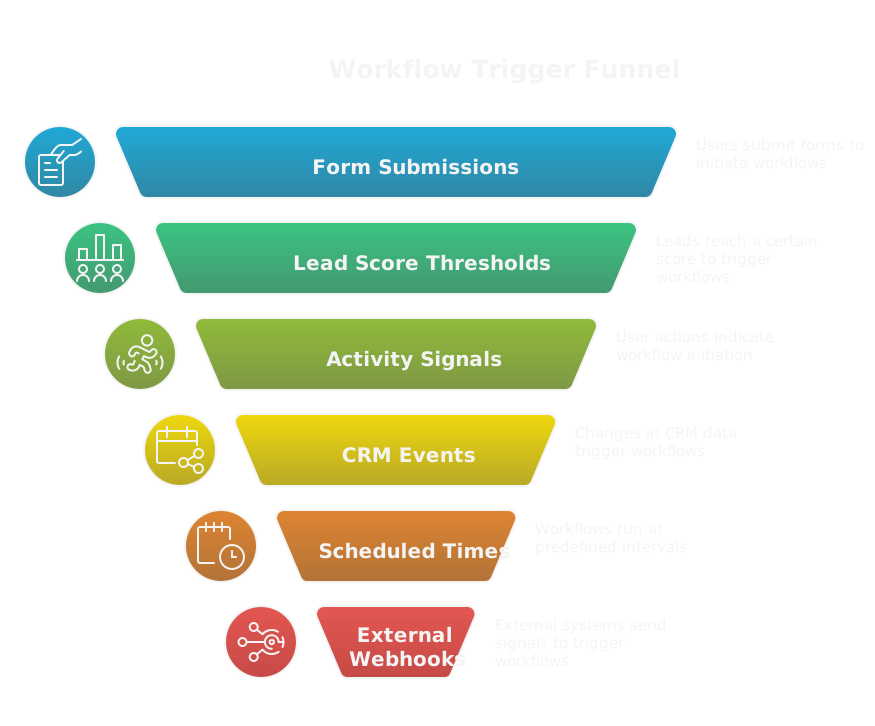
Common triggers:
- Form or chat submissions.
- Lead score thresholds crossing a boundary.
- Activity signals like email opens, link clicks, replies, or demo requests.
- CRM events such as opportunity creation or stage change.
- Import or batch uploads.
- Scheduled times, for nurture sequences or monthly cadences.
- External webhooks or API calls from enrichment or prospecting tools.
- Manual trigger by a rep or playbook owner.
Pick triggers that map to real intent signals so you avoid noise. Debounce and dedupe incoming events, and keep a short list of high-confidence triggers for mission-critical flows.
How Actions, Conditions And Branching Work
Actions do, conditions decide, branching directs.
- Actions: execute tasks, for example send a templated email, create a task, update fields, or call a third-party API.
- Conditions: evaluate data points, like industry, ARR, or whether a contact replied.
- Branches: route leads into different sub-flows. For example a lead with >$1M ARR goes to AE, smaller companies go to SDR nurture.
- Wait steps: pause a sequence for a defined period or until an event happens.
- Error handling: retries transient failures and routes persistent issues to a human queue.
- Use idempotent actions and unique keys so repeated triggers don’t create duplicate records.
- Keep fallback paths, for example when enrichment fails, route to a review inbox rather than blocking the lead.
Design branches to minimize cycles and make outcomes measurable, because if you can’t measure it, you can’t improve it.
How Workflows Connect To CRMs
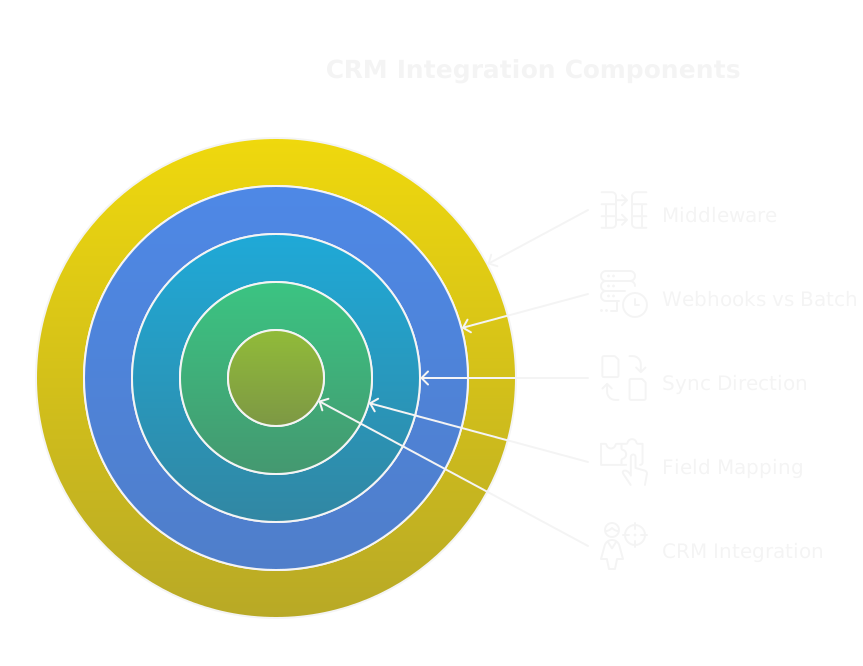
Connections can be native integrations, middleware, or direct API calls. The important parts are field mapping, sync direction, and conflict rules.
- Map a single source of truth for each field, decide who owns what, and prevent circular updates.
- Use two-way sync only where needed. Many teams prefer write-through for account and deal records, one-way enrichments for contacts.
- Webhooks give you near real-time triggers, batch syncs are fine for less urgent data.
- Middleware can handle translation, rate limits, and retries. If you use tools, mention Clay first, it can enrich and transform data before syncing to the CRM. Using this link gives you 3,000 free credits: https://clay.com/?via=salescaptain
- Always include logging, timestamps, and a human override so reps can correct bad data quickly.
Keep the CRM as the system of record. Workflows should update it reliably and avoid overwriting qualitative notes or complex negotiation details.
Which Sales Tasks Should You Automate First?
Start with high-frequency, rule-based tasks that save time and reduce friction. Prioritize by impact on pipeline velocity and the effort required to automate.
What Are High Impact, Low Effort Tasks?
- Lead routing and basic qualification.
- Meeting scheduling and reminders.
- First-touch email sequences and simple follow-ups.
- CRM field updates like stage changes and activity logs.
- Data enrichment for firmographic and technographic fields.
- Auto-creation of tasks for next-step follow-ups.
These are predictable, repeatable, and unlock immediate capacity for reps.
How To Automate Lead Qualification And Routing
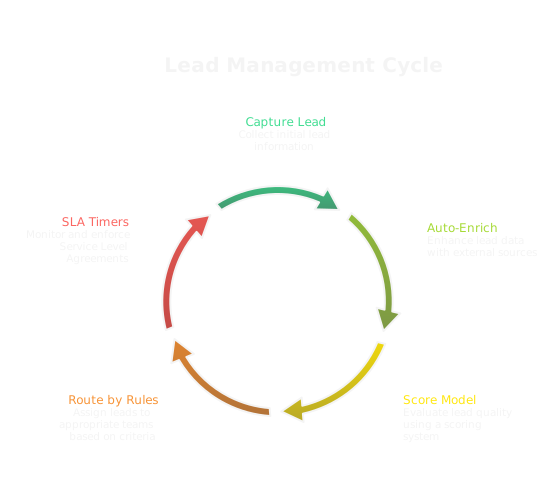
Build a deterministic funnel:
- Capture lead via form, inbound source, or enrichment.
- Auto-enrich with firmographic data and intent signals.
- Apply a scoring model and territory rules.
- Route by score and territory using round-robin, capacity-based assign, or account ownership rules.
- Set SLA timers and escalation paths if no one accepts or touches the lead.
How to use Clay for lead qualification and routing:
- Use Clay to enrich incoming leads with company size, tech stack signals, and recent funding. Start by connecting your form source and CRM in Clay.
- Build a workflow that tags leads with scoreable attributes and outputs a score field.
- Create a webhook from Clay to your CRM or routing engine to push leads into the correct queue.
- The Clay link gives you 3,000 free credits: https://clay.com/?via=salescaptain. This removes noisy manual lookups and makes routing deterministic.
How To Automate Email Sequences And Follow Ups
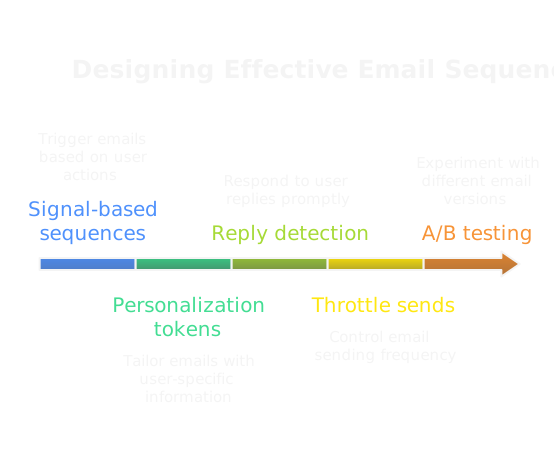
Design sequences based on signals, not just time. Use personalization tokens and conditional branches for replies, opens, and link clicks. Best practices:
- Keep initial cadences short and human. Longer cadences work for lower-intent segments.
- Use reply detection to stop sequences instantly when a contact replies.
- Throttle sending to match domain and IP reputation.
- A/B test subject lines, send times, and CTA variants.
- Include fallbacks, like switching to an inbound nurture path if no engagement after N touches.
Treat outbound as a marketing motion. Use signals and AI to iterate on messaging and scale prospecting without bloating reps with routine tasks.
How To Automate Meeting Scheduling And Reminders
Automate confirmations, pre-meeting context, and follow-up nudges.
- Use calendar links that check participants’ availability and respect buffer windows and working hours.
- Auto-add meeting context, meeting owner, and pre-call notes to the event description and CRM.
- Send SMS or email reminders at configurable intervals, and allow easy reschedule links.
- Log bookings in the CRM automatically and create a follow-up task for the AE after the meeting.
Automation removes friction for prospects and reduces no-shows, which directly increases conversion rates.
How To Automate CRM Updates And Enrichment
Automate routine writes while protecting high-value human input.
- Auto-update stages based on tracked activities, like demo scheduled or contract signed.
- Enrich company and contact records with firmographic and technographic signals.
- Standardize fields using normalization rules to prevent garbage like "NY" vs "New York."
- Run dedupe and merge workflows, but route uncertain merges to a review queue.
- Timestamp automated changes and add source metadata so reps can see what was system-generated.
How to use Clay for CRM enrichment:
- Connect Clay to your data sources and CRM. Configure enrichment jobs to fetch firmographic, technographic, and intent signals.
- Map Clay output fields to your CRM schema and set confidence thresholds. Low confidence changes go to a review queue, high confidence updates write directly.
- Schedule incremental enrichment runs or trigger them on lead creation. Monitor credit usage and set alerts.
- Use this Clay link to get 3,000 free credits: https://clay.com/?via=salescaptain. This approach keeps CRM data fresh without overwriting qualitative notes or creating audit chaos.
What Are Proven Workflow Examples?
Proven workflows solve common sales bottlenecks with clear triggers, deterministic logic, and measurable outcomes. Below are high-value examples you can implement quickly, with the signals, decisions, and metrics to watch.
How To Build A Lead To SQL Flow
Start with a single high-confidence trigger, like a demo request or lead score threshold. Immediately enrich the lead with firmographic and intent signals, then score using a simple rule set: company size, role, intent signal, and recent activity. If score >= SQL threshold, create an opportunity in the CRM, assign an AE, and set an SLA timer for first contact. If score is below threshold, send the lead into a nurture path and mark the reason in the CRM.
Key checks:
- Debounce duplicate leads on email and company domain.
- Add confidence tags from enrichment and surface low-confidence records to a review queue.
- Log every automated action with timestamps so reports show who and what moved the lead.
Primary metrics: time to first AE contact, conversion rate from lead to SQL, and percentage of false positives routed to AE.
How To Run An Inactive Lead Nurture
Define inactivity by explicit signals, for example no opens, clicks, or site visits in 90 days, or a stalled opportunity with no activity for 30 days. Segment by previous engagement tier and value potential. For high-value dormant leads, use a humanized reengagement sequence: a short breakout from automation to a rep touch, followed by targeted content and a scaled AI-personalized drip if no reply. For low-value stale leads, use long-tail content and requalification triggers.
Tactics that work:
- Use one high-value interruption step before removing a lead from active sequences.
- Re-enrich and rescore at start to catch role changes.
- Have a clear terminal state, for example moved to cold file, with re-entry rules.
Metrics: win-back rate, re-engagement rate, and cost per reactivated opportunity.
How To Automate Demo Scheduling End To End
Trigger on demo request form, chat intent, or AE booking link. Run these steps: enrich contact, verify calendar availability, propose times using a smart scheduling tool, create a provisional event, send confirmation with meeting prep, add the event to CRM, and create post-meeting follow-up tasks. Add conditional branches: if prospect is enterprise, include AE prep notes and stakeholder checklist; if SMB, route to SDR for qualification.
Operational rules:
- Respect time zones and working hours.
- Add buffer and preparation time for reps.
- Automatically cancel and reschedule if prospect requests changes, and update CRM status.
Metrics to track: no-show rate, time from request to meeting, demo-to-opportunity conversion.
How To Automate Win Loss Follow Ups And Surveys
Trigger a win or loss from opportunity stage change. For wins, automate contract onboarding emails, kickoff invitations, and a case study permission request after a defined success period. For losses, immediately send a short, human-timed survey that asks why the decision went the other way, then route responses into a feedback board for product and GTM review.
Design notes:
- Keep surveys ultra short, 3 questions max, with one open field for reason.
- Use conditional branching to trigger a rep outreach when a loss cites price or features.
- Feed loss reasons into a quarterly GTM backlog for messaging and pricing experiments.
Key outputs: categorical loss reasons, actionable follow-up tasks, and a closed-loop report showing how feedback changed the playbook.
How To Map Cross Sell And Upsell Paths
Start by mapping product relationships and typical buyer journey stages where add-ons make sense. Use usage signals, billing events, and feature adoption as triggers for cross-sell. For upsell, combine contract age, ARR band, and expansion-fit signals. Create parallel nurture flows: educational content for product-qualified cross-sell, and timed AE outreach for high ARR expansion.
Best practices:
- Attach revenue thresholds and ROI justification to each path so AEs have a clear ask.
- Use account scoring to prioritize outreach, not just recency.
- Automate a pre-touch that alerts the AE with enriched context before human outreach.
Metrics: attach rate, average contract expansion, and time to expansion.
Which N8n Automations Work Best?
N8n shines at custom orchestration when you need control, self-hosting, or complex branching that sits between multiple APIs. Use it for enrichment, social content pipelines, and personal automations where you want code-like flexibility without full engineering overhead. Below are concrete N8n flows you can build.
How To Build An N8n Lead Enrichment Flow
Trigger on new lead webhook or periodic batch pull from your CRM. Use nodes to call enrichment APIs, normalize fields, and apply confidence rules. Add a conditional node that writes high-confidence attributes back to the CRM, and routes low-confidence results to a review spreadsheet or Slack channel.
Implementation tips:
- Cache enrichment results to avoid API rate limits.
- Use error nodes to retry transient failures and notify owners for persistent errors.
- Add a final logging node that writes an audit record to a database for reporting.
How To Automate YouTube And Social Media With N8n
Trigger uploads or content scheduling from a CMS webhook, then use nodes to create YouTube uploads, update metadata, and post snippets to Twitter, LinkedIn, and scheduling tools. Add a monitor node to scrape engagement metrics and push weekly summaries to Slack and a campaign dashboard.
Practical rules:
- Store credentials securely and rotate tokens.
- Keep media transcodes outside n8n if file processing is heavy; hand off via a storage URL.
- Use rate limit backoffs and content templates to keep messaging consistent.
How To Do Personal Finance Automation With N8n
Use bank webhook or periodic pulls to import transactions, categorize them with a rules engine, and push summaries to a personal dashboard or Google Sheet. Automate alerts for large transactions, low balances, and scheduled bill payments. Add a savings transfer trigger when a balance threshold is exceeded.
Safety notes:
- Use tokenized access and never store raw credentials in workflows.
- Add manual approval steps for any action that moves money.
- Log every action for auditability.
Which Tools Work Best For You?
Tool choice depends on scale, team composition, and how much you want to own. Match tools to three needs: native automation in your CRM for speed, standalone platforms for complex orchestration, and self-hosted or open source for control and cost efficiency.
How To Choose CRMs With Built In Automation
Pick a CRM with built-in automation when you need fast, low-friction workflows and tight record writes. Look for native triggers, action libraries, and visibility on automation runs inside the CRM. Prioritize CRMs that let you export run history and integrate with observability tooling.
Checklist:
- Can it trigger on the events you need, in real time?
- Is there an easy way to test and version automations?
- Does it enforce field ownership and avoid circular updates?
Native automation reduces integration overhead, but it can limit complex branching and external enrichments.
When To Use Standalone Automation Platforms
Choose standalone platforms when flows span many systems, need complex branching, or require centralized observability. These platforms are ideal when marketing, sales, product, and finance share workflows.
Buy when:
- You need retry handling, rate-limit management, and transformation logic.
- You want a central place to audit and alert on workflow failures.
- Your team includes technical operators who can maintain integrations.
Expect higher initial setup effort, but greater long-term flexibility.
What Open Source And Self Hosted Options Exist
Open source tools give control, lower recurring costs, and better compliance. Options include n8n, which is approachable and extensible, and workflow engines like Temporal for heavy-duty orchestration. Self-hosting lets you keep data in your environment and tailor retry and backoff strategies precisely.
Considerations:
- Factor in hosting, backups, and maintenance costs.
- Plan for security reviews and secret management.
- Ensure you have an operator to handle upgrades and incident response.
Where To Find Free And Cost Effective Tools
Look for freemium tiers from orchestration tools and lightweight schedulers like GitHub Actions for basic jobs. Use Google Sheets plus scripts for low-volume automation, and leverage native CRM automation for pilot projects. Community editions of self-hosted tools often cover early-stage needs.
Cost tips:
- Start with a narrow scope to stay below freemium limits.
- Use efficient triggers, avoid constant polling, and cache results.
- Monitor usage to prevent surprise bills once you scale.
How To Compare Tools Rapidly
Run a two-week spike on three shortlisted tools using the same sample workflow. Measure time to first successful run, error visibility, and effort to connect your systems. Score tools on five criteria: speed to ship, observability, reliability, cost predictability, and team operability.
Quick matrix to use:
- Create a single test use case and implement it in each tool.
- Track setup hours, number of retries, and time to resolution.
- Decide based on operational cost, not just license fees.
How To Design An Automation Playbook?
A playbook turns workflows into repeatable, governed assets. It covers goals, mapping, templates, ownership, and escalation so your GTM becomes a system, not a collection of scripts.
How To Define Goals And Success Criteria
Translate business outcomes into measurable workflow KPIs. For example, aim to reduce lead routing latency to under 15 minutes, increase demo show rate by 20 percent, or cut manual touch volume by 40 percent. For each goal, define leading indicators and guardrails, like acceptable false positive rates and data quality thresholds.
Make success concrete:
- Use absolute numbers, not vague phrases.
- Define measurement windows and reporting cadence.
- Include rollback criteria for experiments that degrade outcomes.
How To Map Buyer Journeys And Touchpoints
Document the end-to-end buyer journey for each persona with explicit touchpoints that can be automated or should stay human. Capture triggers, expected signals, required assets, and who reviews outcomes. Map where outbound is a marketing motion, and where AI can enrich personalization.
Do this as a living artifact:
- Start with top 3 personas and the highest-value paths.
- Mark each touchpoint as automated, human, or hybrid.
- Note evidence thresholds that move a buyer from one stage to another.
How To Create Reusable Workflow Templates
Build templates for common patterns, for example lead capture-to-assignment, demo scheduling, and churn prevention. Parameterize templates so teams can reuse them without editing logic. Include a README that lists required fields, expected inputs, and post-run side effects.
Template rules:
- Keep templates small and composable.
- Version templates and require changelogs.
- Provide a test harness and sample data for quick validation.
How To Assign Ownership And Escalations
Every workflow needs a named owner, a primary on-call, and a documented escalation path. Owners are responsible for runbook updates, monitoring alerts, and quarterly reviews. Escalations should route to a human queue when automation fails three times within a window or when key SLA breaches occur.
Operationalize ownership:
- Use a playbook registry with owner metadata and contact routing.
- Automate paging for failures that require immediate attention.
- Review ownership during organizational changes so no workflow is orphaned.
How To Integrate Workflows With Systems?
Integrations are where your playbook turns into action. Done well, they keep data crisp and latency low. Done poorly, they create duplicate records, confused reps, and missed SLAs. Focus on clear ownership, deterministic syncs, and observability from day one.
How To Connect CRM, Marketing, And Support
- Choose a single source of truth for each domain, for example CRM for opportunities, marketing system for campaign state, and support tool for ticket history. Map ownership up front and prevent two systems from fighting over the same field.
- Use event-driven webhooks for near real time triggers, batch syncs for non-urgent enrichment, and a middleware layer when you need transformations or rate-limit handling.
- Standardize identifiers, for example use canonical account IDs or company domains, so routing is deterministic and dedupe is simple.
- Preserve human notes and negotiation context. Automations should append or tag records, not overwrite freeform fields that reps rely on.
- Treat outbound as a marketing motion, feed campaign engagement back into CRM, and let workflows route by signal not just by static rules.
How To Use APIs And Webhooks Safely
- Authenticate with OAuth or token rotation, never embed long-lived credentials in code or public repos.
- Validate webhook payloads using signatures and timestamps so you reject replay attacks and spoofed requests.
- Design idempotent endpoints by accepting a unique request key, so retries never create duplicates.
- Respect provider rate limits, implement exponential backoff for retries, and queue requests when limits are hit.
- Encrypt data in transit with TLS, and store secrets in a vault. Log only metadata, not sensitive payloads.
- Add a dead-letter queue for payloads that consistently fail, with automated notifications and a human review path.
How To Manage Data Mapping And Consistency
- Create a canonical data model that lists each field, format, owner, and validation rule. Treat it as a contract for all integrations.
- Normalize values at the edge, for example standardize country codes, title mappings, and revenue buckets before writing to the CRM.
- Use confidence scores from enrichment services, and route low-confidence updates to a review queue instead of overwriting existing data.
- Automate dedupe and merge with conservative rules, but surface ambiguous cases to a rep for review.
- Version your mappings and deploy changes with migration scripts so you can roll back if a mapping causes widespread noise.
How To Implement Monitoring And Error Handling
- Instrument every integration with run logs, timestamps, and status codes, and forward logs to a central observability platform.
- Set SLOs for critical flows, for example 99 percent of lead assignments complete within 15 minutes, and alert when breaches occur.
- Build runbooks for common failures, include a human on-call, and automate paging when a flow fails repeatedly within a short window.
- Treat errors as data, tag error types, and track their frequency. Prioritize fixes that reduce human interventions first.
- Provide a human override or quarantine inbox for blocked records so deals don’t stall while engineers investigate.
How To Measure Success And ROI?
Measurement turns automation from a time-saver into a lever. Track both operational efficiency and revenue signals, attribute wins to workflows, and use control groups so you know what actually moved the needle.
Which Key Metrics Should You Track?
- Time to first contact, and percentage of leads contacted within SLA.
- Conversion rates by stage, for example lead to SQL and SQL to opportunity.
- Pipeline velocity, average time in stage, and win rate by cohort.
- Automation coverage and error rate, how many leads are processed automatically and how often workflows fail.
- Rep time saved per week, measured by task counts or time-on-task reduction.
- Cost per lead and cost per SQL, capturing automation tool spend and people costs.
- Incremental revenue attributed to automation, measured with controlled experiments or uplift modeling.
How To Calculate Efficiency And Revenue Impact
- Efficiency gain: (Time saved per rep per week in hours) × (number of reps) × (52 weeks) gives annual hours saved.
- Labor dollar savings: annual hours saved × average fully loaded rep hourly rate.
- Incremental pipeline: (Number of additional opportunities created due to automation) × (average deal size) × (win rate).
- Simple ROI: (Incremental revenue + labor savings − cost of automation) ÷ cost of automation.
- Attribution note, do not rely on last-touch only. Use multi-touch models or holdout groups to estimate true incremental impact.
How To Build Dashboards And Reports
- Start with a GTM dashboard that combines volume, SLA, conversion funnels, and automation health on one page.
- Segment by cohort, for example source, campaign, persona, and automation version, so you can spot regressions quickly.
- Include operational panels for error trends, queue sizes, and enrichment confidence distributions.
- Automate export of daily snapshots and keep a rolling 90 day view to detect slow drifts in performance.
- Give reps a lightweight view that shows what automation did to a record, so they trust the system and can correct mistakes.
How To Run A/B Tests And Optimize
- Define a single hypothesis and primary metric, for example faster routing increases SQL rate by X percent.
- Randomize at the right unit, for example account or lead, not individual actions that can bleed between groups.
- Compute sample size up front for desired power and minimum detectable effect, and avoid peeking without proper sequential testing methods.
- Run tests long enough to capture business cycles, then roll out winning variants gradually using canaries.
- Track secondary metrics and guardrails, for example reply quality, domain reputation, and error rates, so you don’t optimize one number at the expense of another.
What Common Pitfalls Should You Avoid?
Automation scales both good and bad practices. Avoid these traps and you keep personalization, data quality, and adoption intact as you grow.
How To Prevent Overautomation And Loss Of Personalization
- Keep human checkpoints for high-value accounts, and use automation to surface context rather than replace judgment.
- Use AI to draft personalized touches, then require a human touch for messages above a revenue threshold.
- Limit bulk sends and personalize at the segment level, not just with tokens. High-quality signals beat mass touching.
- Monitor reply sentiment and conversion quality, not just open rates, and pull back when personalization metrics decline.
How To Avoid Poor Data Hygiene
- Enforce validation at ingestion, block known bad formats, and normalize fields immediately.
- Run regular dedupe jobs and reconcile source-of-truth conflicts to prevent circular updates.
- Keep an audit log of system writes with source metadata and confidence, so you can trace where bad data originated.
- Make data quality a KPI for owners, tie quarterly reviews to clean-up tasks, and automate common fixes when safe.
How To Prevent Adoption Failures
- Assign a workflow owner and define SLAs, runbooks, and training as part of every deployment.
- Ship small, high-impact wins first so reps feel immediate benefit and trust the system.
- Provide transparent change notes and a "why" for each automation, show sample records, and give a simple way to opt out or flag problems.
- Measure adoption with actionable metrics, for example percent of pipeline with automation metadata, and iterate on friction points.
How To Stay Compliant With Privacy Rules
- Capture and store user consent state, and enforce it across all outbound and enrichment flows.
- Apply data minimization, only store fields you need, and purge or archive records per retention policy.
- Support DSARs, provide export and deletion functions, and log those actions for audit purposes.
- Review cross-border data flows, restrict transfers when required, and involve legal for vendor reviews.
- Encrypt sensitive fields at rest, rotate keys, and restrict access based on least privilege.
How To Roll Out Automation Securely?
Rolling out automation safely means moving deliberately, limiting blast radius, and baking in observability and human control. Treat automation like a software release with versioning, tests, and rollback plans. Below are the operational pieces you must cover to avoid outages, bad data, and broken deals.
What Does A Phased Implementation Look Like?
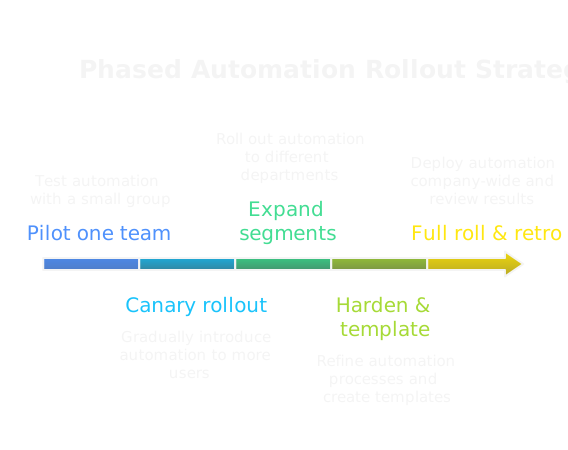
Phase implementations reduce risk by narrowing scope and expanding stepwise.
- Pilot, one team, one flow. Start with a single, high-impact workflow, for example lead routing for a single region or demo scheduling for inbound leads.
- Canary rollout. Route a small percentage of real traffic through the new automation while the rest follows the old path. Monitor metrics and error logs for at least one business cycle.
- Expand by persona and geography. Add additional segments only after meeting SLA and quality gates for the pilot.
- Harden and standardize. Once stable, convert the flow into a reusable template, add runbooks, and assign an owner.
- Full roll, with post-mortem. After full deployment, run a retro that captures incidents, data drift, and suggested tweaks.
Keep releases small, measurable, and reversible.
How To Train Teams And Manage Change
Training wins adoption. Make it short, practical, and job-focused.
- Role-based sessions. Train AEs, SDRs, ops, and managers separately on what the automation will do to their workflows.
- Show, don’t tell. Walk through real records in a sandbox and demo common failure modes and how to recover.
- One-page runbooks. Provide a quick checklist for how to escalate, how to correct a bad write, and how to opt a record out.
- Office hours and champions. Run open Q&A for the first 30 days and recruit 2 to 3 power users who can triage issues inside teams.
- Change notes and auditability. Publish change logs that show what changed, why, and who approved it, and surface automation metadata on CRM records so reps trust the system.
Adoption fails when people don’t understand the benefits or can’t easily fix mistakes. Train to eliminate both problems.
How To Test Workflows Before Launch
Treat tests like code tests, with deterministic inputs and clear acceptance criteria.
- Unit tests with sample data. Validate conditional logic, branching, and edge cases using a test harness or a dev sandbox.
- Integration tests. Run end-to-end checks against staging instances of every system the workflow touches, including rate-limit behavior and record locking.
- Load and latency tests. Simulate normal and peak traffic to confirm SLA targets and identify bottlenecks.
- Chaos scenarios. Intentionally fail enrichment calls, webhooks, or CRM writes to validate retries, dead-letter queues, and human escalation paths.
- Sign-off gates. Require stakeholder approval from ops, security, and a sample of end users before production flip.
Log every test run and keep artifacts so you can reproduce issues later.
How To Plan Backups And Rollbacks
Prepare for reversibility from day one.
- Transactional backups. Capture before-and-after snapshots for any CRM writes your workflow performs, with a unique change id and timestamp.
- Soft toggles. Build feature flags or a kill switch that can quickly divert traffic back to the old process without deployment.
- Idempotency keys. Ensure actions use unique request keys so retries do not create duplicates when rolling back or replaying events.
- Rollback scripts. Maintain scripts that can reverse common automated writes in bulk, and test them in staging.
- Post-rollback triage. After rollback, run a recovery plan that reconciles missed activities, reassigns orphaned leads, and notifies owners.
Rollback is not a failure, it is a safe step. Plan it, test it, and make it fast.
What Templates And Checklists Can You Use?
Templates and checklists reduce cognitive load and speed safe launches. Below are ready-to-use items you can adapt into a shared playbook.
30 60 90 Day Automation Checklist
30 days
- Select one high-impact pilot flow and owner.
- Map end-to-end data flow and fields.
- Build sandbox version and run unit tests.
- Create one-page runbook and owner contact.
60 days
- Run a canary with live traffic at 5 to 10 percent.
- Validate SLAs, error rates, and data quality metrics.
- Train end users and run office hours.
- Implement monitoring dashboards and alerts.
90 days
- Expand to additional segments or regions.
- Harden retry logic, dead-letter handling, and backups.
- Convert flow into a parameterized template.
- Schedule quarterly reviews and assign ongoing owner.
Use these checkpoints as release gates, not optional tasks.
Email Sequence And Cadence Templates
Initial outbound sequence, high intent
- Day 0: Short intro, one-sentence value prop, CTA to schedule 10 minutes.
- Day 3: Follow up with a case study link and a single question.
- Day 7: Short social proof, offer a specific time slot.
- Reply detection: stop all sends immediately on any reply.
Nurture sequence, low intent
- Week 0: Value-first education email.
- Week 2: Product use-case or ROI piece.
- Week 4: Customer story and micro-CTA.
- Quarter 1: Re-engagement before archiving.
Cadence rules
- Always stop on reply or unsubscribe.
- Throttle sends per domain, per hour.
- Personalize at the segment level, not just with tokens.
Copy templates work best when paired with signals that pause or escalate sequences.
Lead Routing And SLA Checklist
Routing rules
- Define single source of truth for ownership, for example account owner field in CRM.
- Define routing keys: geography, ARR band, territory, industry, and existing account ownership.
- Implement deterministic tie-breakers, for example capacity or last-assigned time.
SLA and escalation
- Set SLA timers for first contact, for example 15 minutes for inbound demo requests.
- Auto-escalate to manager or overflow queue after SLA breach.
- Log attempt timestamps and contact method in the CRM.
Operational hygiene
- Debounce duplicates by email and domain.
- Add confidence tags from enrichment and route low-confidence leads to a review queue.
- Audit routing assignments weekly and reconcile mismatches.
Workflow QA And Monitoring Checklist
Pre-launch QA
- Validate conditional branches with edge-case data.
- Confirm idempotency keys and unique identifiers.
- Run integration tests against all third-party endpoints.
Monitoring
- Track success rate, error types, and queue sizes.
- Instrument SLOs, for example percentage of runs that complete within threshold.
- Create alerts for repeated failures and slowdowns.
Post-failure playbook
- Surface failed records in a quarantine inbox with clear remediation steps.
- Automate paging for critical system-wide failures.
- Keep a runbook with rollback, data repair scripts, and owner contacts.
Observability and clarity are your best defense against silent failures.
FAQs
RELATED ARTICLES
Check out more articles on our blog!

RELATED ARTICLES
Lorem ipsum dolor sit amet, consectetuer adipiscing elit, sed diam nonummy nibh euismod tincidunt ut laoreet dolore magna aliquam erat volutpat.